A change order log that shows what isn’t billed yet.
One row per owner change order from the first request to the pay app it is billed on. The log keeps a running revised contract, counts days in owner review and flags approved changes that haven’t been billed or passed to the sub.
What’s in the workbook
The download is one Excel file (81 KB) with 3 sheets: Instructions, CO log, Summary. The formulas are live, the inputs are marked, and it opens in Excel for Windows and Mac, Excel for the web, Google Sheets and LibreOffice. This is the CO log sheet with the sample data:
Formula in R10: =IF($A10="","",IF(AND(G10="Approved",P10=""),"Approved, not billed yet",IF(AND(G10="Approved",O10="No"),"Sub CO not issued",IF(AND(OR(G10="Submitted",G10="Pricing"),N10<>"",N(N10)>21),"In review over 21 days",IF(AND(G10="Approved",I10=""),"Approved amount missing","")))))| A | C | D | G | H | I | N | O | P | Q | R | |
|---|---|---|---|---|---|---|---|---|---|---|---|
| 1 | Change order log | ||||||||||
| 2 | Project | ||||||||||
| 3 | Blue cells on yellow are inputs. One row per owner change order, from first request to the pay app it is billed on. Days in review count to the owner’s decision, or to the as-of date while it is still open. Sample data is illustrative. | ||||||||||
| 4 | CO # | Title | Origin | Status | Requested amount | Approved amount | Days in review | Sub COs issued | Billed on pay app # | Revised contract (running) | Flag |
| 5 | CO-001 | Rock removal at footing F-7 | Hidden condition | Approved | $24,800 | $21,500 | 15 | Yes | 2 | $20,171,500 | |
| 6 | CO-002 | Add card readers at suite 300 | Owner request | Approved | $6,850 | $6,850 | 7 | Yes | 3 | $20,178,350 | |
| 7 | CO-003 | Concrete mix change for cold weather | Value engineering | Rejected | $9,400 | 18 | N/A | $20,178,350 | |||
| 8 | CO-004 | Revised footing detail at grid C | Design change / ASI | Approved | $18,200 | $16,500 | 19 | Yes | 4 | $20,194,850 | |
| 9 | CO-005 | Plumbing reroute at existing utility | Hidden condition | Approved | $26,400 | $24,000 | 25 | Yes | 5 | $20,218,850 | |
| 10 | CO-006 | Fire dampers at level 2 corridor | RFI answer | Approved | $72,900 | $68,000 | 26 | No | $20,286,850 | Approved, not billed yet | |
| 11 | CO-007 | Owner-added outlets in exam rooms | Owner request | Submitted | $46,000 | 69 | N/A | $20,286,850 | In review over 21 days | ||
| 12 | CO-008 | Fire-rated glazing at stairs | Code / inspector | Submitted | $26,000 | 27 | N/A | $20,286,850 | In review over 21 days | ||
| 13 | CO-009 | Upgrade lobby floor tile | Owner request | Pricing | $31,500 | N/A | $20,286,850 | ||||
| 14 | CO-010 | Owner contingency: signage allowance | Allowance reconciliation | Approved | ($12,000) | ($12,000) | 7 | N/A | 7 | $20,274,850 | |
| 15 | CO-011 | Added exterior lighting at parking | Design change / ASI | Draft | $18,750 | N/A | $20,274,850 | ||||
| 16 | |||||||||||
Sheets
- Instructions
- Columns, statuses and how to keep the log current through billing.
- CO log
- 40 rows with drop-down status, origin and sub CO columns, days in review, a running revised contract and flags.
- Summary
- Counts and amounts by status, revised contract, pending exposure, approved vs requested, schedule days, review time and approved-not-billed.
Built in
- Live formulas: change an input and every total, flag and chart updates
- Frozen header rows and columns, so labels stay put as you scroll
- Drop-down lists and value checks on the input cells
- Conditional formatting for flags and overruns
- An Instructions sheet with every column defined
- Prints landscape, one page wide, with the header row repeated
Worked example: eleven changes on Riverside
Illustrative log from the sample file, as of 11/2/2026. Eleven change orders are logged and 6 are approved for $124,850, which takes the contract from $20,150,000 to $20,274,850, 0.6% of the original.
On approved changes you were granted 91.0% of what you requested, and the owner took 16.71 days on average to decide. Pending exposure is $122,250 across draft, pricing and submitted changes; CO-007 has been with the owner for 69 days and is flagged.
The flags catch the money that leaks: CO-006 for $68,000 is approved but not on a pay app, and its subcontract change order hasn’t been issued, so the mechanical sub can’t bill it either. The Summary puts approved-but-unbilled at $68,000.
The formulas in the file
Days in reviewCO log · N5
=IF(OR($A5="",L5=""),"",IF(M5="",$K$2,M5)-L5)Owner decision date, or the as-of date while open, minus the date submitted.
Revised contract (running)CO log · Q5
=IF($A5="","",$F$2+SUMIF($G$5:G5,"Approved",$I$5:I5))Original contract plus approved change orders up to this row.
FlagCO log · R5
=IF($A5="","",IF(AND(G5="Approved",P5=""),"Approved, not billed yet",IF(AND(G5="Approved",O5="No"),"Sub CO not issued",IF(AND(OR(G5="Submitted",G5="Pricing"),N5<>"",N(N5)>21),"In review over 21 days",IF(AND(G5="Approved",I5=""),"Approved amount missing","")))))Approved not billed, sub CO not issued, in review over 21 days, or approved amount missing.
Pending exposureSummary · B18
=C5+C6+C7Requested amounts on draft, pricing and submitted change orders.
Approved but not billedSummary · B24
=SUMIFS('CO log'!$I$5:$I$44,'CO log'!$G$5:$G$44,"Approved",'CO log'!$P$5:$P$44,"")Approved amounts with no pay app number yet.
Change order log template: printable version
os.construction · free template- Project
- Original contract
- As of
- Kept by
Change order log (sample rows)
| CO # | Title | Origin | Status | Requested amount | Approved amount | Days in review | Billed on pay app # | Revised contract (running) |
|---|---|---|---|---|---|---|---|---|
| CO-001 | Rock removal at footing F-7 | Hidden condition | Approved | $24,800 | $21,500 | 15 | 2 | $20,171,500 |
| CO-002 | Add card readers at suite 300 | Owner request | Approved | $6,850 | $6,850 | 7 | 3 | $20,178,350 |
| CO-003 | Concrete mix change for cold weather | Value engineering | Rejected | $9,400 | 18 | $20,178,350 | ||
| CO-004 | Revised footing detail at grid C | Design change / ASI | Approved | $18,200 | $16,500 | 19 | 4 | $20,194,850 |
Sample rows are illustrative and marked for deletion. Your contract, drawings and specifications govern. Template from os.construction/resources/templates/change-order-log
Using the change order log template
- Enter the original contract and an as-of date at the top. Days in review count to the owner’s decision, or to the as-of date while a change is still open.
- Add a row as soon as a change is likely to become a change order, with its origin and the RFI, ASI or change event it came from.
- Move the status along as it happens: Draft, Pricing, Submitted, then Approved, Rejected or Void. Record the date you submitted it and the date the owner decided.
- When it is approved, enter the approved amount and days, issue the matching subcontract change orders and record the pay app it goes on.
- Review the Flag column and the Summary sheet in the weekly meeting: approved but not billed, sub COs not issued, and changes stuck in review for more than three weeks.
- DraftChange identified, origin logged
- PricingSub quotes, markup
- SubmittedReview clock startsRevise, resubmit: back to “Pricing”
- ApprovedContract revised, sub COs issued
- BilledOn the next pay app
Text version
- Draft: Change identified, origin logged
- Pricing: Sub quotes, markup
- Submitted: Review clock starts
- Approved: Contract revised, sub COs issued
- Billed: On the next pay app
Revise, resubmit: from “Submitted” back to “Pricing”.
Do this in os.construction instead of a spreadsheet
In os.construction a change starts as a change event and becomes a potential change order priced against the owner’s prime contract, with the line items carried over, then goes to the owner alone or grouped in a change order package. Approved owner change orders change the contract sum and executed ones flow into owner billing on pay apps. The sub side is a potential change order against the subcontract from the same event, or a commitment change order, and approved and pending owner changes show in the budget. PCO and package lists export to CSV. A built-in approved-but-not-billed view is planned, so the flags in this log are still worth keeping.
Watch the walkthrough · 2:50
Log a potential change as a change event
- 0:00Start a new change event
- 0:31Name the possible change
- 0:50Mark the scope
- 1:19Describe what happened
- 1:33Choose a cost code for the line
- 1:56Add a rough line item
- 2:09Enter a rough amount
- 2:21Create the change event
- 2:32Check the saved line item
Read the transcript
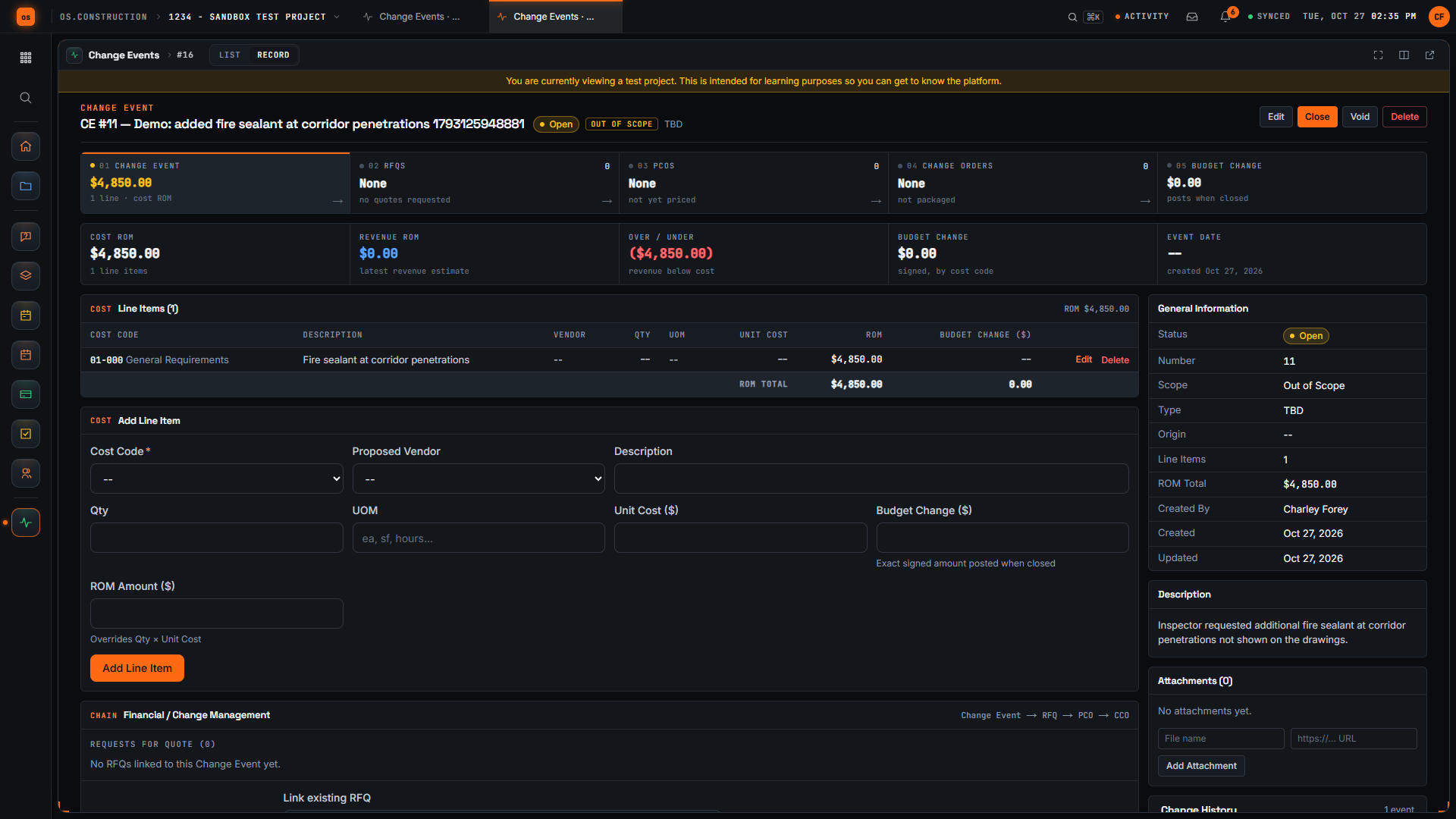
Here we are on the New Change Event page in our local sample project. A change event is where we note a possible change early, before anyone prices or approves it. Let's log one together.
First, we give it a title that says what changed. Our example is added fire sealant at corridor penetrations. The demo adds a unique reference so each recording creates its own sample record.
Next, we set Scope. For this sample we choose Out of Scope, which tells the team we believe the work sits outside the current contract. Pick whatever your team has actually agreed.
In Description, we explain what happened and why it may cost money. Our sample says the inspector asked for extra fire sealant at corridor penetrations that aren't shown on the drawings.
Now let's add a line item. We start with the cost code, because a line needs one to be saved. For this sample we use General Requirements; choose the code your team actually tracks this work against.
In the Line Items section, we type a short description of the work. One line is enough to start, and we can refine it later.
Then we enter a rough amount for that line. It's an early estimate, not an approved price, and we can refine it later.
Now we select Create Change Event. The app saves it and opens the detail page with its number and our title in the header.
Here's the change event we created. The header shows the Open status and the Out of Scope tag, and our new line appears in Line Items with its rough amount. We have logged the possible change, marked its scope, and recorded a first estimate, so pricing can move forward from here.
Video page with chaptersStep-by-step guideMore in Cost & accounting
Try it on the sample project
Every trial workspace includes a sample project to run this workflow on. 14-day free trial. Pricing for paid plans isn't set yet.
Questions about the change order log template
What should a change order log include?
For each change order: a number, the date it started, a title, where it came from and the RFI or change event behind it, the cost code, status, requested and approved amounts, schedule days requested and approved, submitted and decision dates, whether subcontract change orders were issued and the pay app it was billed on.
What is the difference between requested and approved amounts?
Requested is what you priced and submitted; approved is what the owner signed. Tracking both shows how much of what you ask for you actually get, which is worth knowing before you price the next one.
How do I track pending change orders?
Keep them in the same log with a status of Draft, Pricing or Submitted. The Summary sheet totals them as pending exposure and shows what the contract would be if they were approved as requested, without mixing them into the revised contract.
Should I log deductive change orders?
Yes, as negative amounts. Credits for unused allowances or deleted scope change the contract just as additions do, and leaving them out overstates the revised contract.
Is there a CSV version?
Yes. The original change order log CSV is still available, and the change event log template covers changes before they are priced.
Keep going
- Pillar guideLife of a change order
- Free toolChange order markup calculator
- os.constructionChange order software
- GlossaryChange Event
- GlossaryChange Order (CO)
- GlossaryConstruction Change Directive (CCD)
- GlossaryPay Application (Pay App)
- GlossaryPotential Change Order (PCO)
- GlossarySchedule of Values (SOV)
- Free resourceChange order markup calculator
- Free resourceChange event log template
- Free resourceChange order log (CSV)
- Free resourceHow to price a change order
- TemplatePunch list template
- TemplateMeeting minutes template
- TemplateInspection checklist starter pack
- TemplateT&M ticket template
- TemplateRFI writing checklist
- TemplateDaily log checklist
- TemplateChange event log
- TemplateBack charge notice and log
- TemplateThree-week look-ahead template
- TemplateSafety observation log
- TemplateAction item tracker
- TemplateCloseout and TCO checklist
- TemplateNotice to proceed template
- TemplateJob cost report template
- TemplateConstruction schedule (Gantt) template
- TemplateBid tabulation and leveling template
- TemplateCash flow projection template
- TemplateBuyout log template
- TemplateASI log template
Keep exploring
Related across os.construction
- PlatformChange order management (use case)How os.construction handles change order management on one record.
- Free toolChange event logFree change event log.
- DocsChange events and potential change ordersHow a possible change is captured as a change event, priced as a potential change order, submitted and approved, and how exposure is tracked before anything is signed.
- ExplainerChange events vs change orders: the full lifecycleWhat a change event is, what a PCO and change order are, and where each one shows up in the budget, the contract and the pay app in os.construction.
- ExplainerFrom field question to paid change orderFollow RFI-212 into a change event, a priced PCO, executed CO #14, the budget and a pay app in os.construction, with every link stored on one record.
- Free toolASI log templateFree ASI log and ASI form template.