Meeting minutes that carry open items forward.
A minutes sheet for the weekly OAC or subcontractor coordination meeting. Every topic gets a number, an owner and a due date, and anything still open goes onto next week’s agenda.
Meeting minutes template
os.construction · free template- Project
- Meeting # / series
- Date and time
- Location / call link
- Minutes by
- Next meeting
Attendance
| Name | Company | Role | Present / absent / call / distribution only |
|---|---|---|---|
| (name) | Sample GC | Project manager | Present |
| (name) | Sample Architects | Architect | Call |
Topics and minutes
| Item # | Category | Topic | Discussion / decision | Owner | Due | Linked record | Status |
|---|---|---|---|---|---|---|---|
| 11.2 | Business from previous minutes | Corridor fire damper detail | Architect to issue detail; affects ceiling close-in (SAMPLE · delete this row) | Architect | RFI-212 | Open | |
| 12.1 | Safety | Crane pick on Thursday | Lift plan reviewed; area cordoned 7–10 am | GC super | Closed | ||
| 12.2 | Submittals | Door hardware resubmittal | Returned revise and resubmit; sub to resubmit | Doors & hardware | Submittal 08 71 00-2 | Open | |
Sample rows are illustrative and marked for deletion. Your contract, drawings and specifications govern. Template from os.construction/resources/templates/meeting-minutes
Using the meeting minutes template
- Use the same agenda order every week: safety, previous open items, schedule and look-ahead, RFIs, submittals, changes, quality and punch, owner items, next meeting.
- Number each topic by meeting and item (12.3 is meeting 12, topic 3) and keep the number when it carries forward, so everyone can find its history.
- Write the decision, not the conversation. One or two lines: what was agreed, who does what, by when.
- Every open topic gets one owner and a due date. “Team” is not an owner.
- Link the RFI, submittal or change number the topic is about, so the minutes point at the record instead of retelling it.
- Send the minutes within a day, ask for corrections by a stated date, then copy every open topic to the top of next week’s agenda.
- AgendaPrevious open items first
- Meeting heldAttendance taken
- Minutes recordedDecision, owner, due date per topic
- Minutes distributedCorrections by a stated date
- Open topics carried forwardOnto the next agendaNext week: back to “Agenda”
Text version
- Agenda: Previous open items first
- Meeting held: Attendance taken
- Minutes recorded: Decision, owner, due date per topic
- Minutes distributed: Corrections by a stated date
- Open topics carried forward: Onto the next agenda
Next week: from “Open topics carried forward” back to “Agenda”.
Do this in os.construction instead of a spreadsheet
The Meetings tool in os.construction holds each meeting from agenda to minutes: recurring weekly, biweekly or monthly series, attendance marked Present, Absent, Conference or For Distribution Only, numbered topics with an assignee and due date, and links to the RFI, submittal, punch item or observation a topic is about. Create Follow-up Meeting carries open topics into the next meeting, and Create task turns a topic into a tracked task.
Watch the walkthrough · 1:49
Schedule a project meeting with a clear agenda
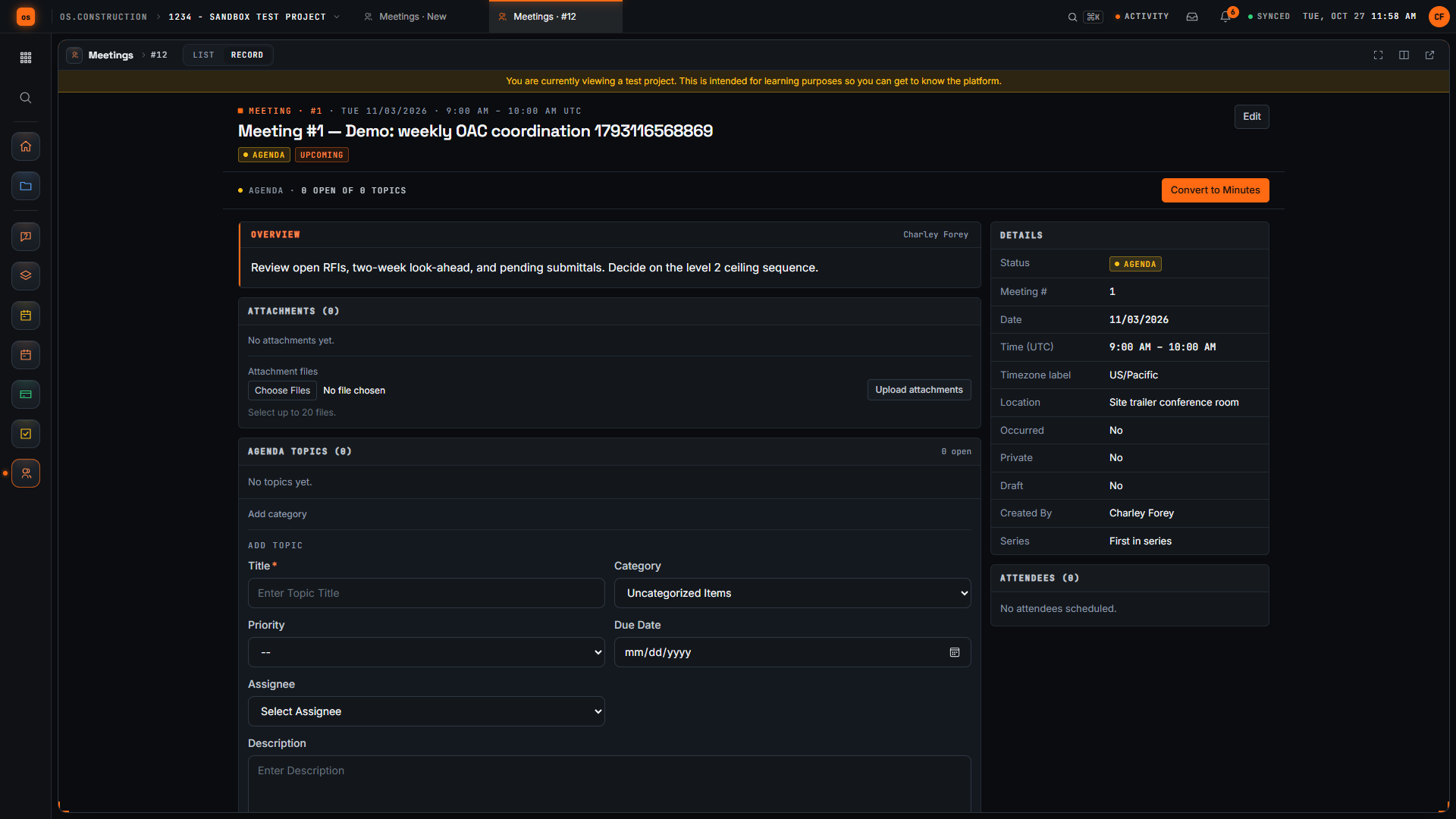
- 0:00Open Create Meeting
- 0:19Give the meeting a clear title
- 0:35Check the date and time
- 0:54Add the location
- 1:10Write the overview
- 1:27Create the meeting
- 1:38Review the saved meeting
Read the transcript
Here's the Create Meeting page in our local sample project. A good meeting record tells everyone what we're meeting about, where, and what we want to decide. Let's set one up together.
We start with a title people will recognize in a list. Ours is the weekly owner, architect and contractor coordination meeting. The demo adds a unique reference so each recording creates a separate sample record.
Next, let's check the date and time. The form suggests a date, a time zone, and a start and end time. We keep the suggested values in this sample; set them to match your real meeting.
Now we add where the meeting happens. For this sample it's the site trailer conference room.
In Overview, we write the agenda and the decision we need. Our sample covers open RFIs, the two-week look-ahead, pending submittals, and one decision on the level 2 ceiling sequence.
Then we select Create. The app saves the meeting and opens its record, with the meeting number and our title in the header.
Here's our saved meeting. Let's check that the location and agenda came through. We've created a meeting with a clear title, a place, and an overview the team can prepare for.
Video page with chaptersStep-by-step guideMore in Field: daily logs & tasks
Try it on the sample project
Every trial workspace includes a sample project to run this workflow on. 14-day free trial. Pricing for paid plans isn't set yet.
Questions about the meeting minutes template
What is an OAC meeting?
Owner–architect–contractor: the regular meeting, usually weekly, where the three parties review progress, open RFIs, submittals, changes and owner decisions.
What should construction meeting minutes include?
Project, meeting number, date, attendance, and for each topic a number, the decision, the owner, the due date and the status. Open items from the previous meeting go first.
Who takes the minutes?
Usually the GC’s project manager or project engineer. Whoever takes them should send them, and the contract may say who is responsible.
How do I handle corrections?
State in the minutes that they stand as written unless corrections arrive by a date, then record any corrections at the start of the next meeting.
Does os.construction email the minutes?
No. Record Distribution keeps a record of who received the minutes; send them the way your team normally does.
Keep going
- GlossaryChange Event
- GlossaryLook-Ahead Schedule
- GlossaryRequest for Information (RFI)
- GlossarySubmittal
- TemplatePunch list template
- TemplateInspection checklist starter pack
- TemplateT&M ticket template
- TemplateRFI writing checklist
- TemplateDaily log checklist
- TemplateChange event log
- TemplateThree-week look-ahead template
- TemplateSafety observation log
- TemplateAction item tracker
Keep exploring
Related across os.construction
- PlatformRole guide: Owner’s representativeAn owner’s rep’s week in os.construction.
- Free toolAction item trackerFree action item tracker for construction PMs.
- PlatformCourse: run your first projectSeven 10-minute lessons on the sample project: RFIs, daily log, meetings, punch, changes and pay apps.
- Free toolRFI writing checklistFree checklist for writing construction RFIs.
- DocsSchedule: import, look-ahead and GanttImport a P6 XER or Microsoft Project XML schedule, read it as a list, 3-week look-ahead, calendar or Gantt, and update progress on each activity.
- ExplainerThe 3-week look-ahead: catching overdue and at-risk workRun the weekly look-ahead in os.construction: read Overdue and At Risk flags, move the data date, update progress, and take the right list to the meeting.