How to write an RFI that gets answered.
Most slow RFI answers start with a vague question. Run this checklist before you send one: it takes two minutes and saves a round trip.
RFI writing checklist
os.construction · free template- Project
- RFI #
- Subject
- Date needed by
- Written by
- Assigned to
Before you write it
| Item | Done | Comment / follow-up |
|---|---|---|
| Searched the drawings, specifications, addenda, ASIs and bulletins for the answer | ||
| Checked earlier RFIs and approved submittals for the same question | ||
| Confirmed it is a question, not a submittal, a means-and-methods decision or a change request | ||
| Talked to the trade that raised it and understood exactly what they need to proceed |
The question
| Item | Done | Comment / follow-up |
|---|---|---|
| One question per RFI | ||
| Subject names the element and the location (e.g. “Corridor fire damper detail, L2 grid C”) | ||
| References the sheet, detail and specification section involved | ||
| States the conflict or gap in a sentence: what the documents say and why it doesn’t work | ||
| Proposes a solution the designer can accept or reject | ||
| Asks for a specific answer: a dimension, a product, a yes or no, a detail | ||
| Marked-up sheet or photo attached |
Routing
| Item | Done | Comment / follow-up |
|---|---|---|
| Assigned to the person who can answer it, with the right people on distribution | ||
| Due date set from when the field needs the answer, inside the contract response time | ||
| Cost and schedule impact marked: yes, no or to be determined | ||
| Logged with a number so it can be tracked and referenced in meetings |
When the answer comes back
| Item | Done | Comment / follow-up |
|---|---|---|
| The answer actually answers the question; if not, follow up the same day | ||
| Official response distributed to the field and affected trades | ||
| Drawings or field sets marked with the RFI number | ||
| Change event opened if the answer adds cost or time | ||
| RFI closed, with the closed date recorded |
Sample rows are illustrative and marked for deletion. Your contract, drawings and specifications govern. Template from os.construction/resources/templates/rfi-checklist
Using the RFI writing checklist
- Use the first section to decide whether you need an RFI at all. A question already answered in an addendum or a previous RFI is a day lost.
- Write the subject last: element plus location. It is what everyone sees in the log and in meeting minutes.
- Put your proposed solution in. A designer can approve a proposal faster than they can design from scratch.
- Set the due date from the schedule, not by habit. If the work is three weeks out, say so; if it is tomorrow, call as well as send.
- Review open RFIs by ball in court every week, in the meeting, so nothing waits silently.
- DraftBall in court: the writer
- Open, no response yetBall in court: the assignees
- Response receivedBall in court: the RFI managerNot answered: back: back to “Open, no response yet”
- Official response distributedField and affected trades
- ClosedNobody: closed date recorded
Text version
- Draft: Ball in court: the writer
- Open, no response yet: Ball in court: the assignees
- Response received: Ball in court: the RFI manager
- Official response distributed: Field and affected trades
- Closed: Nobody: closed date recorded
Not answered: back: from “Response received” back to “Open, no response yet”.
Do this in os.construction instead of a spreadsheet
RFIs in os.construction save as a draft until they’re ready, then open to the assignees. Ball in court is worked out from the RFI’s state, overdue RFIs are flagged in the log, and the answer that settles the question can be marked official. An RFI links to drawings, submittals, change events and photos, and Export PDF downloads the full RFI with its responses.
Watch the walkthrough · 1:57
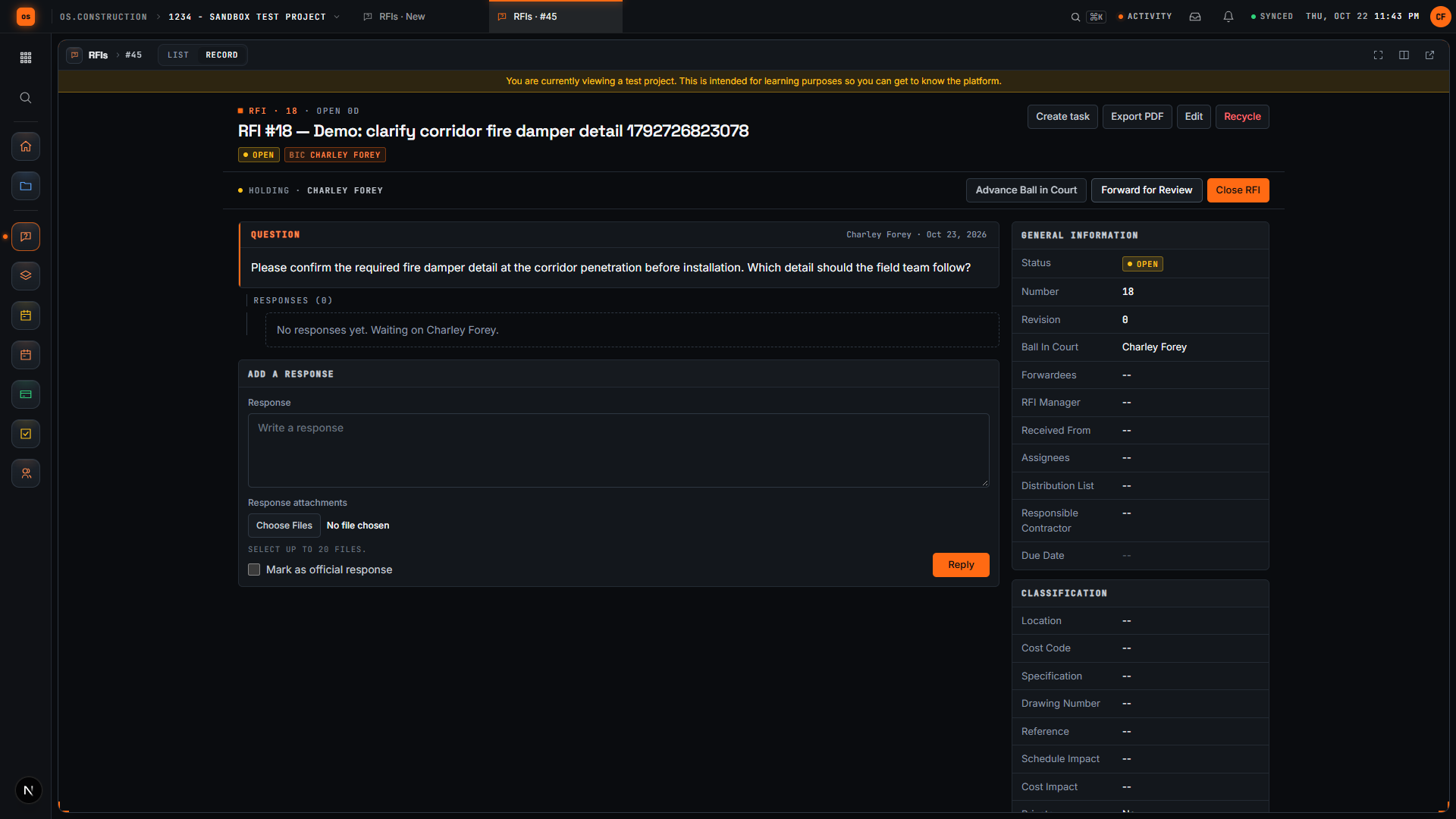
Create a draft RFI and open it
- 0:00Start a new request for information
- 0:27Give the RFI a clear subject
- 0:59Write the question
- 1:15Save the draft
- 1:28Review the saved question
- 1:43Open the RFI
Read the transcript
Here we are in the actual os.construction app, using a local sample project. On the New RFI page, we can prepare a question and save it as a draft before opening it.
Use a subject that tells the reviewer what needs clarification. In this example, we are asking about the corridor fire damper detail. The demo adds a unique reference so each recording creates a separate sample record.
State the decision the team needs. Our question asks the reviewer to confirm the required fire damper detail before installation and identify which detail the field team should follow.
Select Create as Draft. The app saves the RFI and opens its detail page. We will check that the Open RFI action is available before moving forward.
The saved record now has its own detail page. Review the subject and question here. A draft gives the team a chance to check the request before opening it.
Select Open RFI. Wait for the Open RFI action to disappear after the update. Close RFI remains available. We have written a request, saved it as a draft, reviewed it, and moved it into the open workflow.
Video page with chaptersStep-by-step guideMore in RFIs & submittals
Try it on the sample project
Every trial workspace includes a sample project to run this workflow on. 14-day free trial. Pricing for paid plans isn't set yet.
Questions about the RFI writing checklist
What is an RFI in construction?
A request for information: a formal written question to the design team (or owner) about the contract documents, used when the drawings or specifications are unclear, conflicting or incomplete.
How long should an RFI response take?
Whatever your contract says; many contracts set a response period, and the due date on the RFI should reflect when the field actually needs the answer. If none is set, agree one at the start of the job.
Should an RFI include a proposed solution?
Usually yes. A proposal the designer can accept is faster to answer than an open question, and it shows the field’s preferred approach. The designer still decides.
Is an RFI a change order?
No. An RFI asks a question. If the answer changes the scope, cost or time, open a change event and price it; the RFI is the backup.
Can I see a filled-in RFI in os.construction?
Yes. Every trial includes a sample project with RFIs you can open, and the walkthrough above shows drafting and opening one.
Keep going
- GlossaryArchitect's Supplemental Instructions (ASI)
- GlossaryChange Event
- GlossaryRequest for Information (RFI)
- GlossarySubmittal
- Free resourceRFI log (CSV)
- Free resourceRFI management
- TemplatePunch list template
- TemplateMeeting minutes template
- TemplateInspection checklist starter pack
- TemplateT&M ticket template
- TemplateDaily log checklist
- TemplateChange event log
- TemplateThree-week look-ahead template
- TemplateSafety observation log
- TemplateAction item tracker
Keep exploring
Related across os.construction
- PlatformRole guide: Project managerA GC project manager’s week in os.construction.
- Free toolRFI response time calculatorPaste your RFI log: median turnaround, share answered in the contract period, late open RFIs.
- PlatformRole guide: Owner’s representativeAn owner’s rep’s week in os.construction.
- Free toolMeeting minutes templateFree OAC and weekly meeting minutes template.
- ExplainerA day as a project managerOne PM's day on a sample project: the desktop, an RFI answer, submittals, the daily log, an OAC meeting, tasks and a change event, all on one record.
- DocsRFIsCreate, route, answer and close RFIs in the app. Ball in court, distribution, official responses, related items, private RFIs and PDF export.