What every daily log should capture.
The daily log is the record you reach for when a delay, claim or dispute comes up months later. This checklist covers what to write down, every day, before you leave site.
Daily log checklist
os.construction · free template- Project
- Date
- Superintendent
- Weather AM / PM
Conditions
| Item | Done | Comment / follow-up |
|---|---|---|
| Weather morning and afternoon: sky, temperature, wind, precipitation | ||
| Ground and site conditions, and whether weather stopped or slowed any work |
Who was on site
| Item | Done | Comment / follow-up |
|---|---|---|
| Manpower by company: workers and hours | ||
| Visitors: who, company, why, time in and out | ||
| Inspections: inspector, scope, result |
Work and materials
| Item | Done | Comment / follow-up |
|---|---|---|
| Work performed by area and trade | ||
| Quantities of work in place where you track them | ||
| Deliveries: from whom, what, received by | ||
| Equipment on site: hours operating and idle |
Problems
| Item | Done | Comment / follow-up |
|---|---|---|
| Delays: cause, start and end, who was affected and who was told | ||
| Directions received in the field (and the T&M ticket or RFI they led to) | ||
| Phone calls or conversations that changed the plan |
Safety
| Item | Done | Comment / follow-up |
|---|---|---|
| Toolbox talk topic and attendance | ||
| Incidents and near misses, with who was involved | ||
| Safety violations issued and to whom |
Close out the day
| Item | Done | Comment / follow-up |
|---|---|---|
| Photos taken and labelled with location | ||
| Tomorrow’s scheduled work and crews noted | ||
| Log signed or completed before leaving site |
Sample rows are illustrative and marked for deletion. Your contract, drawings and specifications govern. Template from os.construction/resources/templates/daily-log-checklist
Using the daily log checklist
- Write it before you leave, every day, including the quiet ones. A day with no entry is a day you can’t prove anything about.
- Record facts, not opinions: times, counts, names, locations.
- Write delays the day they happen, with the cause and who you told. That note is the start of any time extension.
- Copy yesterday’s crews as the starting point, then correct them; most days look like yesterday.
- Cross-reference: if a direction became a T&M ticket or an RFI, put its number in the log.
- Daily log entrySuperintendent, every day
- Manpower and equipment hoursBackup for T&M and job cost
- Delays and directionsBackup for time and change claims
- Inspections and safetyQuality and safety record
- The project recordWhat you reach for in a dispute
Text version
- Daily log entry: Superintendent, every day
- Manpower and equipment hours: Backup for T&M and job cost
- Delays and directions: Backup for time and change claims
- Inspections and safety: Quality and safety record
- The project record: What you reach for in a dispute
Do this in os.construction instead of a spreadsheet
The Daily Log in os.construction is one page per day with sections for weather, manpower, notes, visitors, deliveries, equipment, accidents, phone calls, delays, quantities, safety violations, scheduled work and more. Copy from previous day brings yesterday’s manpower forward, Complete Day locks the entries until someone reopens it, and each day exports to PDF or CSV.
Watch the walkthrough · 2:18
Add a note to the daily log
- 0:00Confirm the project and day
- 0:19Find the Notes section
- 0:52Write the field observation
- 1:14Save and inspect the entry
- 1:32Move to the previous day
- 1:48Return to the day
- 2:04Read the saved observation again
Read the transcript
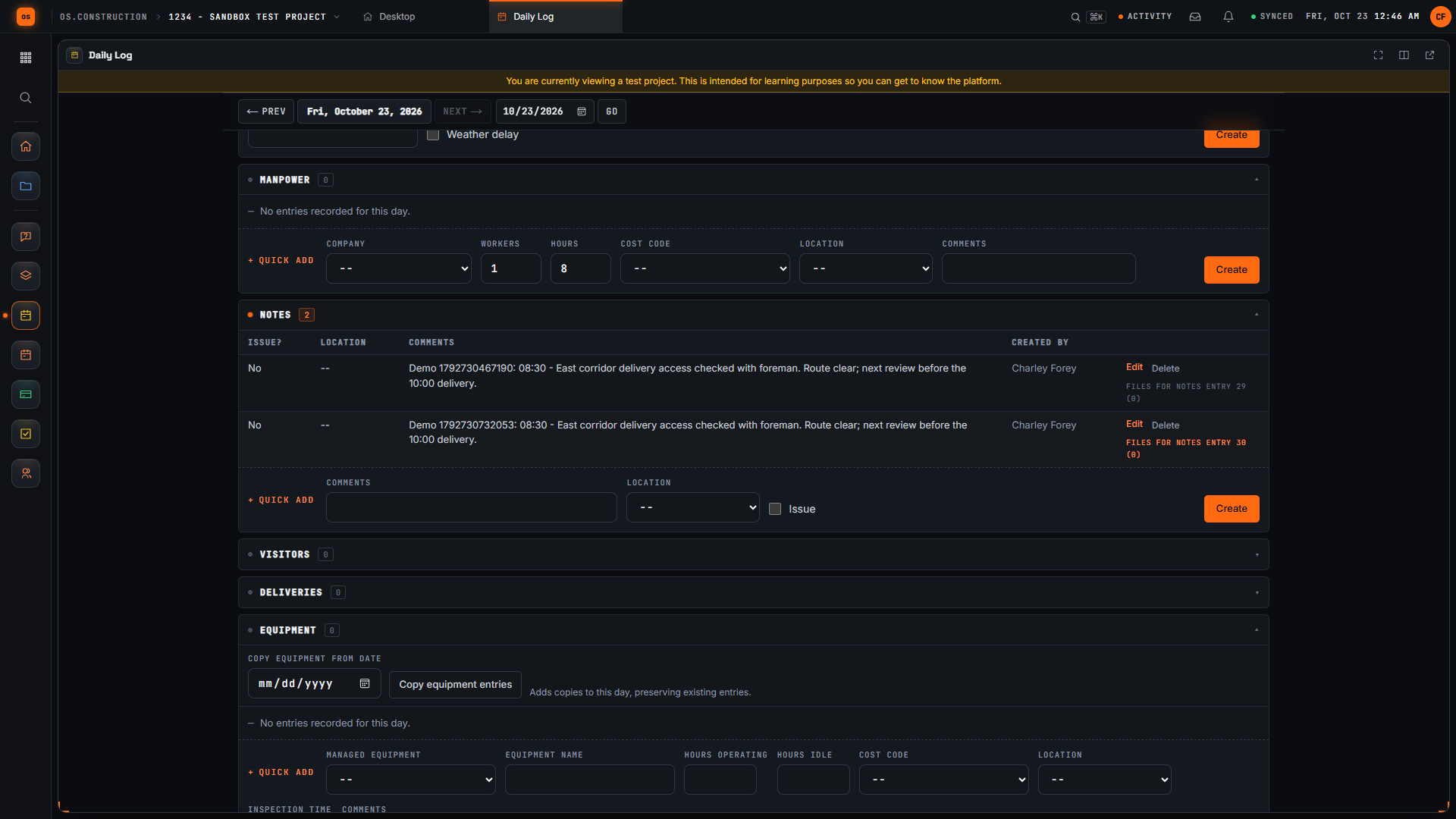
Start with the project and date. We are in the local sample project's Daily Log, which opens on today. A useful field note tells the next reader what happened, where, and what needs attention next.
Scroll to Notes. This section has its own entry form. Keep an observation specific enough that another team member can understand the location, the time, and the next check without asking you to reconstruct the day.
Our invented example records an access check at the east corridor, the time, and a follow-up before the delivery. The unique demo reference distinguishes this sample note from other recordings. Replace the example with facts you actually observed on your project.
Select Create in the Notes form. Wait for the new row to appear, then read the saved comment. Checking the row confirms the submitted text reached the day's log instead of remaining only in the form.
Use Previous Day to leave this day's view. Each day has its own log. The Today link lets us return to the day where we created the note and check that the saved entry is still there.
Select Today to return to the day where we created the note. Check the displayed date, then return to Notes to find the saved observation.
Here is the same note in the Notes table after returning to the day. Read the time, location, observation, and next check. We have saved a specific field note and confirmed that another reader can find its context again.
Video page with chaptersStep-by-step guideMore in Field: daily logs & tasks
Try it on the sample project
Every trial workspace includes a sample project to run this workflow on. 14-day free trial. Pricing for paid plans isn't set yet.
Questions about the daily log checklist
What should a construction daily report include?
Weather, manpower by company with hours, work performed, deliveries, equipment, visitors and inspections, delays with their cause, safety items, photos and the next day’s plan, signed by the superintendent.
Who fills out the daily log?
Usually the superintendent, sometimes with foremen submitting their crews. Many subcontracts also require the sub to keep its own daily reports.
How long should I keep daily logs?
For the life of the job and as long as claims could arise afterward. Your contract, insurance and counsel set the retention period.
Is there a printable daily log form?
Yes: the free daily construction log form prints one page per day. This checklist is what to make sure that form, or your app, captures.
Does the os.construction daily log work on a phone?
It runs in your phone’s browser and needs a connection; offline capture is planned.
Keep going
- GlossaryDaily Log
- GlossaryDelay Claim
- GlossaryLook-Ahead Schedule
- GlossaryTime and Materials Ticket (T&M Ticket)
- Free resourcePrintable daily log form
- TemplatePunch list template
- TemplateMeeting minutes template
- TemplateInspection checklist starter pack
- TemplateT&M ticket template
- TemplateRFI writing checklist
- TemplateChange event log
- TemplateThree-week look-ahead template
- TemplateSafety observation log
- TemplateAction item tracker
Keep exploring
Related across os.construction
- PlatformRole guide: SuperintendentA superintendent’s week in os.construction.
- PlatformCourse: run your first projectSeven 10-minute lessons on the sample project: RFIs, daily log, meetings, punch, changes and pay apps.
- ExplainerDaily reports that hold up: weather, manpower, notesDaily logs in os.construction that hold up a year later: weather with delays, manpower with hours and cost codes, specific notes, and a completed day.
- BlogField to ledger: why daily logs are financial documentsThe daily log is usually treated as a field formality. It's actually the first record of almost every number accounting cares about: labor, equipment, deliveries, delays and changes. Here's what to capture, and how it flows to cost, billing and claims.
- DocsSchedule: import, look-ahead and GanttImport a P6 XER or Microsoft Project XML schedule, read it as a list, 3-week look-ahead, calendar or Gantt, and update progress on each activity.
- ExplainerThe 3-week look-ahead: catching overdue and at-risk workRun the weekly look-ahead in os.construction: read Overdue and At Risk flags, move the data date, update progress, and take the right list to the meeting.