Log every change before you know the price.
A change event is the first record that something changed. Log it the day it is found, with where it came from and a rough cost, so the exposure is in the forecast and the notice clock is protected.
Change event log
os.construction · free template- Project
- Contract
- Log kept by
- Last updated
Change events
| CE # | Date found | Title | Origin | Origin ref | Scope | Type | Rough cost (ROM) | Cost codes | Notice sent | Status | PCO / CO # |
|---|---|---|---|---|---|---|---|---|---|---|---|
| CE-031 | Fire dampers missing at L3 corridor (SAMPLE · delete this row) | RFI answer | RFI-212 | Out of scope | Owner change | 80,000–90,000 | 23-3300 | Open | PCO-044 | ||
| CE-032 | Owner adds card reader at suite 300 entry | Owner direction | OAC minutes 12.4 | Out of scope | Owner change | 6,500 | 28-1300 | Open | |||
| CE-033 | Rock at footing F-7 below design elevation | Daily log | Daily log, photos | TBD | TBD | 15,000–25,000 | 31-2300 | Open | |||
Sample rows are illustrative and marked for deletion. Your contract, drawings and specifications govern. Template from os.construction/resources/templates/change-event-log
Using the change event log
- Open a change event the day something might change cost or time: an RFI answer, an owner direction, a hidden condition, a drawing revision, a sub’s notice. You don’t need the price yet.
- Record the origin and its reference (RFI number, minutes item, daily log date) so the backup is one lookup away when you price it.
- Put a rough order of magnitude (ROM) on it, even as a range. A range in the forecast beats a blank.
- Mark scope as in, out or to be determined. In-scope events still matter: they move cost even when they don’t move the contract.
- Check your contract’s notice requirements and record when notice went out.
- When it is priced, write the PCO or change order number on the line, so the log shows where every event ended up.
- Change foundRFI, owner direction, field condition
- Change event loggedOrigin, scope, rough cost
- Priced as a PCOSub quotes, markup
- Submitted to the ownerWith backup
- Change order executedContract, budget, commitment updated
- BilledOn the next pay app
Text version
- Change found: RFI, owner direction, field condition
- Change event logged: Origin, scope, rough cost
- Priced as a PCO: Sub quotes, markup
- Submitted to the owner: With backup
- Change order executed: Contract, budget, commitment updated
- Billed: On the next pay app
Do this in os.construction instead of a spreadsheet
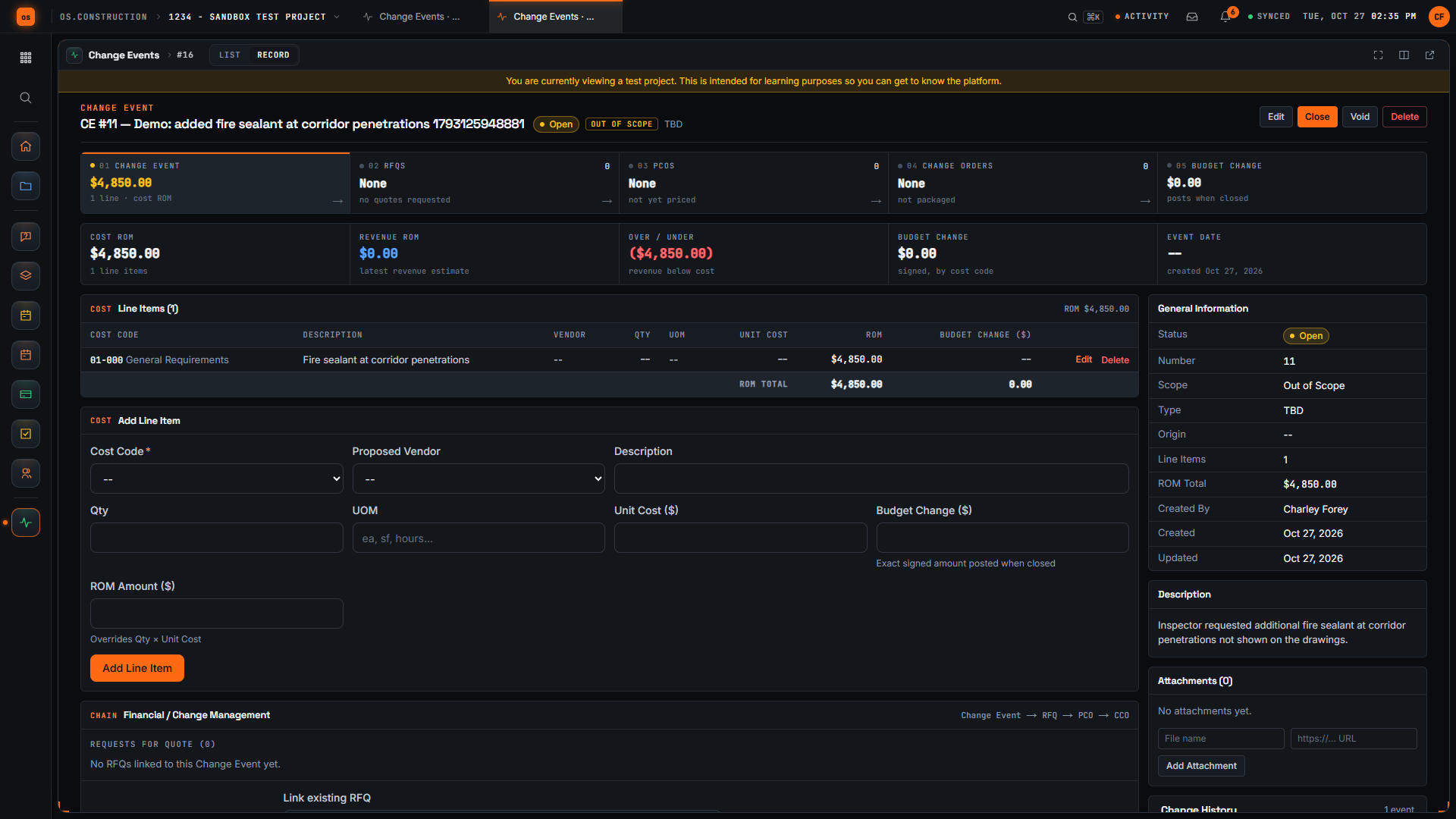
Change Events in os.construction record a title, scope (TBD, In Scope or Out of Scope), type (TBD, Allowance, Contingency, Owner Change or Transfer), event date and an origin RFI, with line items by cost code, proposed vendor, quantity, unit cost and a rough order of magnitude. Create RFQ from Change Event sends it out for pricing, Create PCO from Change Event copies the lines into a potential change order, and closing the event posts its budget changes by cost code.
Watch the walkthrough · 2:50
Log a potential change as a change event
- 0:00Start a new change event
- 0:31Name the possible change
- 0:50Mark the scope
- 1:19Describe what happened
- 1:33Choose a cost code for the line
- 1:56Add a rough line item
- 2:09Enter a rough amount
- 2:21Create the change event
- 2:32Check the saved line item
Read the transcript
Here we are on the New Change Event page in our local sample project. A change event is where we note a possible change early, before anyone prices or approves it. Let's log one together.
First, we give it a title that says what changed. Our example is added fire sealant at corridor penetrations. The demo adds a unique reference so each recording creates its own sample record.
Next, we set Scope. For this sample we choose Out of Scope, which tells the team we believe the work sits outside the current contract. Pick whatever your team has actually agreed.
In Description, we explain what happened and why it may cost money. Our sample says the inspector asked for extra fire sealant at corridor penetrations that aren't shown on the drawings.
Now let's add a line item. We start with the cost code, because a line needs one to be saved. For this sample we use General Requirements; choose the code your team actually tracks this work against.
In the Line Items section, we type a short description of the work. One line is enough to start, and we can refine it later.
Then we enter a rough amount for that line. It's an early estimate, not an approved price, and we can refine it later.
Now we select Create Change Event. The app saves it and opens the detail page with its number and our title in the header.
Here's the change event we created. The header shows the Open status and the Out of Scope tag, and our new line appears in Line Items with its rough amount. We have logged the possible change, marked its scope, and recorded a first estimate, so pricing can move forward from here.
Video page with chaptersStep-by-step guideMore in Cost & accounting
Try it on the sample project
Every trial workspace includes a sample project to run this workflow on. 14-day free trial. Pricing for paid plans isn't set yet.
Questions about the change event log
What is a change event?
The first record that something on the job may change cost or time, before anything is priced or signed. It later becomes a potential change order, a change order, or nothing if it turns out to be in scope with no cost.
What is the difference between a change event and a change order?
A change event says something changed and roughly what it might cost. A change order is the signed change to a contract. One event can lead to an owner change order and a subcontract change order.
When should I log a change event?
The day it is found. Many contracts set a notice period for changes, and an event logged early keeps the exposure in the forecast and the paper trail started.
What is a ROM?
A rough order of magnitude: a quick range or estimate of cost, good enough to forecast with until a real price comes in.
Does a change event change the budget in os.construction?
Only when you set a budget change amount on its lines and close the event. Closing posts those amounts by cost code, and reopening removes them.
Keep going
- GlossaryChange Event
- GlossaryChange Order (CO)
- GlossaryConstruction Change Directive (CCD)
- GlossaryDiffering Site Conditions
- GlossaryPotential Change Order (PCO)
- Free resourceLife of a change order
- Free resourceChange order markup calculator
- Free resourceChange order log (CSV)
- TemplatePunch list template
- TemplateMeeting minutes template
- TemplateInspection checklist starter pack
- TemplateT&M ticket template
- TemplateRFI writing checklist
- TemplateDaily log checklist
- TemplateThree-week look-ahead template
- TemplateSafety observation log
- TemplateAction item tracker
Keep exploring
Related across os.construction
- PlatformChange order management (use case)How os.construction handles change order management on one record.
- DocsChange events and potential change ordersHow a possible change is captured as a change event, priced as a potential change order, submitted and approved, and how exposure is tracked before anything is signed.
- Free toolChange order markup calculatorPrice a change order with labor burden, overhead and profit markups.
- BlogChange events vs change orders: tracking exposure before it's signedBy the time a change order is signed, the money is already spent or already lost. The change event is where exposure starts. Here's how to track it, what to put in the forecast, and why the gap between the two is where margin leaks.
- ExplainerLife of a change orderFollow one change order from a hidden condition through change event, PCO, COR and owner approval, then watch the money move into budget, pay app and WIP.
- DocsChange events and change ordersTrack a change from the first sign of it to an executed change order. Change events, potential change orders, packages, commitment change orders and budget posting in the app.