Know who owes the answer. Keep it attached to the cost.
Write the question once, send it to the people who owe the answer, and see who has the ball on every open RFI. When the answer changes the work, start the change event from the RFI, so the question, the official response and the cost stay linked.
14-day free trial. Pricing for paid plans isn't set yet.
One question, followed all the way to billing.
RFI-212 asked about missing fire dampers behind an L3 corridor wall, and the answer added scope. Watch the same record become a change event, CO #14 and a line on Pay App #9. Then flip the switch to count the re-keys in a typical stack.
Read this diagram as text
One record. The same record moves through every stage, and each stage links to the one before:
- RFI: RFI-212 is answered: add fire dampers at the L3 corridor.
- Change event: A change event opens from RFI-212. The exposure shows on the forecast before anything is signed.
- Change order: CO #14 is approved at $86,400, linked to the RFI and the change event.
- Budget + commitment: Budget line 23-330 and the Summit Mechanical subcontract update from CO #14.
- Owner billing: CO #14 arrives on Pay App #9 as a new G703 line.
- Job cost: Subcontractor bills post against the same commitment and cost code.
- WIP + GL: WIP reads the approved contract, posted cost and billings. Nothing was retyped.
Today, copied between tools. RFI, change event and change order live in PM software. CO #14 is exported and retyped into a budget spreadsheet, typed again onto the pay app (as $86,040 instead of $86,400), retyped into accounting, exported to a WIP workbook, and the over/under entry is retyped into the general ledger. That is four re-keys, four copies and one amount that no longer matches.
Sample figures from an illustrative job. WIP and the general ledger are part of the Accounting module.
Where RFIs go quiet.
- Failure 01
Nobody knows whose turn it is
The log says Open, but not whether the architect is still reviewing, an engineer was looped in, or the answer came back and is waiting on your PM. A late answer gets noticed when the crew is already standing around.
- Failure 02
The answer lives in an email thread
The response comes back as a reply-all with a sketch attached. The log is updated later, if at all, and the field builds to whichever version reached the foreman first.
- Failure 03
The cost loses its origin
The answer adds scope, someone starts a change order in another system, and the link to the RFI is a note in a description field. When the owner questions the change months later, the paper trail has to be rebuilt.
From question to answer, on one record.
The RFI is the record everyone works from: the question, the people on it, the responses and the items it touches.
- 01
Draft it, then open it
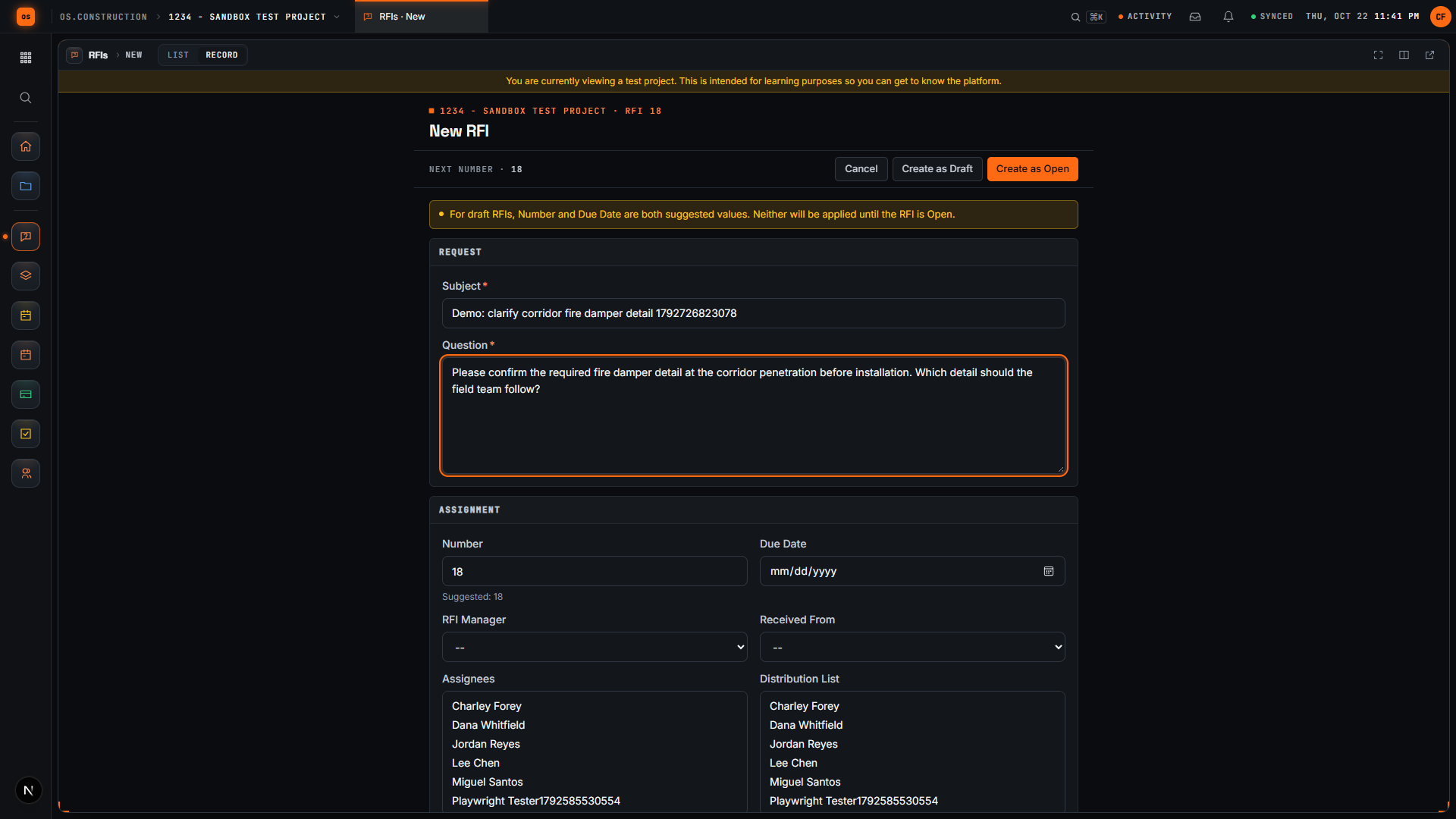
Write the subject and question, then set the RFI manager, assignees, distribution list and due date, with the spec section, location, cost code and drawing number. Record schedule and cost impact as known, unknown, none or TBD. Create as Draft keeps it with you; Open RFI sends it to the assignees.
RFIs guide → - 02
Ball in court from the RFI's state
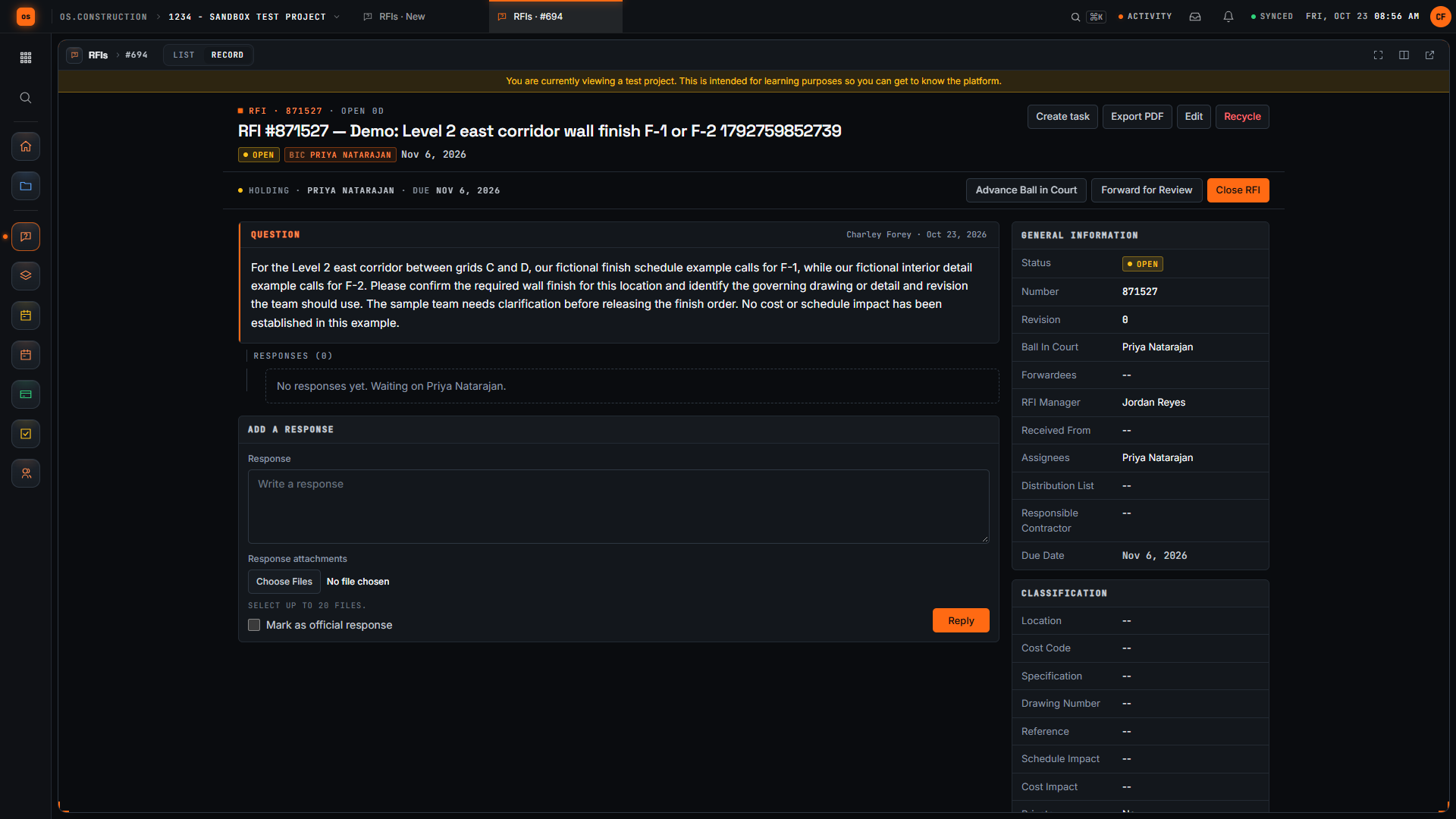
A draft sits with its creator, an open RFI with no response sits with the assignees, and once someone responds it moves to the RFI manager. Advance Ball in Court and Forward for Review move it by hand when an engineer needs to weigh in. Overdue RFIs turn red in the log, and Overdue Only filters to them.
Answers failure 01 - 03
Responses on the record, one marked official
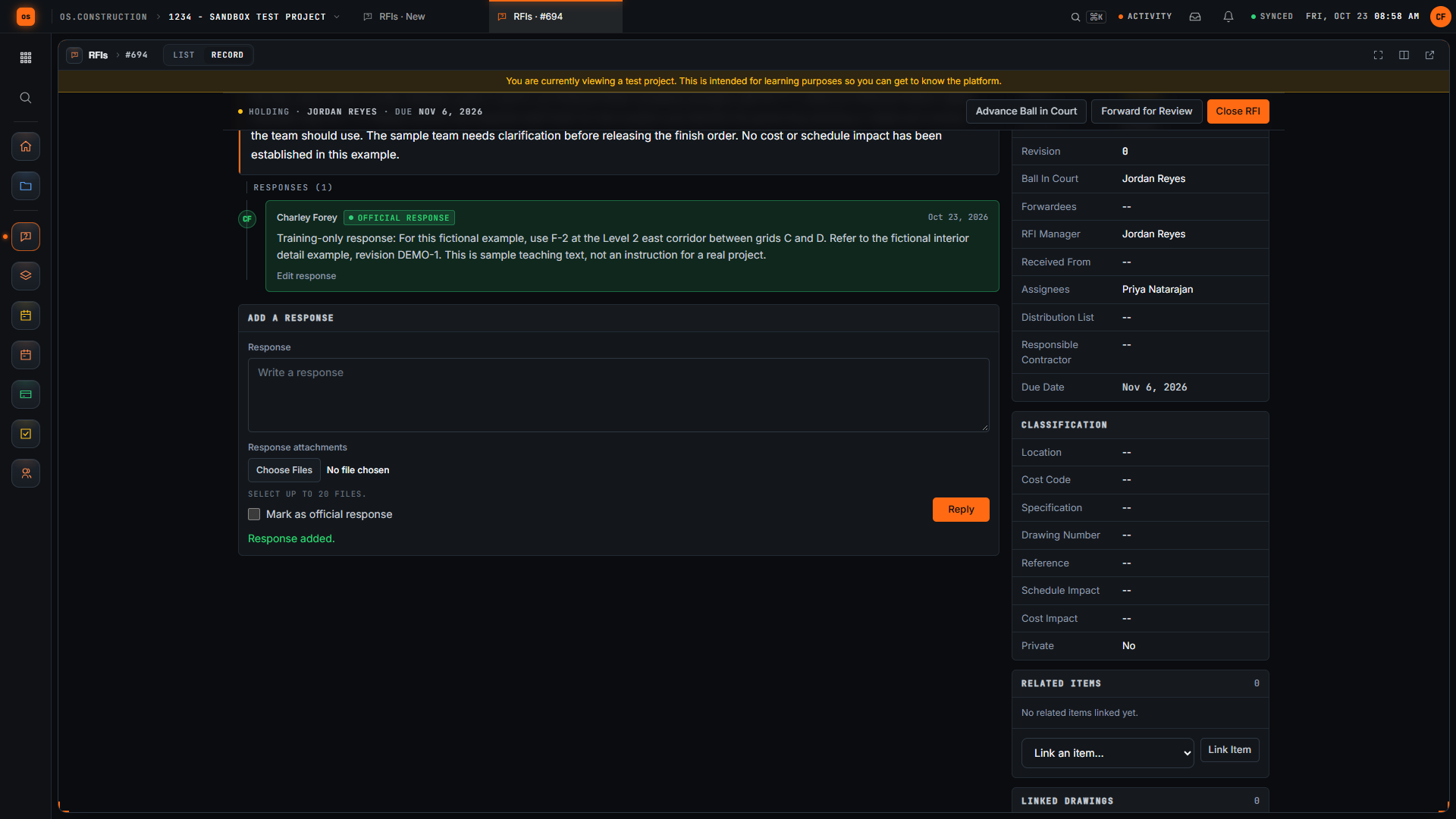
People on the RFI add responses with attachments, and the answer that settles it is marked official, highlighted on the RFI and in its PDF. New responses notify the creator, the RFI manager, the assignees, the distribution list and anyone @mentioned.
Answers failure 02 - 04
Linked to what it touches
Related Items links other RFIs, submittals, drawings, change events and photos. A change event can name the RFI as its origin, and the RFI lists the change events created from it, so the cost side is one click away. Create task opens a follow-up tied to the RFI.
Answers failure 03Change events and PCOs → - 05
Closed, but never lost
Close RFI records the closed date and Reopen RFI brings it back. Every change goes to the RFI's history and the project Activity feed, and Export PDF downloads the full RFI with its responses for the job file.
Audit log and history →
An RFI, in the app.
Real screens on sample data: the question in the RFI form, the open RFI showing who has the ball, and the official response.
Rather click than read? Open the interactive demo: open RFI-212, turn it into CO #14, approve it and watch the budget and Pay App #9 update, on sample data in your browser.
Exactly what ships today.
Status comes from the app's own export, not from this page's copy. Live is in the product now; Preview is in the product with limits we document; Planned is not built yet.
- LiveRFIsThe RFI log with ball in court, due dates, saved views, official responses, private RFIs and PDF export.
- LiveObservationsConvert to RFI turns a safety or quality observation into an RFI that links back to it.
- LiveDrawingsLinked Drawings connects an RFI to the sheets it references.
- LiveSubmittalsRFIs and submittals link to each other from Related Items.
- LivePhotosPhotos with description, location and tags, linked to the RFI they support.
- LiveChange EventsA change event can name the RFI as its origin and carry the cost by cost code.
- LiveTasksCreate task opens a follow-up tied to the RFI.
- PlannedRFI agentAI that would draft RFIs from field notes. Not built; you write RFIs yourself today.
Where we don't fit yet
- No offline drafting yet. RFIs run in a phone's browser with a connection. Offline capture, including draft RFIs, is planned.
- Reviewers need an account. Architects and engineers answer inside the app as invited project users. Answering by email reply or without signing in isn't available.
- PDF export is per RFI. Export PDF works on one RFI at a time. To pull the whole log into a spreadsheet or another system, use the REST API.
RFIs and the tools they link to are live today. Field use on phones runs in the browser; native apps, offline capture and the RFI agent are planned. See the full list on the changelog and the platform overview.
Your books, your data.
Permissions per tool
Permission templates set each tool to none, read only, standard or admin, enforced the same way in the app and the API.
MFA and SCIM
Authenticator-app sign-in for every user, and SCIM 2.0 provisioning from your identity provider.
Change history
Tracked changes record who changed which fields and when, shown as item history and in the activity feed.
Your data, exportable
Export lists to CSV and key records to PDF. Leaving should never mean losing your history.
REST API · 2,549 endpoints
Project and accounting records are available through the documented REST API, with OAuth tokens and signed webhooks for the tools you keep.
We don't hold SOC 2 or any other security certification today, and we won't imply that we do. Read exactly what is in place, or go straight to the API documentation.
What to look for in construction RFI software.
Whatever you end up buying, these are the questions worth asking in a demo. They come from how RFIs stall on real jobs, not from any one product's feature list.
Who it's for
General contractors and construction managers who send RFIs to a design team, and specialty contractors who raise them through a GC. Project engineers and project managers work the log every day, superintendents raise questions from the field, and architects and engineers answer them.
Ball in court you can trust
Ask how the software decides whose turn it is. If someone has to update a field by hand, it will be wrong by the second week. Look for ball in court that follows the RFI's state and can be forwarded to a consultant.
Due dates that match the contract
Contracts set response periods, often in working days. Check that due dates show in the log, that overdue items stand out, and that you can filter to the late ones before the OAC meeting.
An official answer, separate from the conversation
RFIs collect comments. The field needs the one answer that governs. Look for a way to mark the official response and see it first, in the app and on the PDF.
Cost and schedule impact on the RFI
Recording whether an answer may affect cost or time when the RFI is written is useful notice evidence later. Check that impact fields exist and that an RFI can start a change without retyping it.
Links to drawings, specs and submittals
An RFI is about a detail on a sheet or a line in the spec. Linking it to the drawing and related submittals saves the reviewer time and keeps the context for whoever reads it a year later.
How the design team gets in
Find out how architects and engineers respond: their own login, an email reply or a portal. Ask what each costs, what they can see, and whether an RFI can be kept private from other subs.
History you can produce in a dispute
Every change to dates, assignees and responses should be recorded with who and when. Ask to see an RFI's history, not just its current state.
Getting your log in and out
Ask whether open RFIs from your current system can be imported, what export formats exist for one RFI and for the whole log, and whether there is an API.
Common questions.
What is construction RFI software?
Software that keeps the request for information log: each question, who owes the answer, when it is due, the responses, and the drawings, submittals and changes the RFI touches. It replaces the spreadsheet log and the email threads around it.
How does ball in court work on an RFI?
The app works it out from the RFI's state. A draft sits with its creator. An open RFI with no responses sits with the assignees, or the RFI manager if there are none. Once a response is added it moves to the RFI manager, and a closed RFI sits with nobody. Advance Ball in Court and Forward for Review move it by hand when someone else needs to weigh in.
Can architects and engineers answer RFIs in os.construction?
Yes, inside the app. Add their firm to the project Directory and invite each person with a permission template that fits. They add responses with attachments, and anyone your permissions allow can mark the answer that settles the question as official. Answering without an account isn't available today.
Can an RFI become a change order?
Yes. A change event can name the RFI as its origin, and the RFI lists the change events created from it. The event is priced as a potential change order and approved as a change order, and each stage links back to the one before, so the question and its answer stay attached to the cost.
Can I import my existing RFIs?
If your RFIs are in the project management system the import tool connects to, yes: RFIs are one of its scopes, and a dry run counts what would come over before anything is written. The import tool is in preview and connects to one system today, so ask us about yours.
Does it work on a phone?
Yes, in your phone's browser at app.os.construction, with a connection. There is no native app yet, and offline capture, including drafting RFIs without signal, is planned and not built.
Read, calculate, then try it.
From the blog
Free tools
Terms on this page: RFI · Ball in court · ASI · Bulletin · Change event · Construction change directive · Differing site conditions · Submittal
Open RFI-212 and follow the answer.
The interactive demo walks an RFI through to a change order and a pay app on sample data in your browser. Or start a 14-day free trial with a sample project already set up.