Meeting minutes where open items don't get retyped.
Each topic is a record with an owner, a due date and a link to the RFI or submittal it's about. Write the decision in the meeting, and whatever is still open carries into next week's agenda by itself.
14-day free trial. Pricing for paid plans isn't set yet.
From agenda to next week's agenda.
The top lane is this week's meeting, from agenda to minutes. The bottom lane is what it leaves behind: tasks, open topics and the follow-up meeting they carry into.
Where meeting minutes lose the thread.
- Failure 01
Open items retyped every week
The minutes go out as a document and next week someone retypes the open items into a new agenda. A few get dropped on the way, usually the ones that mattered.
- Failure 02
Action items owned by "Team"
Follow-ups are assigned to "GC" or "All" with no date. Nobody owns them, so they come back next week unchanged.
- Failure 03
Minutes that retell the RFI
The minutes paraphrase an RFI's status from last week. By the time anyone reads them, the RFI has moved and the minutes are wrong.
Every topic a record, every open item carried in.
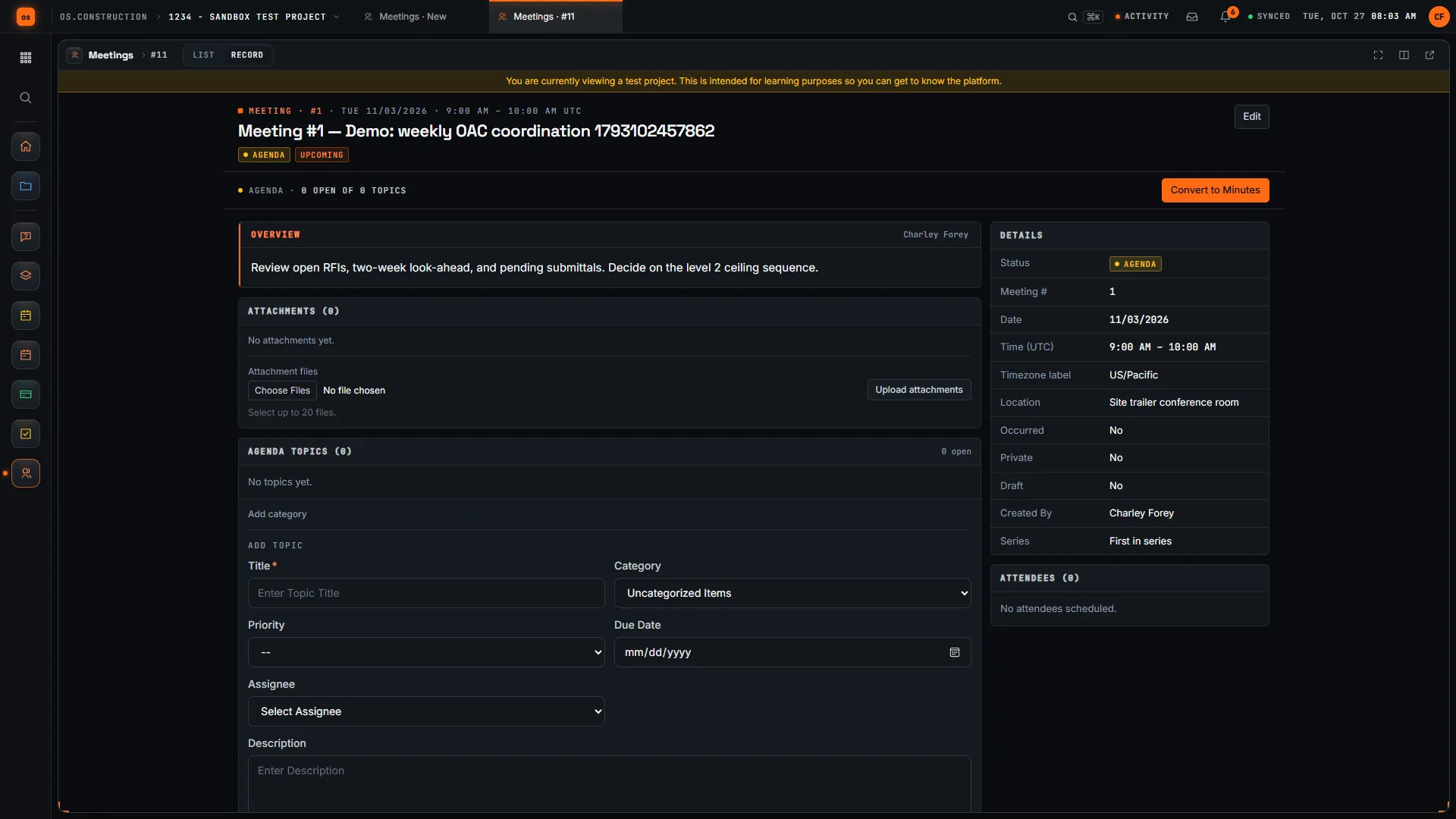
A meeting holds its topics, attendance, minutes and history. Each topic has an owner and a due date, points at the record it's about, and stays open until someone closes it.
- 01
Set up the series once
Set up Recurring Series generates a standing meeting with a Weekly, Biweekly or Monthly cadence, start and end time, number of occurrences and location. The meeting log counts upcoming, agenda, minuted and past meetings.
Meetings guide → - 02
Topics with an owner and a date
Each agenda topic has a title, category, priority, due date and one assignee, and is numbered by meeting and topic (for example 12.3). Open topics show on the assignee's My open items with their other work.
Answers failure 02 - 03
Linked to the record it's about
Link record connects a topic to an RFI, submittal, punch item or observation, so readers open the current record instead of last week's summary of it.
Answers failure 03RFIs guide → - 04
Minutes written per topic
Convert to Minutes moves the meeting from Agenda to Minutes. Mark each attendee Present, Absent, Conference or For Distribution Only, record what was decided on each topic, close the settled ones, and add overall minutes and a conclusion. Every change is kept in the meeting's history.
- 05
Open items carried forward
Create Follow-up Meeting creates the next meeting with every open topic under Business Arising from Previous Minutes, each showing which meeting it came from. Create task on a topic opens a linked task for work due before then.
Answers failure 01Tasks guide →
A meeting, in the app.
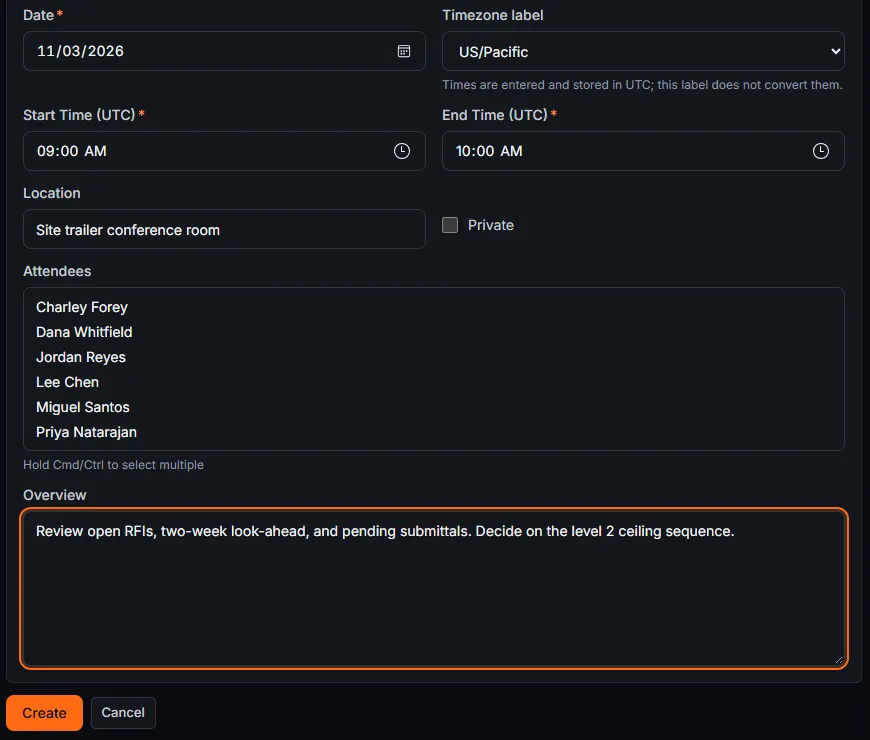
Real screens on sample data: a weekly OAC meeting in Agenda with its overview and the Add Topic form, and the create form for a new meeting.
Rather click than read? Open the interactive demo: open RFI-212, turn it into CO #14, approve it and watch the budget and Pay App #9 update, on sample data in your browser.
Exactly what ships today.
Status comes from the app's own export, not from this page's copy. Live is in the product now; Preview is in the product with limits we document; Planned is not built yet.
- LiveMeetingsRecurring series, agenda topics, attendance, minutes per topic, follow-up meetings and distribution records.
- LiveTasksCreate task on a topic opens a linked task, and the topic lists its tasks.
- LiveRFIsTopics link to the RFIs they are about.
- LiveSubmittalsTopics link to the submittals they are about.
- LivePunch ListTopics link to punch items.
- LiveObservationsTopics link to observations.
Where we don't fit yet
- No email of the minutes. Record Distribution records who received the minutes; it doesn't send email or give anyone access. Send them the way your team does today.
- No PDF export of minutes. Minutes live in the app with their history. A printable minutes PDF is not available yet.
- Times are UTC. Meeting times are entered and stored in UTC. The timezone label is a label and doesn't convert the time.
- Convert to Minutes is one way. A minuted meeting can't go back to Agenda, and there is no On Hold status for topics: close and reopen them, and note the wait in the minutes.
Meetings, Tasks, RFIs, Submittals, the Punch List and Observations are live today. Emailing and PDF export of minutes are not available. See the full list on the changelog and the platform overview.
Your books, your data.
Permissions per tool
Permission templates set each tool to none, read only, standard or admin, enforced the same way in the app and the API.
MFA and SCIM
Authenticator-app sign-in for every user, and SCIM 2.0 provisioning from your identity provider.
Change history
Tracked changes record who changed which fields and when, shown as item history and in the activity feed.
Your data, exportable
Export lists to CSV and key records to PDF. Leaving should never mean losing your history.
REST API · 2,549 endpoints
Project and accounting records are available through the documented REST API, with OAuth tokens and signed webhooks for the tools you keep.
We don't hold SOC 2 or any other security certification today, and we won't imply that we do. Read exactly what is in place, or go straight to the API documentation.
What to look for in meeting minutes software.
Whatever you end up buying, these are the questions worth asking in a demo. They come from how weekly meetings stop closing things on real jobs, not from any one product's feature list.
Who it's for
General contractors and construction managers who run OAC, subcontractor, pre-installation and safety meetings, and the owners, architects and trades who attend them. A project manager or project engineer usually runs it.
Carry-forward of open items
The single biggest time saver. Ask to see last week's open topics appear in this week's agenda without retyping, with the meeting each one came from.
One owner and a due date per item
Check that every action item has a named person and a date, and that each person can see their open items without reading every set of minutes.
Links to the real records
Topics about an RFI, submittal or punch item should open that record, not restate it. Ask what a topic can link to.
Recurring series
A weekly OAC meeting runs for the length of the job. Set one up in the demo and see how long it takes.
Attendance and distribution
Look for attendance per person and a record of who received the minutes. Ask whether the software sends them or only records that they were sent.
A change history
When someone edits last month's minutes, you should be able to see what changed and who changed it.
Turning topics into work
Ask how an action item becomes a tracked task, and what carries over into it.
Getting minutes out
Owners and lenders often want minutes as a file. Ask which export formats exist and whether there is an API.
Common questions.
What is construction meeting minutes software?
Software that holds each project meeting from agenda to minutes: the topics, who attended, what was decided, who owns each follow-up and what is still open for next time. It replaces the minutes document whose open items are retyped into next week's agenda.
What happens to topics that are not closed?
Create Follow-up Meeting on a minuted meeting creates the next one, and every open topic appears in it under Business Arising from Previous Minutes, showing which meeting it came from. Settled topics are closed so they don't carry forward.
Can I set up a weekly OAC meeting once?
Yes. Set up Recurring Series takes a title, first date, start and end time, a Weekly, Biweekly or Monthly cadence, the number of occurrences and a location, then generates the series.
Can a meeting topic link to an RFI or submittal?
Yes. Link record on a topic connects it to an RFI, submittal, punch item or observation, so people open the real record instead of reading a paraphrase of it in the minutes.
Does the app email the minutes or export them to PDF?
Not today. Record Distribution keeps a record of who received the minutes, with attendees pre-checked, but it doesn't send anything, and there is no PDF export of minutes. Send them the way your team normally does.
Can action items become tasks?
Yes. Create task on a topic opens a new task linked to it, and the topic lists its tasks. Meeting notes and participants aren't copied into the task, so write the follow-up and choose who can see it.
Read, calculate, then try it.
From the blog
Free tools
Terms on this page: Meeting minutes · Ball in court · RFI · Submittal · Punch list · Look-ahead schedule
Run next week's meeting on the sample project.
Start a 14-day free trial with the Riverside sample project already set up, or click through the interactive demo on sample data in your browser first.