Construction accounting without re-keying the job.
Close the month from the same records your project team works in. Change orders, commitments, pay apps, job cost and WIP sit on one data core with the general ledger, so a number is entered once and every report reads it, instead of being exported from PM software and retyped into accounting and Excel.
14-day free trial. Pricing for paid plans isn't set yet.
From field to ledger, entered once.
Follow CO #14 from the RFI that started it to the general ledger. Then flip the switch to see the same change order in a typical stack, where it is retyped at every system edge.
Read this diagram as text
One record. The same record moves through every stage, and each stage links to the one before:
- RFI: RFI-212 is answered: add fire dampers at the L3 corridor.
- Change event: A change event opens from RFI-212. The exposure shows on the forecast before anything is signed.
- Change order: CO #14 is approved at $86,400, linked to the RFI and the change event.
- Budget + commitment: Budget line 23-330 and the Summit Mechanical subcontract update from CO #14.
- Owner billing: CO #14 arrives on Pay App #9 as a new G703 line.
- Job cost: Subcontractor bills post against the same commitment and cost code.
- WIP + GL: WIP reads the approved contract, posted cost and billings. Nothing was retyped.
Today, copied between tools. RFI, change event and change order live in PM software. CO #14 is exported and retyped into a budget spreadsheet, typed again onto the pay app (as $86,040 instead of $86,400), retyped into accounting, exported to a WIP workbook, and the over/under entry is retyped into the general ledger. That is four re-keys, four copies and one amount that no longer matches.
Sample figures from an illustrative job. WIP and the general ledger are part of the Accounting module.
Three places the books drift from the job.
- Failure 01
The same change order, typed three times
The PM approves it in project software, someone adds it to the budget spreadsheet, and accounting keys it again when the bill or the pay app arrives. Every copy is a chance to transpose a digit, and nobody owns the difference.
- Failure 02
Job cost that disagrees with the PM's report
Project reports show budget, committed and forecast cost; the ledger shows what posted. In separate systems, the month starts with a reconciliation instead of a decision, and the controller has to explain which number is right.
- Failure 03
Billing and retainage tracked on the side
Pay apps are built in Excel from the schedule of values, retainage sits in a separate log and lien waivers live in email. AR, AP and the paperwork drift apart, and cash waits on the gap.
Accounting reads the job. It doesn't re-enter it.
Project financials and company accounting are different questions about the same records. Each handoff keeps its source link and its own review, so posting stays controlled without a second copy.
- 01
Project records are the source
Prime contracts, commitments, change orders and pay apps live in project financials. Accounting documents are created from them and link back, so an entry can be traced to the change order behind it.
Answers failure 01 - 02
Pay apps become AR with the math re-checked
A certified owner pay app becomes an AR invoice only after the G702 math is re-performed and matches, with line-level retainage. You can download a G702/G703-style PDF.
Answers failure 03 - 03
Bills are matched to the commitment
AP bills reference the subcontract or PO and are compared with commitment lines, approved commitment changes and, for purchase orders, receipts. A missing lien waiver or an expired certificate of insurance holds the payment.
Answers failure 03 - 04
Job cost and WIP read posted records
The job cost forecast brings together budget, approved commitments and posted job cost. WIP computes from posted cost, posted billings and frozen PM forecasts, then posts after independent approval.
Answers failure 02 - 05
Controls an auditor can follow
Maker-checker approvals, period locks enforced by the database, and a posted ledger that can't be edited, with an audit row written in the same transaction as each change.
Recorded in the app, on sample data.
Real screens from os.construction on the illustrative Riverside job: the pay app summary, the change event that started it, and the forecast the job cost view reads.
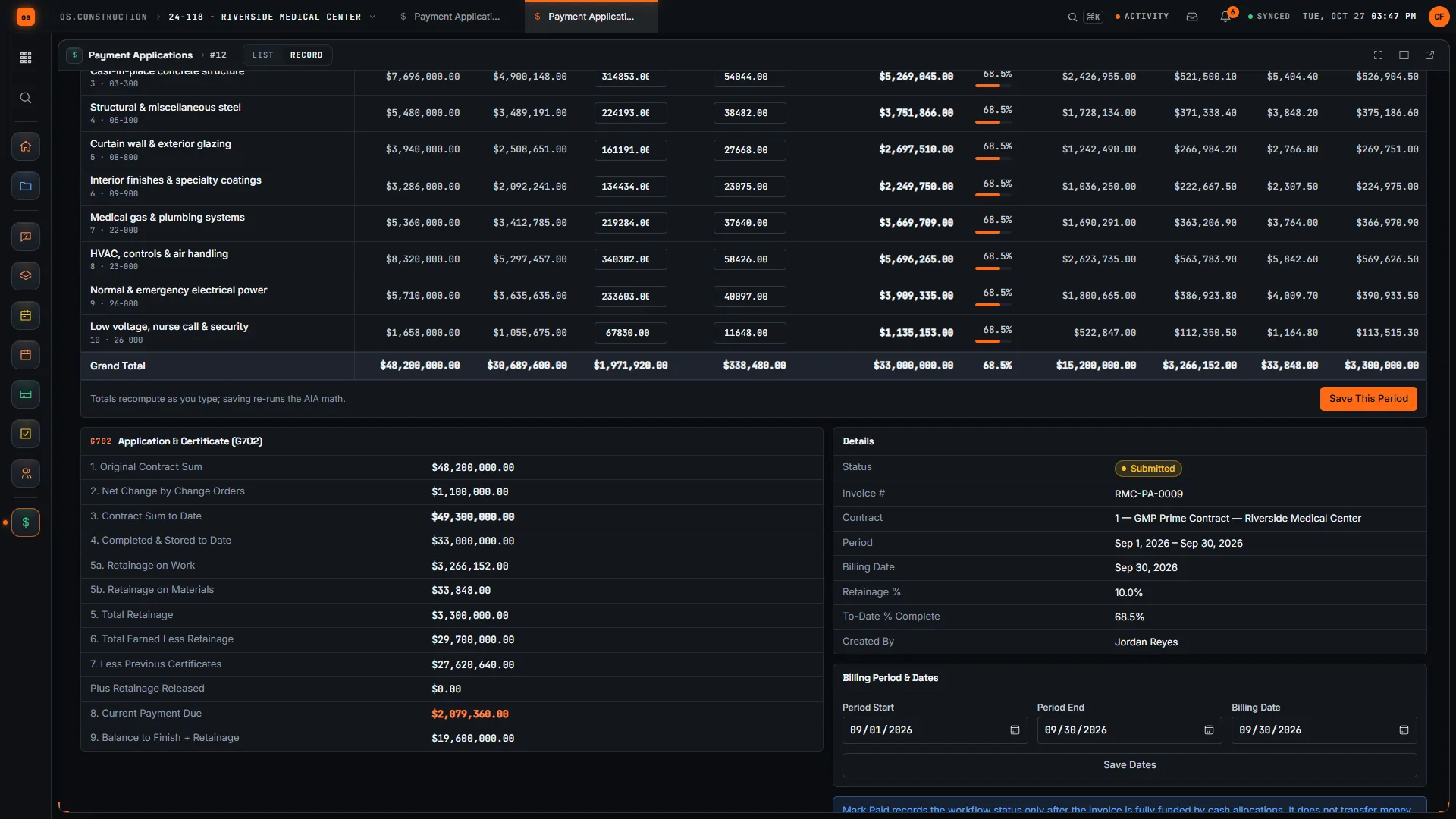
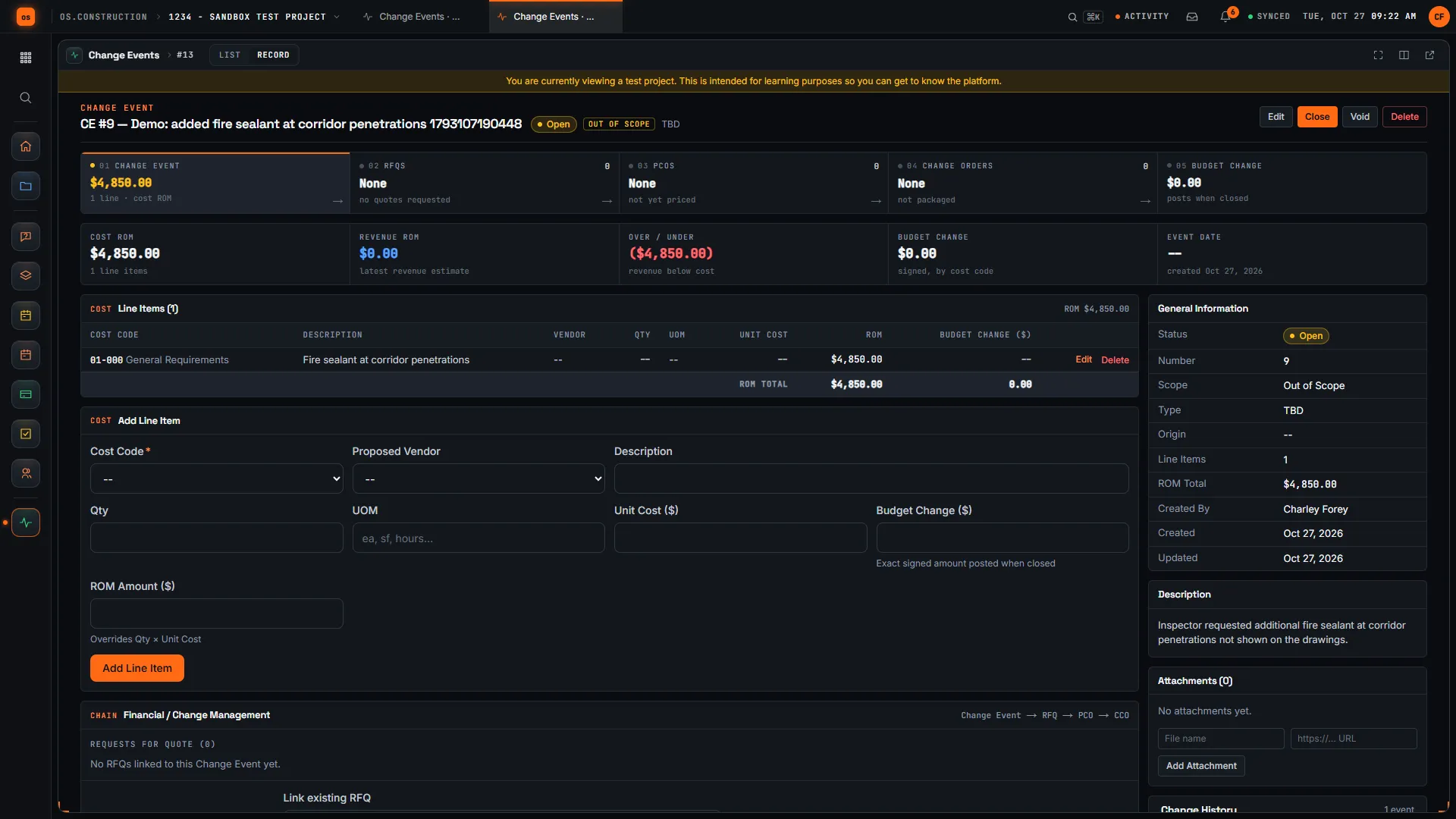
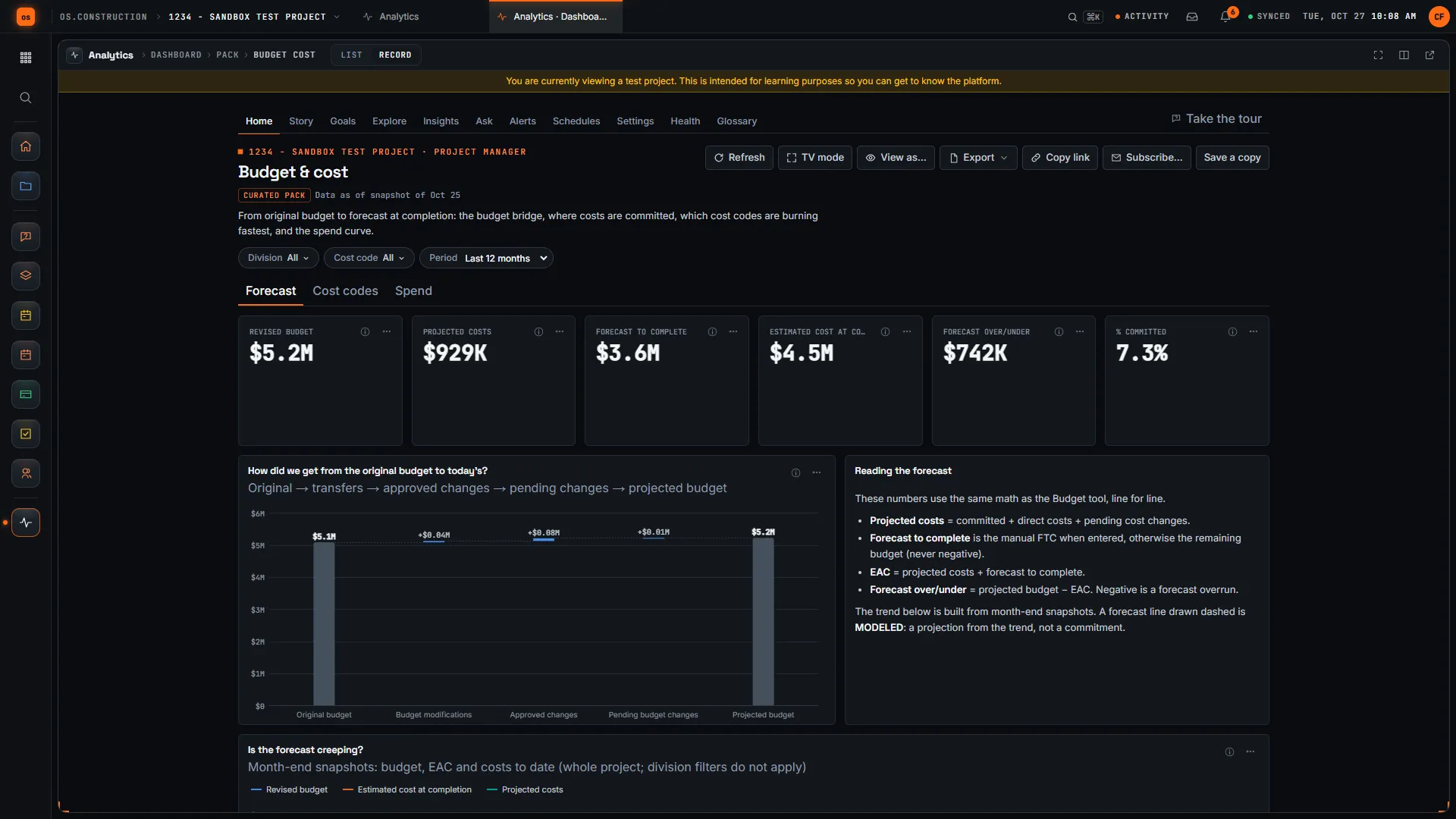
Rather click than read? Open the interactive demo: open RFI-212, turn it into CO #14, approve it and watch the budget and Pay App #9 update, on sample data in your browser.
Exactly what ships today.
Status comes from the app's own export, not from this page's copy. Live is in the product now; Preview is in the product with limits we document; Planned is not built yet.
- LiveBudgetBudget, committed and actual cost by cost code, with modifications, forecasts and snapshots.
- LiveCommitmentsSubcontracts and POs with their own schedule of values, change orders and invoices.
- LiveChange OrdersPotential, packaged and executed change orders that update the contract and the budget.
- LivePayment ApplicationsG702/G703-style owner pay apps with retainage and stored materials.
- LiveDirect CostsDirect costs coded to cost codes and the work breakdown structure.
- LiveGeneral LedgerMulti-entity ledger; posted entries cannot be edited, and every change is audited.
- LiveAccounts PayableBills matched to commitments, with lien waiver and COI payment holds.
- LiveAccounts ReceivableCertified pay apps become AR invoices with source links and retainage.
- LiveJob Cost ForecastForecast from budget, approved commitments and posted job cost.
- LiveWork in Progress (WIP)Compute, independently approve and post over and under billing.
- LiveApprovalsRule-based maker-checker routing. Nobody approves their own work.
- LiveAccounting ImportsStaged imports from files, and a read-only pull from QuickBooks Online.
- PlannedAP and Billing agentsAI that would code invoices and draft pay apps for a person to approve. Not built; nothing above depends on it.
Accounting is live: it runs in the product, with limits documented in the accounting guide. Read them before you move your books. See the full list on the changelog and the platform overview.
Your books, your data.
Permissions per tool
Permission templates set each tool to none, read only, standard or admin, enforced the same way in the app and the API.
MFA and SCIM
Authenticator-app sign-in for every user, and SCIM 2.0 provisioning from your identity provider.
Change history
Tracked changes record who changed which fields and when, shown as item history and in the activity feed.
Your data, exportable
Export lists to CSV and key records to PDF. Leaving should never mean losing your history.
REST API · 2,549 endpoints
Project and accounting records are available through the documented REST API, with OAuth tokens and signed webhooks for the tools you keep.
We don't hold SOC 2 or any other security certification today, and we won't imply that we do. Read exactly what is in place, or go straight to the API documentation.
Common questions.
What is construction accounting software?
Accounting software built around how contractors earn, bill and pay: job costing by cost code, commitments, change orders, progress billing on G702/G703-style pay apps, retainage in both directions, lien waivers and percent-complete WIP. General business accounting tracks the company; construction accounting also tracks every job inside it.
Does os.construction replace QuickBooks, Sage or Vista?
It can, at the pace you choose. The Accounting module covers the general ledger, payables, receivables, banking, payroll, job cost, WIP and close, and it is live for every trial. Many teams start with project financials next to their current books. QuickBooks Online can pull supported records into staged imports without writing back; other systems use documented file imports.
How does a change order reach the general ledger?
The approved change order updates the project budget and, for subcontract scope, the commitment. Executed owner change orders flow onto the next owner pay app. A certified pay app becomes an AR invoice after its G702 math is re-performed and matches, and that invoice posts through accounting review. WIP then reads the approved contract value, posted billings and posted cost.
Is project data copied into accounting?
Nothing is retyped. Accounting documents such as AR invoices and AP bills are their own records, because posting needs its own review, but they are created from and linked to the project records they came from. You can trace an entry back to its pay app, commitment or change order.
Does it handle retainage and lien waivers?
Yes. Pay apps carry retainage on work and stored materials per line. In Accounting, retainage payable and receivable each have their own release posting, and a missing lien waiver or an expired certificate of insurance holds a subcontractor payment until it is resolved or an approver overrides it with a reason.
Is there AI in the accounting module?
No. Every figure has a written formula and every suggestion is a fixed rule over your own records. AI agents for AP and billing are planned, not built, and they are designed to propose rather than post: a person approves first.
Can I try it before talking to anyone?
Yes. The interactive demo runs on sample data in your browser with no sign-up, and the 14-day free trial starts with a sample project already set up.
Read, calculate, then try it.
From the blog
- Project Financials and company Accounting: where the records meet
- The real cost of re-keying a change order
- A practical project-to-accounting reconciliation
- Retainage, lien waivers and pay apps on one record
- The 3-way match, explained for construction AP
- Your first accounting cycle: setup, transactions and close
Free tools
Explainers and docs
- Why one data core: the same record everywhere
- Anatomy of a pay app (AIA G702/G703)
- Life of an invoice: three-way match
- Budget, commitments and cost: one ledger for the job
- Accounting module guide
- Accounting: apps, workflows and controls
- Sage 300 CRE (Timberline) alternative, compared
- Viewpoint Vista alternative, compared
- Foundation Software alternative, compared
Terms on this page: Job costing · General ledger · Subledger · Commitment · Change order · Schedule of values · Retainage · Lien waiver · Three-way match · WIP schedule · Segregation of duties
See the change order reach the ledger.
Click through RFI-212 to CO #14 and Pay App #9 in the interactive demo, or start a 14-day free trial with a sample project already set up.