A punch list you can stand behind at the final walk.
Create items on the walk with a location, a photo and the trade that owns the fix. Each trade resolves its own part, your team reviews the work, and the final approver closes it, so nothing comes off the list because someone said so in the hallway.
14-day free trial. Pricing for paid plans isn't set yet.
From the walk to signed off.
The top lane is the usual path: the trade resolves, the manager reviews, the final approver closes. The bottom lane is where items come from and where they go back when the work or the scope is in question.
Where punch lists drag the job out.
- Failure 01
Items nobody can find
"Fix paint, second floor" goes on the list with no room, no wall and no photo. The painter calls the super, the super can't remember, and the item sits until the next walk.
- Failure 02
Crossed off because someone said so
A trade says it's done and the item comes off the list. Nobody looked, and it reappears on the owner's walk, along with a question about every other item you closed.
- Failure 03
Shared items with no clear owner
One item needs the electrician and the painter. Each thinks the other is holding it up, and the spreadsheet has one status column for both.
Every item located, assigned and checked before it closes.
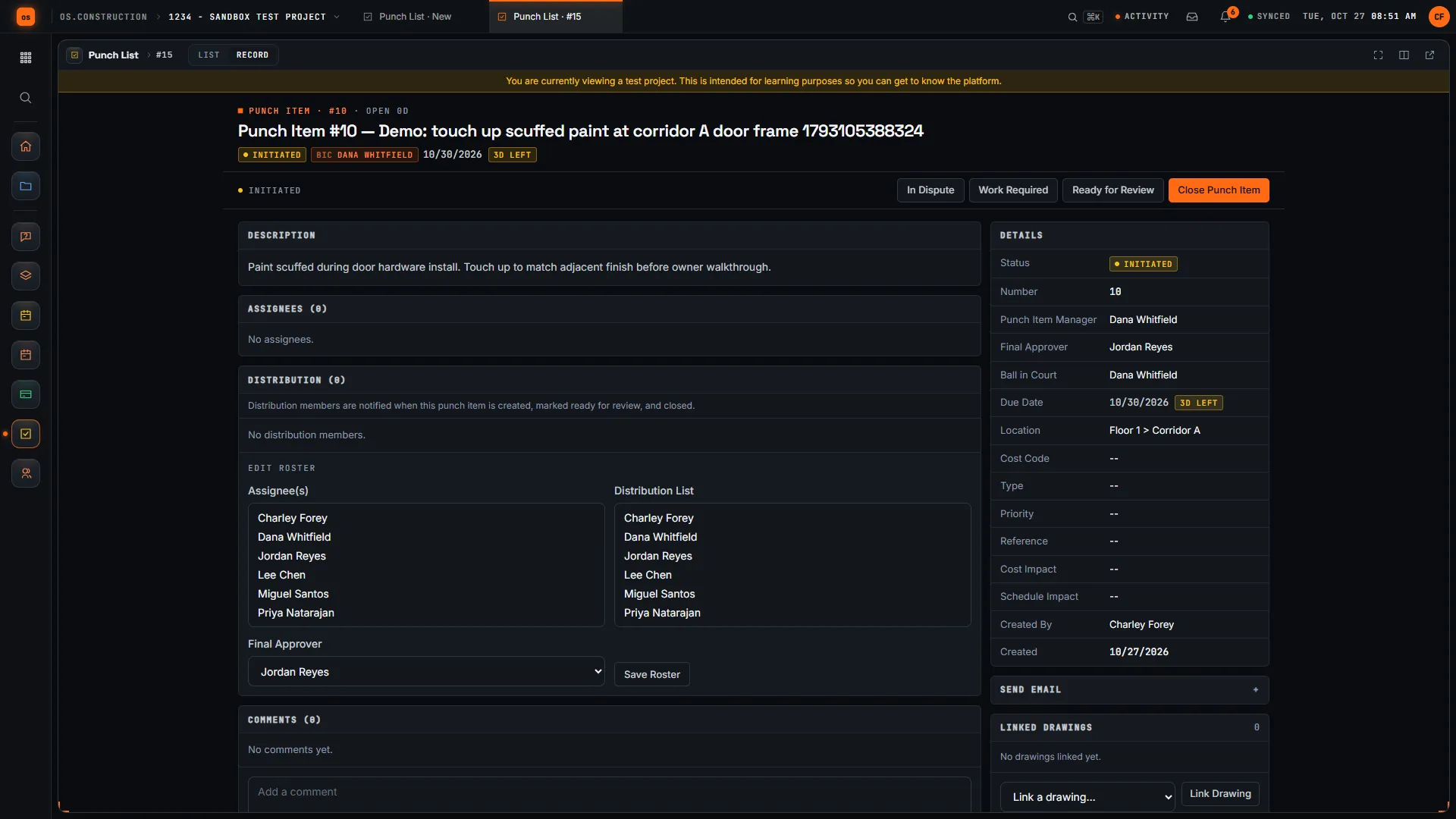
A punch item is a record with a location, the trades who fix it, a manager who reviews it and a final approver who signs it off, linked to the drawing and the observation it came from.
- 01
Located, with the evidence on the item
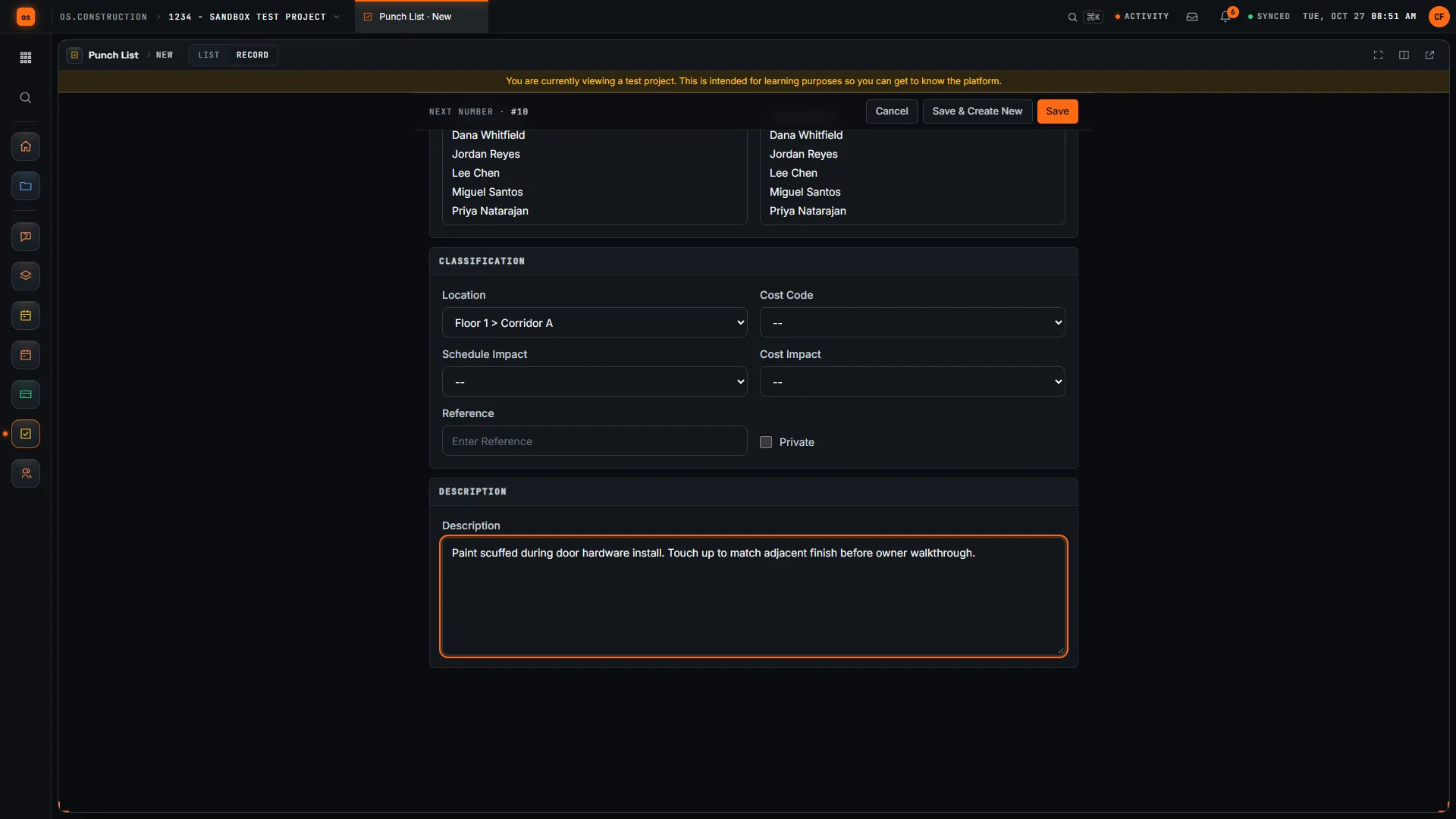
Location comes from the project's location list. Photos go under Attachments, Linked Drawings points at the sheet, and Type, Priority, Cost Code, Schedule Impact and Cost Impact classify it.
Answers failure 01Punch list guide → - 02
Fast to enter on a long walk
Punch Item Templates fill in the type, priority, assignee, manager, final approver and distribution list for common defects. Save & Create New keeps you on the form for the next item.
Answers failure 01 - 03
Resolve, review and close are separate steps
Assignees mark their part resolved. The punch item manager marks it Ready to Close or Work Not Accepted. The final approver closes it or sends it back with Not Accepted by Creator. Every step is in the item's change history.
Answers failure 02 - 04
One line per trade, and ball in court
Each assignee has their own line and Resolve button, and a progress bar shows how many have resolved. Ball in Court follows the status, so the list filters to what is waiting on each trade, the manager or the final approver.
Answers failure 03 - 05
Disputes and rework on the record
An item goes In Dispute when a trade says it isn't theirs, and back to work once settled. A closed item that comes back is reopened to Work Required instead of duplicated, so its history stays in one place.
Answers failure 03 - 06
Connected to observations, inspections and meetings
Convert to Punch Item turns an observation into a punch item and links the two; a failed inspection item creates the observation. A meeting topic can link to a punch item, so the weekly meeting points at the real record.
Observations guide →
A punch item, in the app.
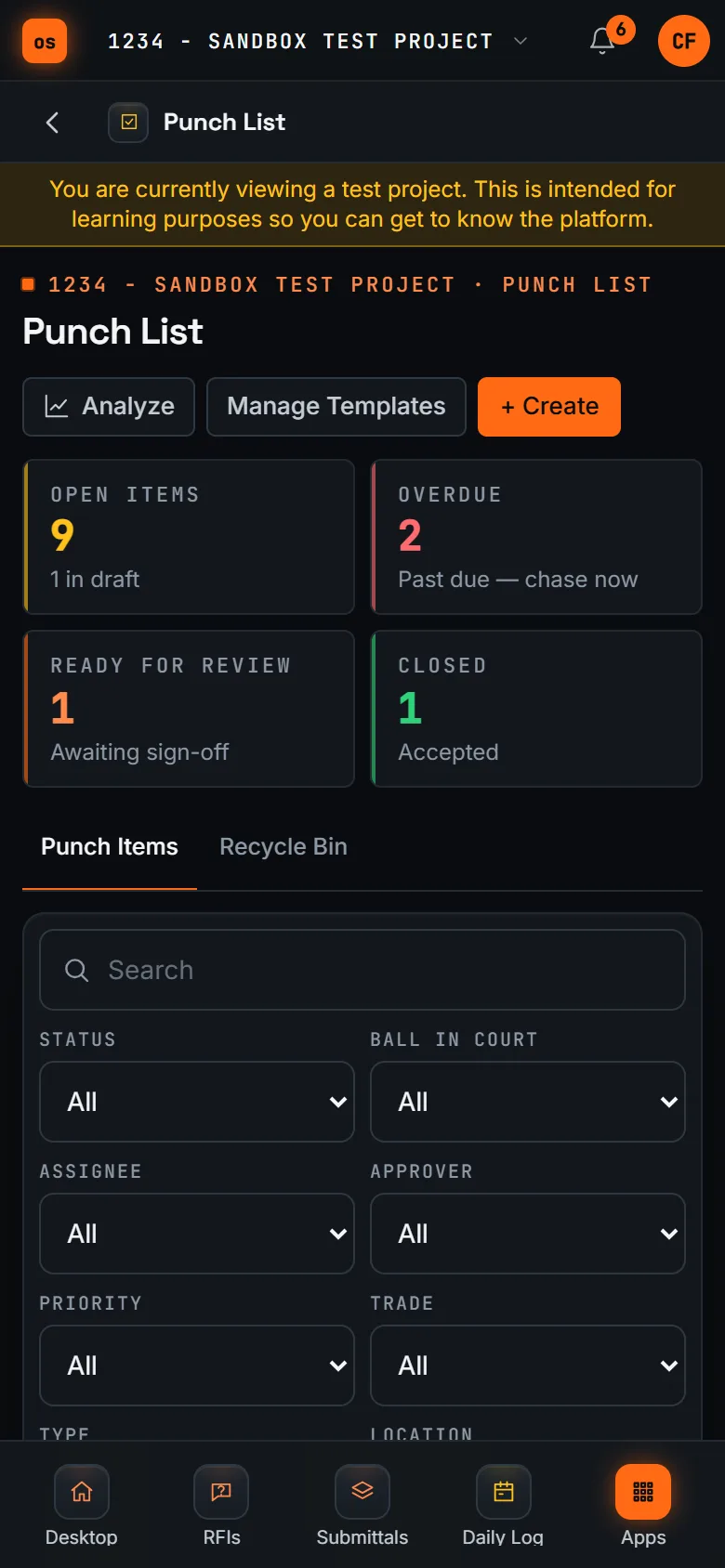
Real screens on sample data: a punch item with its manager, final approver, location and ball in court, the classification on a new item, and the list on a phone.
Rather click than read? Open the interactive demo: open RFI-212, turn it into CO #14, approve it and watch the budget and Pay App #9 update, on sample data in your browser.
Exactly what ships today.
Status comes from the app's own export, not from this page's copy. Live is in the product now; Preview is in the product with limits we document; Planned is not built yet.
- LivePunch ListLocated items, templates, one line per assignee, review and final approval, disputes, ball in court and a recycle bin.
- LiveObservationsConvert to Punch Item creates a linked punch item from an observation.
- LiveInspectionsA failed inspection item creates an observation, which can then be converted.
- LiveDrawingsLinked Drawings connects a punch item to the sheet it is on.
- LiveMeetingsA meeting topic can link to a punch item.
Where we don't fit yet
- No punch list export. There is no CSV or PDF export from the Punch List tool today. Filter and save a view to share the current list in the app, or pull items through the REST API.
- No automatic email on status changes. Send Email sends an item to its distribution list when you choose. Status changes and new comments notify people in the app.
- Needs a connection, no native app. Punch runs in a phone's browser and needs a signal. Offline capture and native iOS and Android apps are planned.
- Attachments in batches of 20. Each upload takes up to 20 files. Larger photo sets go up in more than one batch.
The Punch List, Observations, Inspections, Drawings and Meetings are live today. Offline capture and native phone apps are planned. See the full list on the changelog and the platform overview.
Your books, your data.
Permissions per tool
Permission templates set each tool to none, read only, standard or admin, enforced the same way in the app and the API.
MFA and SCIM
Authenticator-app sign-in for every user, and SCIM 2.0 provisioning from your identity provider.
Change history
Tracked changes record who changed which fields and when, shown as item history and in the activity feed.
Your data, exportable
Export lists to CSV and key records to PDF. Leaving should never mean losing your history.
REST API · 2,549 endpoints
Project and accounting records are available through the documented REST API, with OAuth tokens and signed webhooks for the tools you keep.
We don't hold SOC 2 or any other security certification today, and we won't imply that we do. Read exactly what is in place, or go straight to the API documentation.
What to look for in punch list software.
Whatever you end up buying, these are the questions worth asking in a demo. They come from how punch drags on at the end of real jobs, not from any one product's feature list.
Who it's for
General contractors and construction managers who walk and manage punch, specialty contractors who fix it, and the owner or architect who signs it off. Superintendents and project engineers usually run it day to day.
Entry speed on a walk
A floor walk can produce dozens of items in an hour. Time how long one item takes on a phone, and check for templates or defaults that fill in the trade and the people.
A location a stranger could find
Look for a location list, photos and a link to the drawing sheet on each item, so the trade can find the defect without calling the super.
Separate resolve, review and close
The trade saying it's done is not the same as you checking it, which is not the same as the owner accepting it. Check that these are separate steps with separate people.
Items shared by more than one trade
Ask how an item with two trades shows who is finished and who is not, without splitting it into duplicates.
Ball in court you can filter by
Each trade, your reviewer and the final approver should each be able to see only what is waiting on them.
Subcontractor access
Subs need to see and resolve their own items without seeing or closing everyone else's. Check the permission model before you invite outside companies.
Field connectivity
Ask whether it works without signal in a basement or a new building, whether there is a native app, and what happens to an entry made offline.
Getting the list out
Owners, architects and lenders often want the open list as a file. Ask which exports exist and whether there is an API.
Common questions.
What is punch list software?
Software for the list of work that has to be fixed before the owner accepts the building. Each item records where the defect is, which trade has to fix it, who checks the work and who signs it off, so the list you hand the owner reflects what was actually reviewed.
Can a subcontractor close their own punch item?
No. Each assignee marks their own part resolved. The punch item manager reviews the work and marks it Ready to Close or Work Not Accepted, and the final approver closes the item or sends it back with Not Accepted by Creator.
Can one punch item have several trades?
Yes. Add each trade as an assignee. Each has their own line and Resolve button, and a progress bar on the item shows how many have resolved their part.
Can I add photos and drawings to a punch item?
Yes. Photos and other files go under Attachments, up to 20 files at a time, and Linked Drawings connects the item to the sheet it is on. The item also takes a location from the project's location list.
Does it work on a phone during the walk?
Yes, in your phone's browser, with a connection. Templates fill in the type, priority and people, and Save & Create New keeps you on the form for the next item. Offline capture and native iOS and Android apps are planned, not built.
Can I export the punch list?
Not from the Punch List tool today. Filter the list and save a view to share the current list in the app. The REST API can pull punch items into a spreadsheet or another system.
Read, calculate, then try it.
From the blog
Free tools
Terms on this page: Punch list · Substantial completion · Final completion · Ball in court · Back charge · Closeout · Retainage release · Warranty period
Walk a punch item to closed on the sample project.
Start a 14-day free trial with the Riverside sample project already set up, or click through the interactive demo on sample data in your browser first.