Inspections that actually close
A failed checklist item is only useful if someone owns the fix and someone checks it. Follow a fire-stopping inspection on Riverside's level 3 corridor from template to re-inspection, and see exactly which steps the app links for you.
Seven steps, three stored links
Solid arrows are links the app stores. Dashed arrows are steps a person takes; the app records each one, but doesn't connect the re-inspection back to the first run.
- Stored link
- A person's step
From checklist to closed
01 Build the checklist once
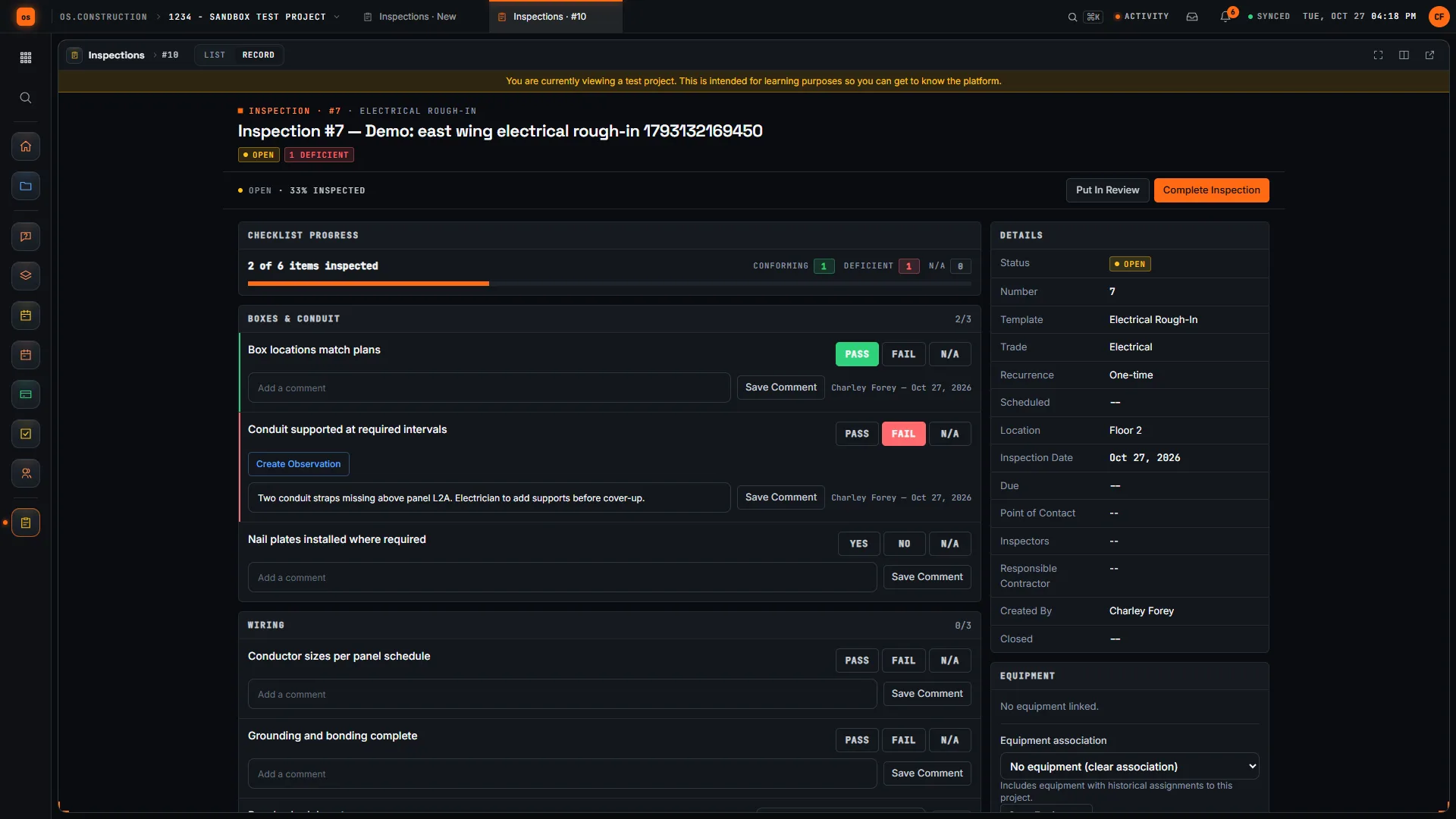
On the Templates tab, a template has sections and items, each with a response type: Pass / Fail, Yes / No, Text or Number. On the items that matter, check Require observation on fail or Require photo on fail, so a failure has to be documented before the inspection can be completed. Templates belong to the project.
02 Run it, on a schedule if it repeats
Create an inspection from the template; its items become the checklist. Set the inspection and due dates, and a recurrence (one-time, daily, weekly, bi-weekly, monthly or quarterly) for checks that repeat. Checklist Progress shows the share of items answered.
03–04 A failed item becomes an observation
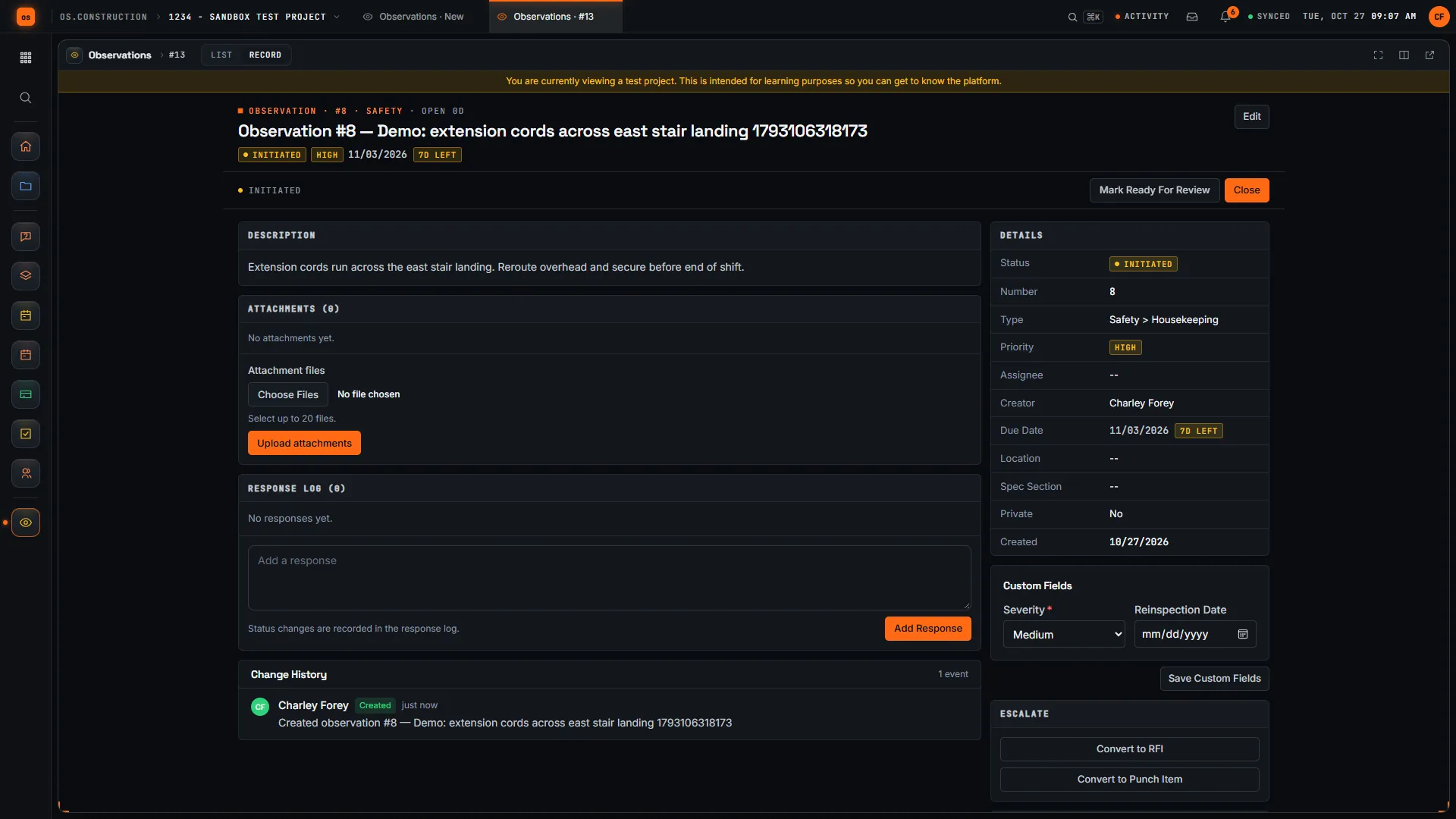
Penetration 3-14 has no sealant. The inspector marks it Fail, uses Attach Photo, and Create Observation opens an observation linked to that item, with an assignee and a due date. The inspection's list shows its conforming and deficient counts.
05–06 Fixed is the trade's word; closed is yours
The firestopping sub seals it, adds a response with a photo and marks the observation Ready For Review. Someone checks it: Close, or Mark Not Accepted with a reason. If the issue becomes a defect to track to closeout, Convert to Punch Item; if it's a design question, Convert to RFI. Both link back.
07 Sign, complete, and re-inspect
Put In Review, Sign Inspection, Complete Inspection. Signing locks the responses; Reopen deletes all signatures, so it has to be signed again. To re-inspect, run the same template again, or use Generate next occurrence on a recurring one. The app doesn't link the new run to the old one: the template, location and the observation's response log are what tie them together.
Deficiencies per run, same checklist
Run the same template weekly and the deficient count should trend down as trades learn what gets checked. A flat line means observations are being closed without the fix sticking. Illustrative sample data, not from a real project or drawn by the app.
Each step, and what's linked
| Step | Record and status | Stored link |
|---|---|---|
| 1. Template | Checklist template with required observation or photo on fail | None |
| 2. Inspection | Inspection, Open | Built from the template |
| 3. Failed item | Item marked Fail, photo attached | Part of the inspection |
| 4. Observation | Observation, Initiated | Linked to the failed item |
| 5. Fixed | Observation, Ready For Review | Response log on the observation |
| 6. Closed | Observation, Closed (or Not Accepted) | Convert to Punch Item or RFI links back if used |
| 7. Re-inspect | New inspection from the same template | None to the earlier run |
Keep going
Keep exploring
Related across os.construction
- DocsObservations: log safety and quality issuesLog a safety, quality, commissioning or warranty observation, assign it, move it through review, and escalate it to an RFI or punch item when it needs one.
- ExplainerPunch list to closeout, on one recordFollow a deficiency from a failed inspection item to an observation, a punch item, review and sign-off, and see what closing punch means for retainage.
- ExplainerSafety observations to closed: building a safety recordLog a safety observation in os.construction, get it fixed, reviewed and closed, then read the record it builds: leading indicators, TRIR and trends.
- GlossaryCertificate of Occupancy (CO)The document a local building authority issues stating a building complies with codes and approved plans and may legally be occupied.
- GlossaryCommissioning (Cx)A quality process that verifies building systems are designed, installed, tested and operating to meet the owner's requirements.
- DocsInspections: checklists, sign-off and recurrenceBuild an inspection checklist template, run inspections against it with pass, fail and N/A responses, follow up on failures, sign and close.
Sample project included
Try this workflow on the sample project
Every trial workspace includes a sample project with sample data, so you can follow these steps in the app before touching a live job.
Want this on live job data?
Inspections, observations and the punch list are live in os.construction. PDF export of signed inspections and cross-project templates are not available today.
14-day free trial. Pricing for paid plans isn't set yet. Talk to us. Already have an account? Sign in →
All figures are illustrative sample data, not a real project. Contract terms and state law decide how retainage, stored materials and change orders work on your job. Check both.