Punch list to closeout
Closeout is where retainage is released, and punch is what stands in the way. Follow one deficiency from a failed inspection item to a closed punch item, with every hand-off linked in the app.
Eight states, three linked records
An inspection, an observation and a punch item are separate records with their own owners. The links between them are stored, so the punch item still shows where it came from at the final walk.
- 01InspectionItem fails
- 02ObservationCreated from the item
- 03Punch itemConvert to Punch Item
- 04Work RequiredTrades assigned
- 05ResolvedEach assignee
- 06Ready for ReviewManager checks
- 07Ready to CloseWork accepted
- 08ClosedFinal approver
Work Not Accepted sends the item back to the assignees. Not Accepted by Creator sends it back to Work Required. A closed item can be reopened.
From a failed check to a closed item
01–02 A failed inspection item becomes an observation
The fire-stopping checklist on Riverside's level 3 corridor is run from an inspection template. One item fails. On that item, Create Observation opens a linked observation, and Attach Photo adds the evidence. Templates can require an observation or a photo on a failure before the inspection can be completed.
Observations also come straight from the field: safety, quality, commissioning or warranty issues seen on a walk.
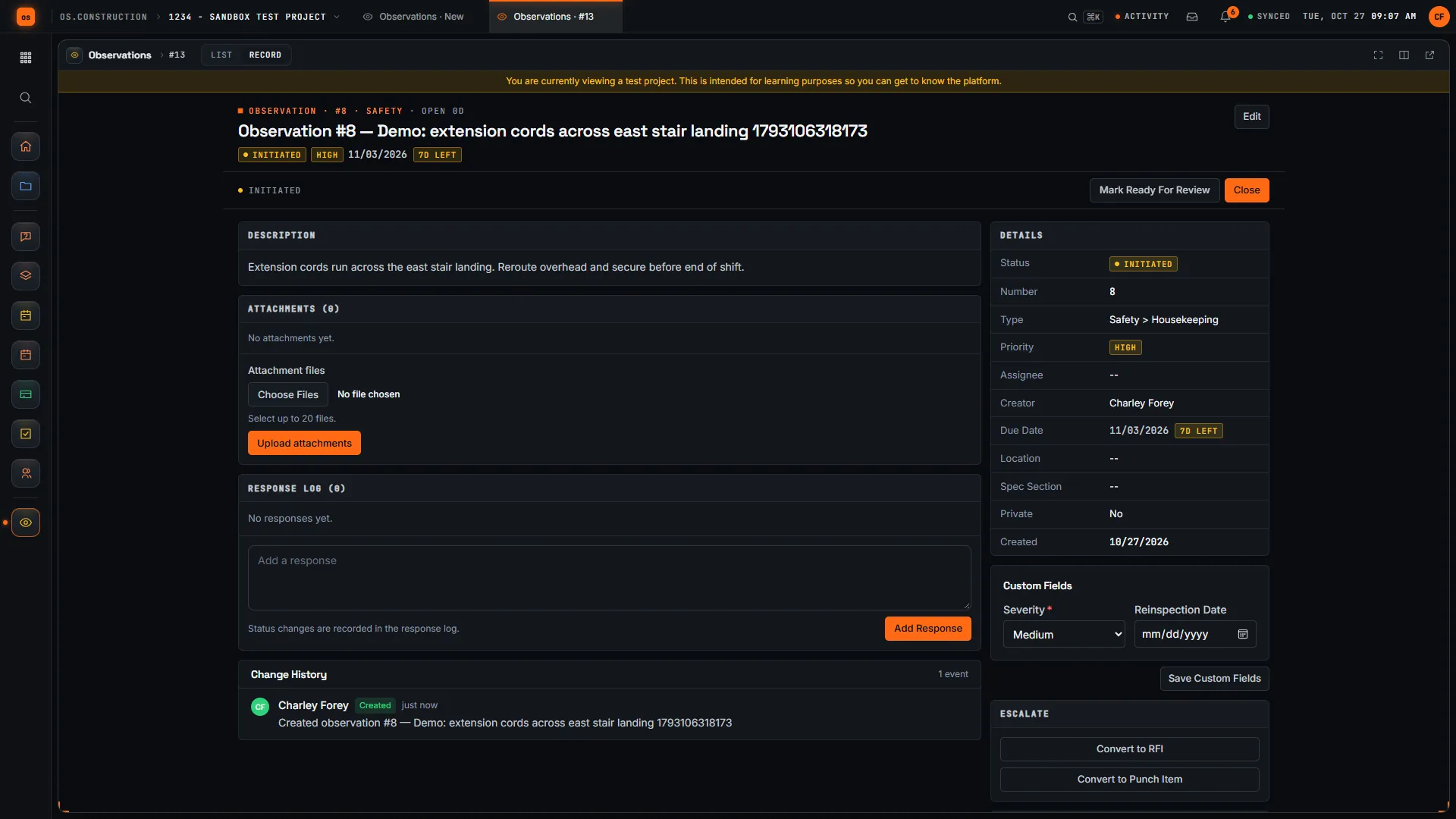
03 Convert to a punch item
When the issue is a defect to fix before the owner accepts the work, Convert to Punch Item creates the punch item and links the two. The observation then shows View linked Punch Item, and the punch item lists it under Linked Observations. If it is a design question instead, Convert to RFI starts the field question chain.
04–05 Trades fix it and resolve their own lines
Each punch item has a location, a Punch Item Manager, a Final Approver and the trades who have to fix it as assignees. In Work Required, each assignee marks their own line Resolved. The bar on the item shows how many have.
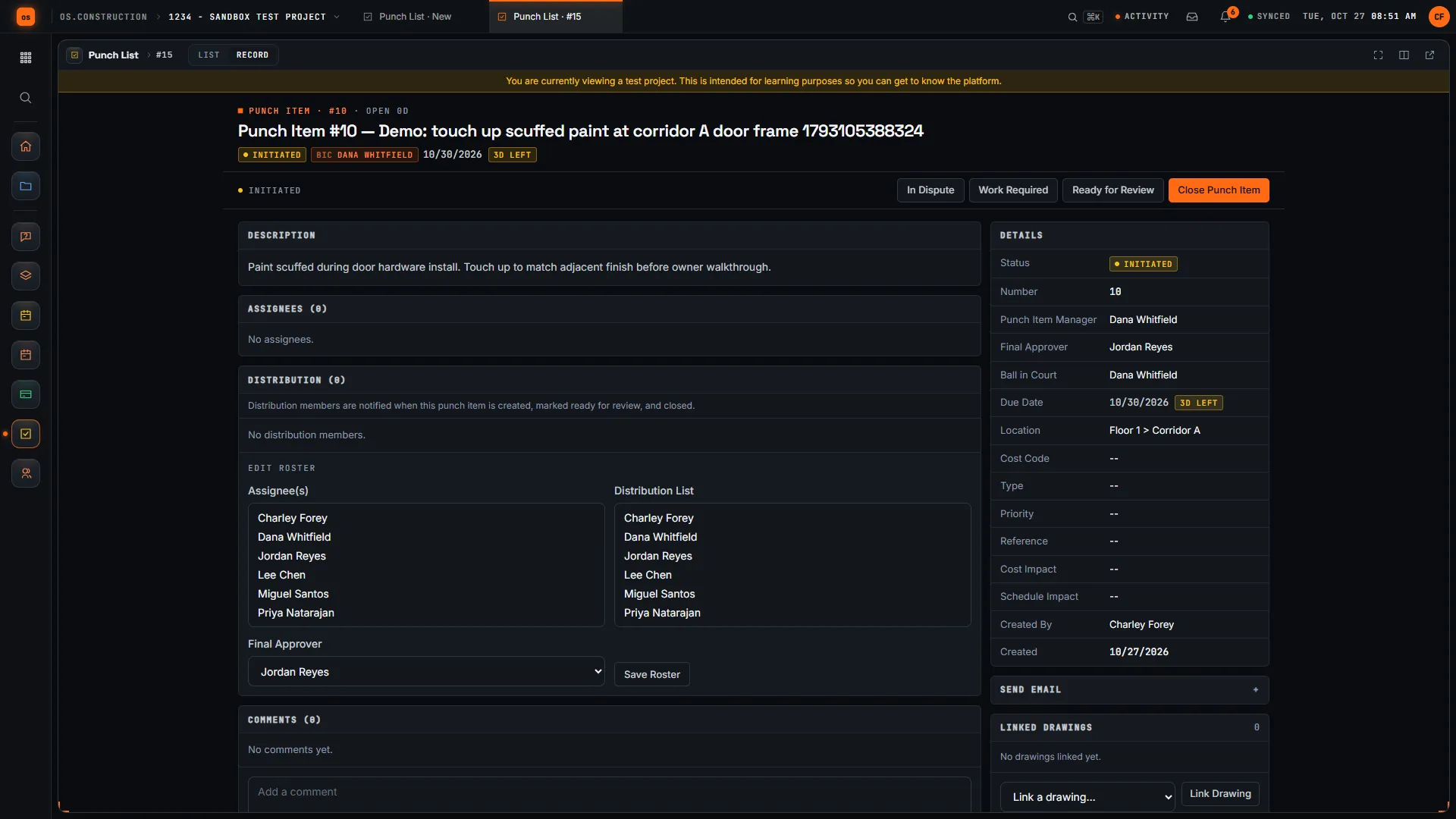
06–08 Review, accept, close
The manager checks the work: Ready to Close, or Work Not Accepted back to the assignees. The final approver closes it, or sends it back. Resolved is the trade's word; Closed is yours. Keeping the review step is what stops items reappearing at the final walk.
What a healthy punch list looks like
The punch list's cards count Open, Overdue, Ready for Review and Closed items. Tracked weekly, the open count should fall to zero before final completion. Illustrative sample data: not from a real project, and not a chart the app draws.
Punch is what holds retainage
After Pay App #9, Riverside's owner holds $3,300,000 of retainage at 10% (sample data). On many contracts part of it can be released at substantial completion and the rest at final completion, when the punch list is done and closeout documents are delivered. Your contract decides.
What's in the app today: the Punch List, inspections and observations, Project Archive, and retainage on pay apps and sub invoices, including retainage released on a pay app. What's planned: closeout requirements attached to each subcontract at buyout and a retainage-release checklist that shows what's still open by party.
| State | Record | Who acts |
|---|---|---|
| Item fails | Inspection | Inspector |
| Observation created | Observation, linked to the inspection item | Inspector or super |
| Convert to Punch Item | Punch item, linked to the observation | Observation owner |
| Work Required | Punch item | Punch item manager |
| Resolved | Assignee line on the punch item | Each assignee |
| Ready for Review | Punch item | Manager checks the work |
| Ready to Close or Work Not Accepted | Punch item | Manager |
| Closed or Not Accepted by Creator | Punch item | Final approver |
Keep going
Keep exploring
Related across os.construction
- GlossaryCloseoutThe final phase of a project: work finished, documents delivered, final payments and lien waivers exchanged, and the job closed financially.
- DocsCloseout and retainage releaseHow closeout requirements are planned to attach to each subcontract at buyout, collect through the job, and gate retainage release on both the owner side and the sub side.
- ExplainerCloseout and turnover: punch, inspections, documentsClosing out a job in os.construction: closed punch, signed final inspections, documents shared to the owner, warranty tracking, and what's planned.
- GlossaryFinal CompletionThe point when all contract work, punch list and closeout requirements are done and final payment becomes due.
- DocsPunch list: create, assign and close itemsCreate punch items with a manager, final approver and assignees, let trades mark their work resolved, then review, approve and close each item.
- Free toolPunch list closeout calculatorWeeks to clear the punch list at your close and add rates, and the rate a target needs.
Sample project included
Try this workflow on the sample project
Every trial workspace includes a sample project with sample data, so you can follow these steps in the app before touching a live job.
Want this on live job data?
Inspections, observations, the punch list and pay app retainage are live in os.construction. Closeout requirements and retainage-release gating are planned.
14-day free trial. Pricing for paid plans isn't set yet. Talk to us. Already have an account? Sign in →
All figures are illustrative sample data, not a real project. Contract terms and state law decide how retainage, stored materials and change orders work on your job. Check both.