Closeout and turnover: punch, inspections, documents
Closeout is a list of small things owed by many people, and retainage waits on all of them. Here's what os.construction covers on Riverside today, from the last punch item to files in the owner's hands and warranty calls after, and which parts are still planned.
From construction to warranty
A project's stage in os.construction moves from Course of Construction to Post-Construction, Warranty and Complete. Closeout is the Post-Construction stretch: it starts at substantial completion and ends when the punch list is closed and the last retainage is paid.
7 live, 4 planned
Each thing an owner expects at turnover, where it lives in os.construction, and whether it's there today. The planned rows are the closeout requirements described in closeout and retainage release.
| Deliverable | Today | Where | How |
|---|---|---|---|
| Punch list closed | Live | Punch List | Final approver closes from Ready to Close; bulk Mark Ready for Review and Close |
| Final inspections signed | Live | Inspections | Pass, Fail or N/A per item, signatures, failed items linked to observations |
| Closeout documents filed | Live | Documents | Folders, versions, and permissions by folder or file |
| Files handed to the owner | Live | Customer portal | Share one reviewed file version to named owner contacts; withdraw it later |
| Warranty service after handover | Live | CRM: Service & warranty | Installed assets, warranty coverages, service cases, warranty reviews |
| Substantial completion date | Live, partly | Prime contract | A date on the contract; nothing is triggered by it |
| Retainage released and billed | Live, partly | Payment applications | One released amount per pay app, added to the payment due |
| Closeout requirements by sub | Planned | — | O&M manuals, warranty letters, as-builts, attic stock, owed by each subcontract |
| Final lien waivers | Planned | — | Collected and matched to the final payment |
| Turnover package assembled | Planned | — | Accepted deliverables in spec order, exported in one go |
| Retainage release gated | Planned | — | Release blocked until each party's requirements are accepted |
Closing out Riverside
01 Drive the punch list to Closed
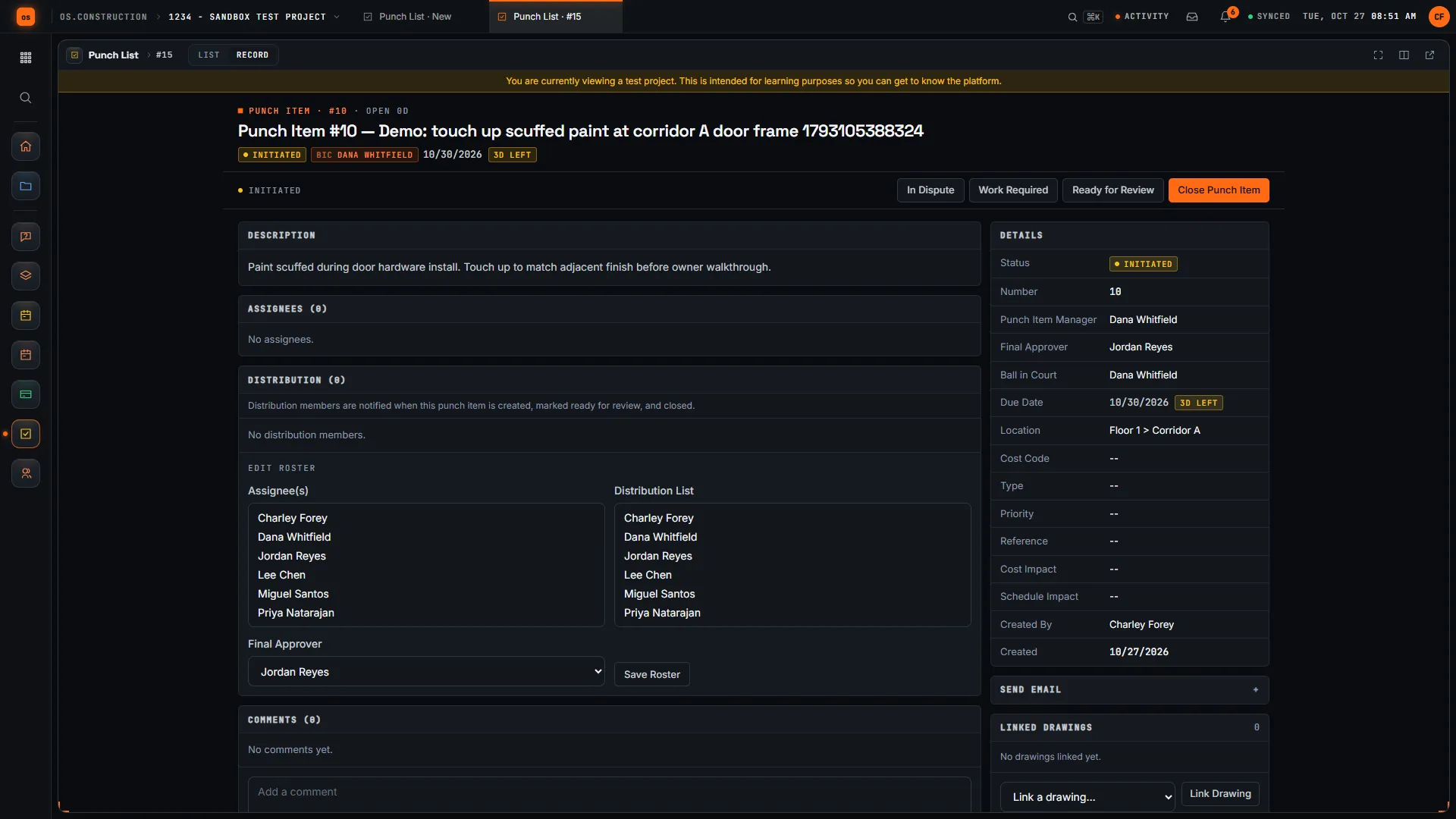
After the substantial completion walk, every punch item has assignees, a punch item manager and a final approver. Trades work it and send it to Ready for Review; the manager accepts it to Ready to Close or sends it back as Work Not Accepted; the final approver closes it. Select a batch in the list to Mark Ready for Review or Close together. A closed item can be reopened to Work Required if the problem comes back. For the full path of one deficiency, see punch list to closeout.
02 Sign off the final inspections
Final inspections run from templates: each item is Pass, Fail or N/A, and a template can require an observation on every failed item, so nothing fails silently. Signatures are captured on the inspection, and once it's signed it can't be changed without removing them. The inspection shows how many of its linked observations are closed.
03 File the closeout documents
Warranties, O&M manuals, test reports and as-builts go into Documents, in folders you set up, with versions and permissions by folder or file. Collecting them is still on you: the app doesn't yet track which sub owes which document (that's the planned closeout requirements).
04 Hand files to the owner
The customer portal, under CRM Service & warranty, shares a document with named owner contacts. Each share is one reviewed version of one file: you draft it, publish it, and can withdraw it later, with a share history kept. There's no one-click turnover package today; you share files one at a time.
05 Keep the warranty year on the same record
After handover, Service & warranty holds installed assets with their handover evidence, warranty coverages, and service cases for issues the owner reports, with response targets. Warranty expirations show up in the CRM action queue as Warranty reviews. A callback in month ten finds the asset, its coverage and the original project records together.
06 Bill the retainage
On Riverside, the owner holds $3,300,000 of retainage after Pay App #9. When it's released, enter the amount on a pay app; it shows as Plus Retainage Released and is added to the payment due. Deciding when it's due, and checking that every sub has delivered, is a manual step today.
Planned: closeout requirements attached to each subcontract at buyout (O&M manuals, warranty letters, as-builts, attic stock, final lien waivers), a turnover package assembled from accepted deliverables, and retainage release that waits on them. Not today: a Closeout project stage or checklist, and exporting punch or documents in bulk.
Keep going
Keep exploring
Related across os.construction
- GlossaryRetainage ReleaseBilling and paying out the retainage held on a contract, usually at substantial or final completion, once the contractual conditions are met.
- DocsCloseout and retainage releaseHow closeout requirements are planned to attach to each subcontract at buyout, collect through the job, and gate retainage release on both the owner side and the sub side.
- GlossaryCloseoutThe final phase of a project: work finished, documents delivered, final payments and lien waivers exchanged, and the job closed financially.
- ExplainerPunch list to closeout, on one recordFollow a deficiency from a failed inspection item to an observation, a punch item, review and sign-off, and see what closing punch means for retainage.
- DocsPay apps, SOV and retainageHow progress billing works with a schedule of values, AIA G702/G703 and retainage, worked through Pay App
- BlogRetainage, lien waivers and pay apps on one recordA pay app, the retainage it withholds and the lien waivers that release it are one transaction. Most contractors track them in three places. Here's how each piece works and why they belong together.
Sample project included
Try this workflow on the sample project
Every trial workspace includes a sample project with sample data, so you can follow these steps in the app before touching a live job.
Want this on live job data?
Punch, inspections, documents, owner document sharing and warranty tracking are live in os.construction. Closeout requirements, turnover packages and retainage-release gating are planned.
14-day free trial. Pricing for paid plans isn't set yet. Talk to us. Already have an account? Sign in →
All figures are illustrative sample data, not a real project. Contract terms and state law decide how retainage, stored materials and change orders work on your job. Check both.