From field question to paid change order
A super finds ducts with no fire dampers. Eight steps later the owner has paid for the work. Follow the records the app keeps along the way, and the links between them that nobody has to retype.
RFI-212 to a paid CO #14, record by record
- Step 1 · RFIs · sample data
A field question becomes RFI-212
Opening a ceiling on Riverside Medical Center, the super finds duct penetrations with no fire dampers. The PM writes RFI-212: one clear question, a ball-in-court owner and a due date. No money has moved, but the RFI is now the first record in the chain.
- Step 2 · Change Events
Open a change event with RFI-212 as its origin
The architect confirms dampers are required. The PM creates a change event, picks RFI-212 as the Origin RFI and adds a rough line by cost code. The RFI now lists the change event created from it, so anyone reading the RFI can follow the cost side.
- Step 3 · Change Orders
Price it as a PCO against the prime contract
Create PCO from Change Event copies the event's line items, so the numbers priced on the event carry over. The PCO keeps a link back to the event.
$68,000 sub + $6,500 supervision + $3,600 fire-stopping = $78,100 cost
+ $8,300 markup = $86,400 - Step 4 · Commitments
Change the sub's commitment from the same event
From the same change event, a second PCO goes against Summit Mechanical's subcontract (or a commitment change order is added on the subcontract itself). Owner side and sub side share one origin: +$68,000 on the commitment.
- Step 5 · Approval
Approve and execute CO #14
The PCO goes to the owner, in a change order package (or through a change order request, if the project runs three tiers). Once approved and executed, the prime contract's revised sum goes up.
$49,213,600 + $86,400 = $49,300,000 - Step 6 · Budget
The budget reads the same records
The approved owner change shows in the Budget tool's Approved Budget Changes, and the sub change moves Committed Costs. When the PM closes the change event, the budget-change amounts set on its lines post by cost code: here the $78,100 cost, not the $86,400 price. The $8,300 difference is margin.
- Step 7 · Payment Applications
The pay app picks up the executed change
On the next pay app, executed change orders are added for you: G702 line 2, net change by change orders, and the contract sum to date. The PM bills the work at 80%, including stored dampers.
$69,120 billed − $6,912 retainage (10%) = $62,208 - Step 8 · Paid
Record the owner's payment
When the owner pays, the receipt is entered in the pay app's Cash Ledger. Mark Paid is available once the pay app is fully funded. The project cash entry records the payment; it does not move money or establish a posted company receivable. Review and reconcile the company Accounting records separately.
Eight steps, one chain of linked records, nothing retyped.
Where the $86,400 goes
CO #14 from its cost build-up to the cash that reaches the contractor this period. Riverside Medical Center sample numbers; hover a bar for its value.
What the records look like
These are real screens from os.construction, recorded on a test project with sample data, so the titles and amounts differ from the Riverside story.
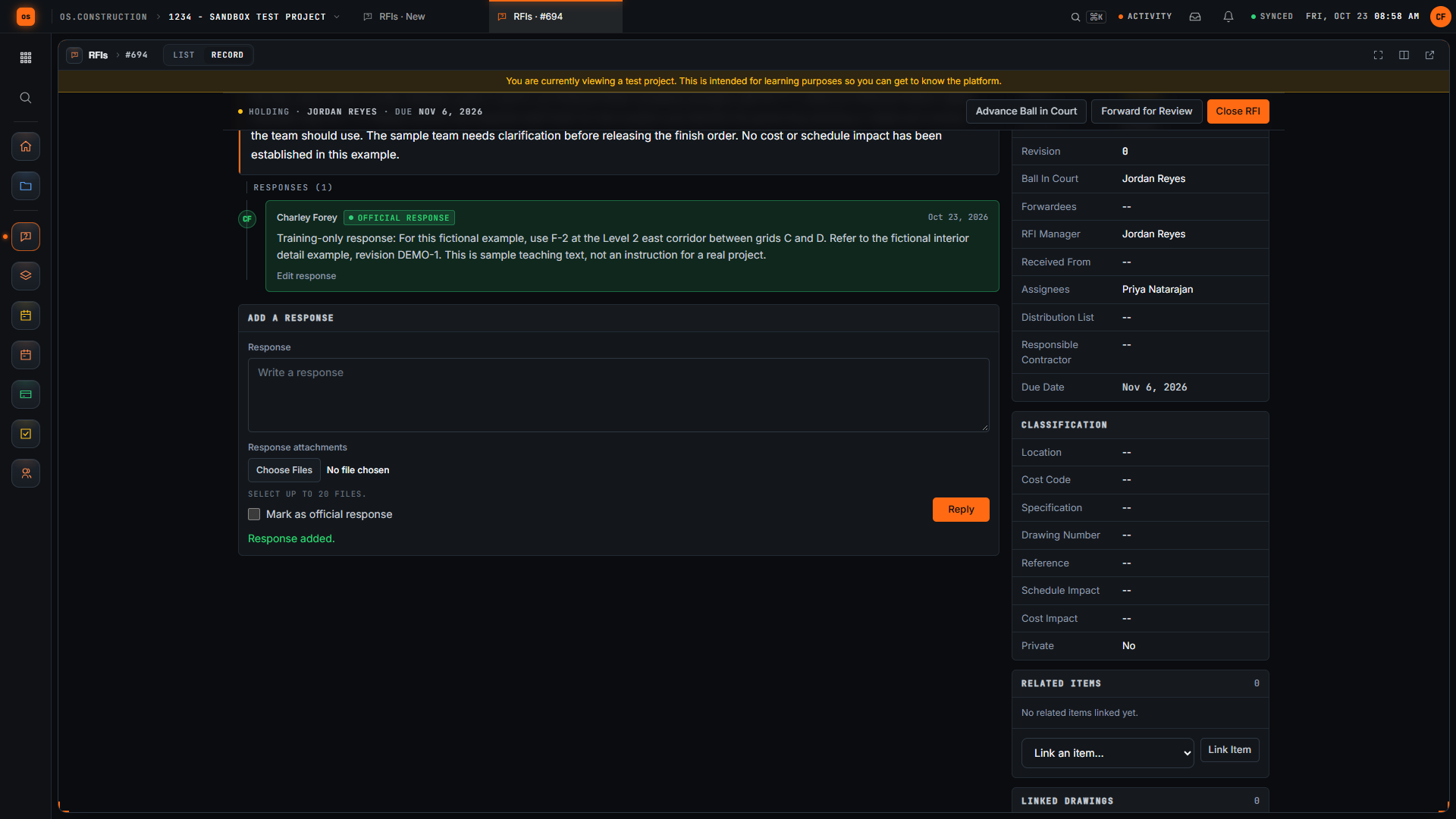
The RFI, answered
The official response sits on the RFI with its ball in court and due date. Related Items links it to drawings, submittals and change events, and change events created from it are listed on the RFI.
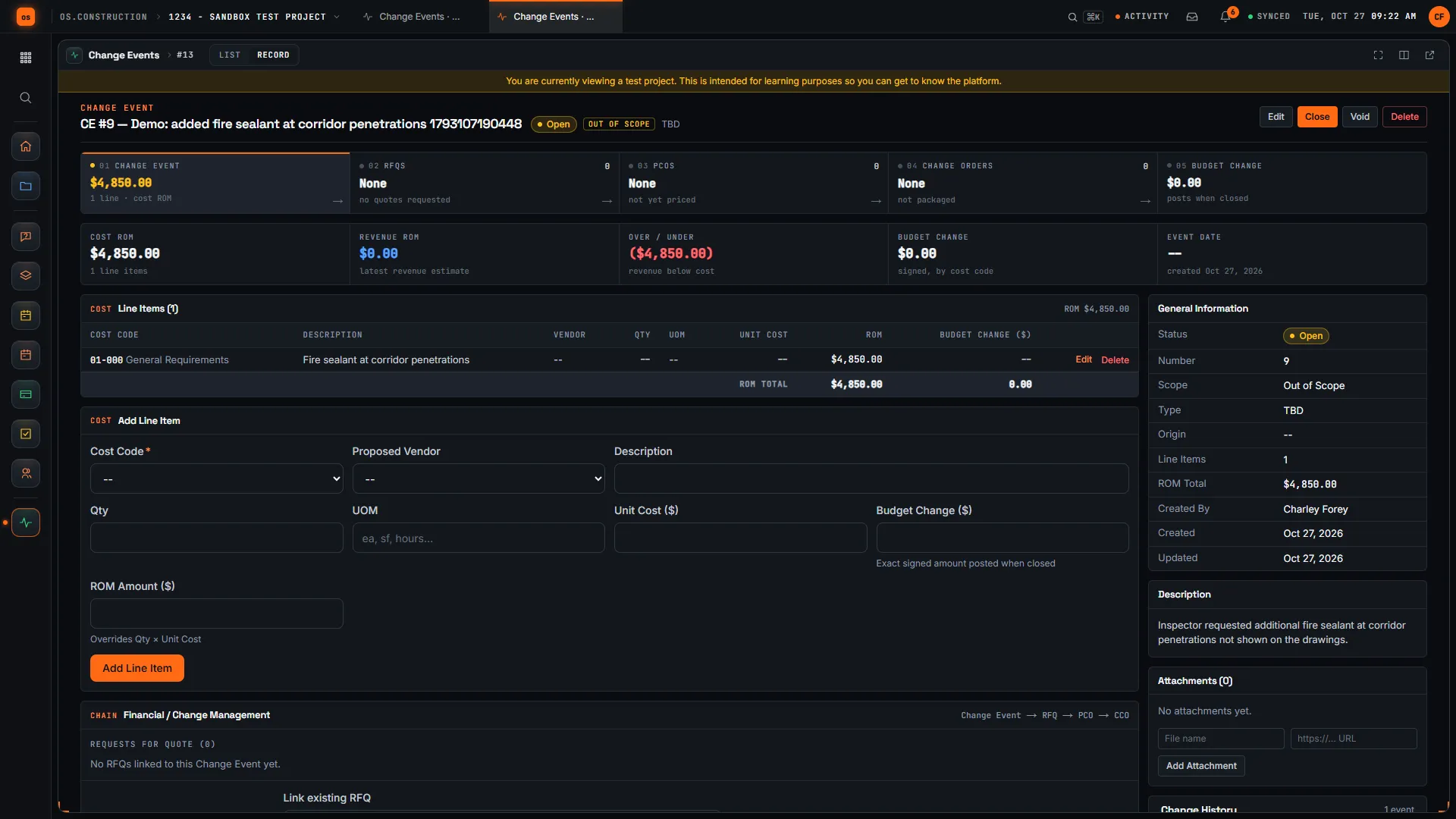
The change event, with the chain built in
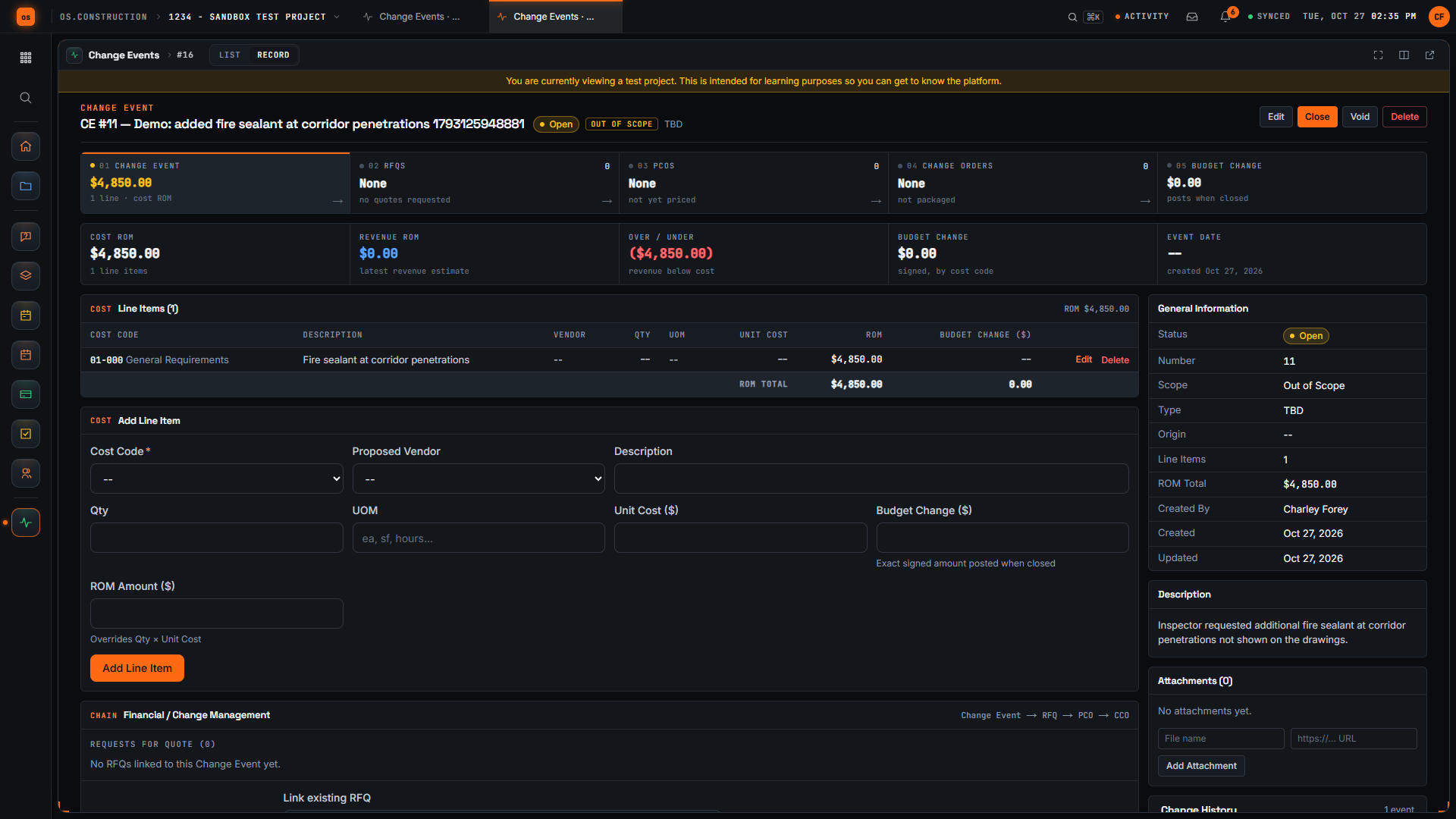
The change event record shows its whole financial chain across the top: change event, RFQs, PCOs, change orders and the budget change that posts when the event is closed. Below, each line carries a cost code, a rough amount and the exact budget change to post.
Watch the walkthrough · 2:50
Log a potential change as a change event
- 0:00Start a new change event
- 0:31Name the possible change
- 0:50Mark the scope
- 1:19Describe what happened
- 1:33Choose a cost code for the line
- 1:56Add a rough line item
- 2:09Enter a rough amount
- 2:21Create the change event
- 2:32Check the saved line item
Read the transcript
Here we are on the New Change Event page in our local sample project. A change event is where we note a possible change early, before anyone prices or approves it. Let's log one together.
First, we give it a title that says what changed. Our example is added fire sealant at corridor penetrations. The demo adds a unique reference so each recording creates its own sample record.
Next, we set Scope. For this sample we choose Out of Scope, which tells the team we believe the work sits outside the current contract. Pick whatever your team has actually agreed.
In Description, we explain what happened and why it may cost money. Our sample says the inspector asked for extra fire sealant at corridor penetrations that aren't shown on the drawings.
Now let's add a line item. We start with the cost code, because a line needs one to be saved. For this sample we use General Requirements; choose the code your team actually tracks this work against.
In the Line Items section, we type a short description of the work. One line is enough to start, and we can refine it later.
Then we enter a rough amount for that line. It's an early estimate, not an approved price, and we can refine it later.
Now we select Create Change Event. The app saves it and opens the detail page with its number and our title in the header.
Here's the change event we created. The header shows the Open status and the Out of Scope tag, and our new line appears in Line Items with its rough amount. We have logged the possible change, marked its scope, and recorded a first estimate, so pricing can move forward from here.
Video page with chaptersStep-by-step guideMore in Cost & accounting
The whole chain, as a table
| Step | Record in the app | Stored link | Money |
|---|---|---|---|
| 1. Field question | RFI-212 | None yet | Nothing recorded |
| 2. Change event | Change event with a rough line by cost code | Origin RFI: RFI-212 (listed back on the RFI) | $80,000–$90,000 rough order |
| 3. PCO | Potential change order on the prime contract | Created from the change event; lines copied | $78,100 cost + $8,300 markup = $86,400 |
| 4. Sub side | PCO or change order on Summit Mechanical's subcontract | Same change event origin | +$68,000 committed |
| 5. Approve and execute | CO #14, through a package or change order request | PCO grouped into the package | Contract $49,213,600 → $49,300,000 |
| 6. Budget | Budget tool | Reads approved owner and commitment changes; change event posts on close | +$78,100 budget change by cost code |
| 7. Pay app | Pay App #9 | Executed change orders added to G702 line 2 | $69,120 billed, $6,912 retainage |
| 8. Paid | Pay app cash ledger | Receipt allocated to the pay app | $62,208 net for this line |
Keep going
Keep exploring
Related across os.construction
- ExplainerLife of a change orderFollow one change order from a hidden condition through change event, PCO, COR and owner approval, then watch the money move into budget, pay app and WIP.
- ExplainerChange events vs change orders: the full lifecycleWhat a change event is, what a PCO and change order are, and where each one shows up in the budget, the contract and the pay app in os.construction.
- DocsChange events and potential change ordersHow a possible change is captured as a change event, priced as a potential change order, submitted and approved, and how exposure is tracked before anything is signed.
- BlogChange events vs change orders: tracking exposure before it's signedBy the time a change order is signed, the money is already spent or already lost. The change event is where exposure starts. Here's how to track it, what to put in the forecast, and why the gap between the two is where margin leaks.
- GlossaryChange Order (CO)A signed agreement between owner and contractor that changes the contract scope, price, time, or a combination of them.
- DocsChange events and change ordersTrack a change from the first sign of it to an executed change order. Change events, potential change orders, packages, commitment change orders and budget posting in the app.
Sample project included
Try this workflow on the sample project
Every trial workspace includes a sample project with sample data, so you can follow these steps in the app before touching a live job.
Want this on live job data?
Financials follows project changes, budgets, commitments, pay apps and cash. Company Accounting covers the books; locked WIP remains unavailable.
14-day free trial. Pricing for paid plans isn't set yet. Talk to us. Already have an account? Sign in →
All figures are illustrative sample data, not a real project. Contract terms and state law decide how retainage, stored materials and change orders work on your job. Check both.