Change events vs change orders: the full lifecycle in os.construction
A change event is a maybe. A change order is a contract. Most change logs blur the two, and the budget ends up counting maybes. Here's what each record is for, how one becomes the next, and which number lands where.
Each record answers one question
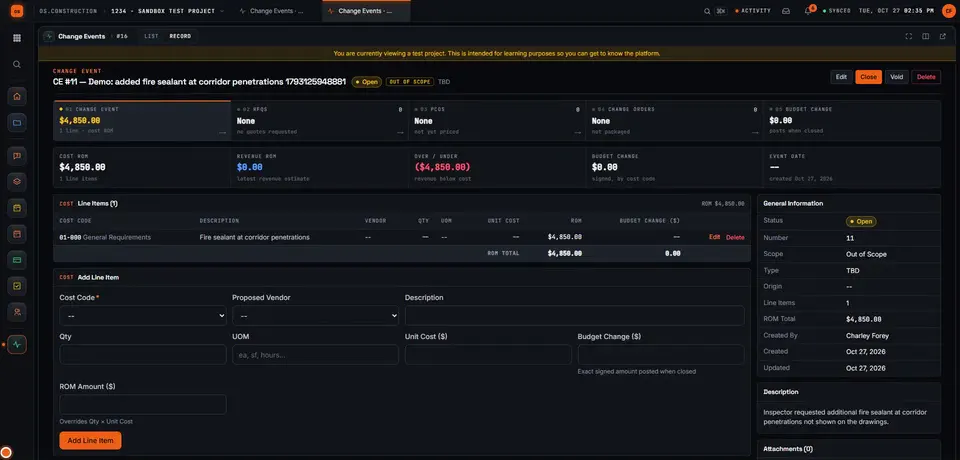
The change event comes first and stays the parent: every RFQ and PCO made from it links back, and its page shows the whole chain. Read left to right; each one starts only when the one before has an answer.
- 01Change eventIs something changing?OpenClosedVoidCost and revenue ROM; budget change posts on close
- 02RFQWhat will it cost us?DraftOut for PricingAwardedQuotes from subs; the award updates the event
- 03PCOWhat will we charge or pay?DraftPricingPendingApprovedPriced lines on one contract, with markup
- 04PackageWhat does the contract change by?PendingApprovedExecutedApproved PCOs batched and executed
Log the maybe early, with a rough number
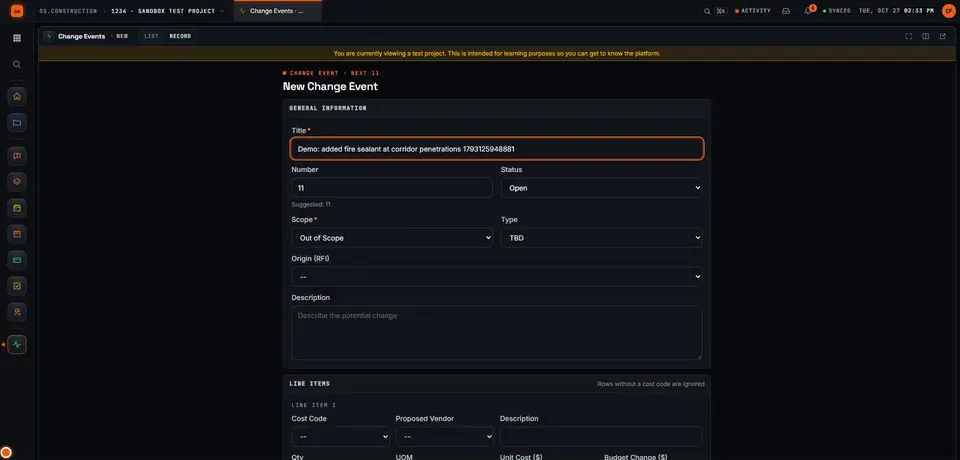
The inspector asks for fire sealant at corridor penetrations that aren't on the drawings. That's a change event: a title, a description, and a Scope of TBD, In Scope or Out of Scope. Out of Scope says you believe it's extra to the contract. Type (Allowance, Contingency, Owner Change, Transfer) says where the money comes from, and Origin (RFI) links the question that started it.
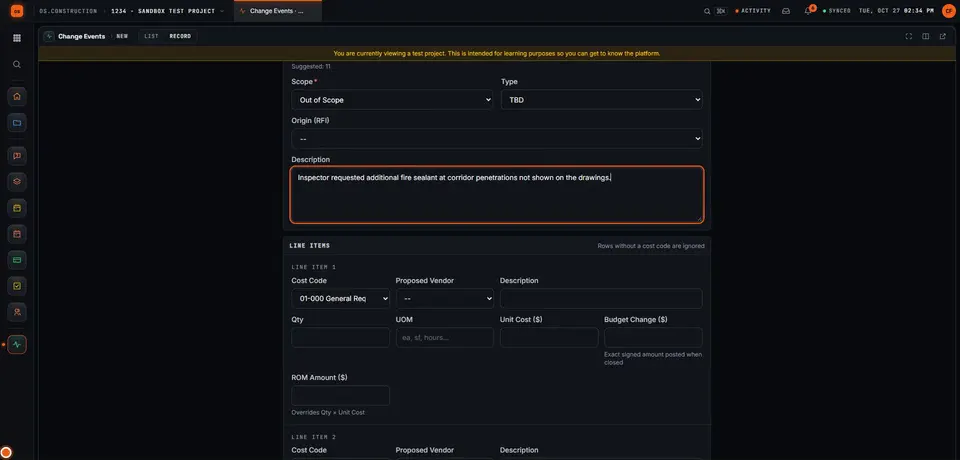
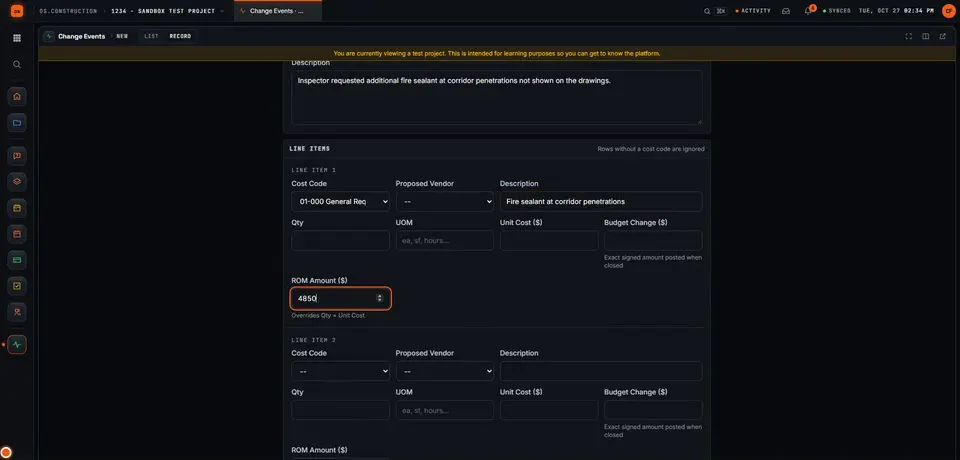
Every line needs a cost code. Its ROM (rough order of magnitude) is quantity × unit cost, or a number you type: an early estimate, not a price. Lines can carry a revenue ROM too, and the event shows the over or under between them. A separate Budget Change amount is the exact signed number that posts to the budget when the event is closed. The ROM alone never touches the budget.
Price it, then put it on a contract
01 RFQ: ask the subs
Create RFQ from Change Event starts a request for quotes with the event's cost code and ROM. When you award a quote, its amounts are written back onto the change event's lines, so the event now shows a real number.
02 PCO: a priced change on one contract
Create PCO from Change Event asks which contract it's against (the prime contract with the owner, or a subcontract or PO) and copies the event's lines into a Draft potential change order. From there it moves through Pricing, Pending and Revised to Approved or Rejected (or No Charge, or Void). The PCO is where markup and tax are added.
03 Package and execute: the contract changes
Approved PCOs are batched into a change order package (shown as "CCO" on the change event's strip) and executed. Execute only works on an approved PCO, and Execute Package executes the approved PCOs in it. Your company chooses the tiers: PCOs straight to the contract, PCO to package (the default), or PCO to change order request to package.
| PCO status | Budget | Prime contract | Pay app (G702) |
|---|---|---|---|
| Draft | — | — | — |
| Pricing · Pending · Revised · Proceeding | Pending Changes | — | — |
| Approved | Approved Changes | Approved COs, revised contract | — |
| Approved and executed | Approved Changes | Approved COs, revised contract | Line 2, net change by COs |
On a subcontract or PO, a pending PCO shows as pending cost and an approved one adds to committed cost. A closed change event's budget change also lands in Approved Changes.
$4,850 rough, $5,830 priced
The same change carries several numbers on its way through. The roll-ups count the PCO's line amounts: markup and tax show on the PCO's own total but aren't in budget, contract or billing totals today. If your markup has to reach the contract sum, add it as a priced line. Illustrative amounts; the change event matches the recorded demo.
Not today: markup and tax in budget, contract and billing totals; creating or editing change order requests (the middle tier) in the app; your own change event statuses. Commitment change orders made from a subcontract's own page are a separate record with no link back to a change event or PCO, so start sub changes from the change event if you want the chain.
Keep going
Keep exploring
Related across os.construction
- DocsChange events and change ordersTrack a change from the first sign of it to an executed change order. Change events, potential change orders, packages, commitment change orders and budget posting in the app.
- ExplainerFrom field question to paid change orderFollow RFI-212 into a change event, a priced PCO, executed CO #14, the budget and a pay app in os.construction, with every link stored on one record.
- DocsChange events and potential change ordersHow a possible change is captured as a change event, priced as a potential change order, submitted and approved, and how exposure is tracked before anything is signed.
- ExplainerLife of a change orderFollow one change order from a hidden condition through change event, PCO, COR and owner approval, then watch the money move into budget, pay app and WIP.
- BlogChange events vs change orders: tracking exposure before it's signedBy the time a change order is signed, the money is already spent or already lost. The change event is where exposure starts. Here's how to track it, what to put in the forecast, and why the gap between the two is where margin leaks.
- GlossaryChange Order (CO)A signed agreement between owner and contractor that changes the contract scope, price, time, or a combination of them.
Sample project included
Try this workflow on the sample project
Every trial workspace includes a sample project with sample data, so you can follow these steps in the app before touching a live job.
Want this on live job data?
Change events, RFQs, PCOs, packages and their budget and billing effects are live in os.construction. Markup doesn't flow into budget and contract totals yet.
14-day free trial. Pricing for paid plans isn't set yet. Talk to us. Already have an account? Sign in →
All figures are illustrative sample data, not a real project. Contract terms and state law decide how retainage, stored materials and change orders work on your job. Check both.