Write the day down once. Find it again when it matters.
One page per day for weather, crews, deliveries, delays, visitors and notes, entered from a phone browser or the trailer, completed and locked at the end of the day, and kept on the same project as the RFIs, tasks and cost codes it refers to.
14-day free trial. Pricing for paid plans isn't set yet.
From the morning weather to the job file.
The top lane is the day as the super records it. The bottom lane is what follows: tomorrow's copy, and the tasks, observations and RFIs a note can lead to.
Where daily logs fail you later.
- Failure 01
Written at the end of the day, from memory
The super fills in the report in the trailer at six, or on Monday for the whole week. Crew counts get rounded, delays get forgotten, and the visitor who gave a verbal direction never makes it in.
- Failure 02
A report nobody can count
Logs live as PDFs or paper in a binder. When a delay claim or a back charge needs to show who was on site and for how long, someone pages through weeks of reports by hand.
- Failure 03
Facts that never reach the office
The note about a missing damper or a late delivery sits in the log. Nobody turns it into a task, an RFI or a change, so the problem is found again later at a higher price.
One page per day, on the same project.
The Daily Log opens on today. Each section saves on its own, so entries can go in as the day happens rather than all at once.
- 01
Sixteen log types, totaled at the top
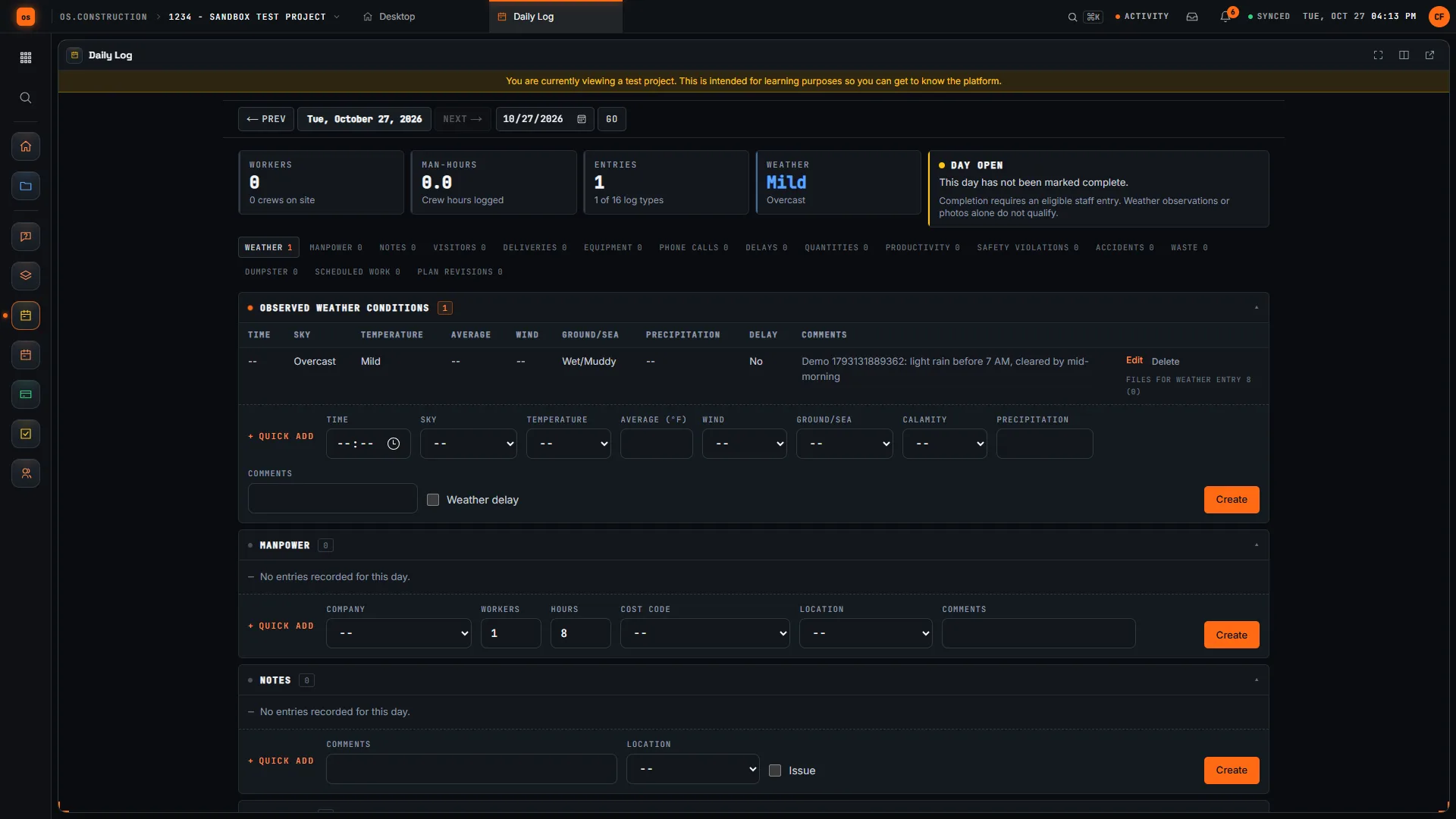
Weather, manpower, notes, visitors, deliveries, equipment, accidents, phone calls, delays, dumpsters, productivity, quantities, safety violations, waste, scheduled work and plan revisions. The day's workers, man-hours and entries total at the top of the page.
Answers failure 01Daily log guide → - 02
Start from yesterday
Copy from previous day brings the most recent prior day's manpower forward. Copy selected logs lets you pick a date and the log types to copy. Copied entries are added to the day, so correct them rather than retype them.
Answers failure 01 - 03
Coded so it can be counted
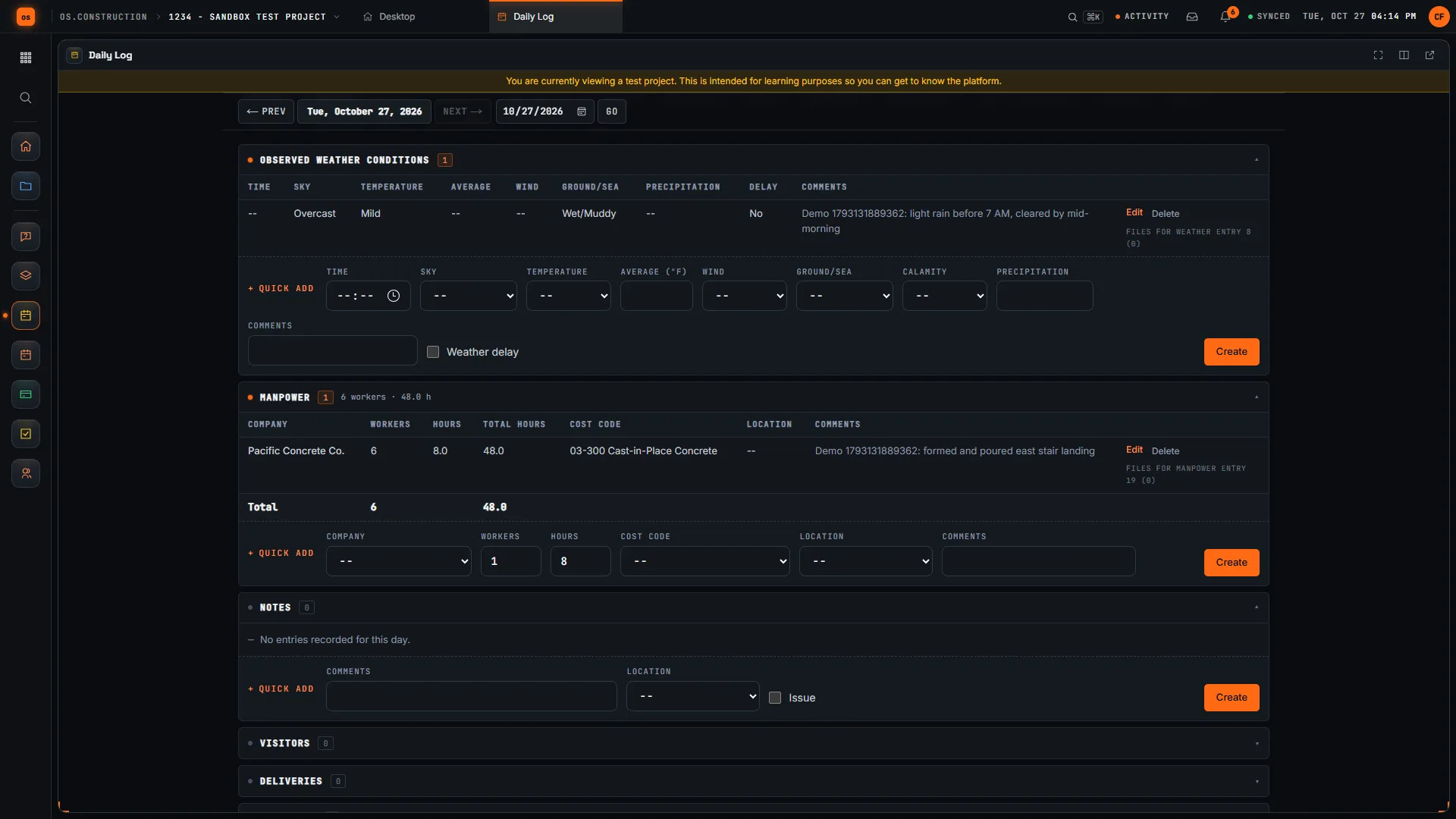
Manpower, equipment, delays and quantities carry a cost code and location from the same project, and a delay records its type, start and end. Workers and hours add up to man-hours instead of sitting in a paragraph.
Answers failure 02 - 04
Complete the day, then lock it
Check the acknowledgement and click Complete Day. The day shows who completed it and when, and its entries can't change until someone clicks Reopen Day. Deleted entries go to the Recycle Bin and can be restored. Export PDF and Export CSV give you the day for the job file.
Answers failure 02 - 05
Turn a note into work
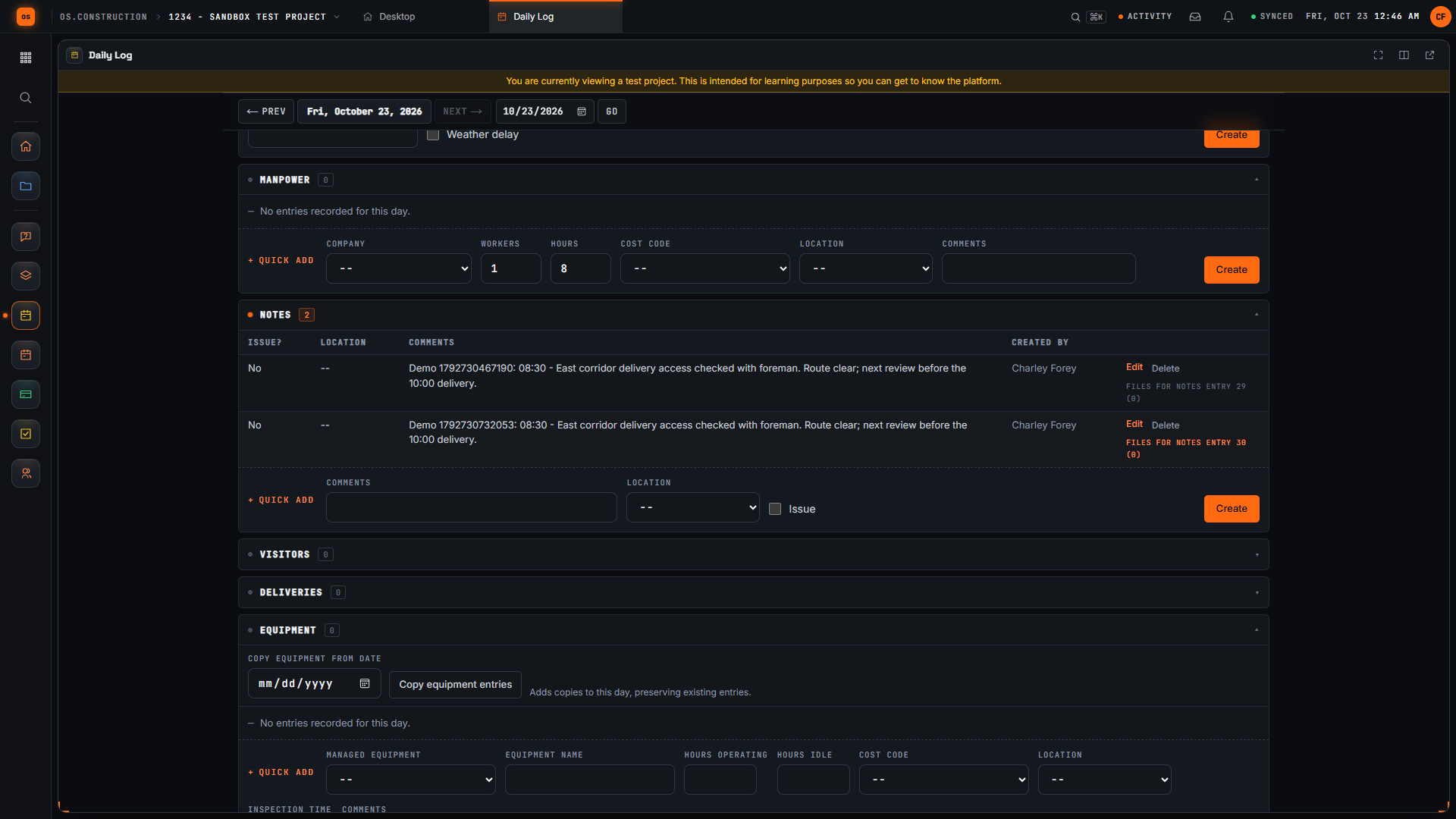
When a note needs action, create a task with an owner and a status, or an observation that runs from review to closed; Convert to RFI turns an observation into an RFI that links back to it. You create the follow-up yourself; a note is not converted automatically.
Answers failure 03Field tools on phones →
A day, in the app.
Real screens on sample data: the day with its log types and a weather entry, a manpower entry coded to a cost code, and a saved field note.
Rather click than read? Open the interactive demo: open RFI-212, turn it into CO #14, approve it and watch the budget and Pay App #9 update, on sample data in your browser.
Exactly what ships today.
Status comes from the app's own export, not from this page's copy. Live is in the product now; Preview is in the product with limits we document; Planned is not built yet.
- LiveDaily LogSixteen log types, copy from previous day, Complete Day and Reopen Day, and PDF and CSV export for each day.
- LivePhotosPhotos in albums with description, location and tags, uploaded from the phone's camera or library.
- LiveTasksFollow-ups with an owner and a status, from Initiated to In Progress.
- LiveObservationsSafety and quality issues tracked to closed, with Convert to RFI and Convert to Punch Item.
- LiveRFIsQuestions for the design team, with ball in court and due dates.
- LiveT&M TicketsLabor, equipment and material on time-and-material work, ready to price.
Where we don't fit yet
- Needs a connection. The Daily Log runs in a phone's browser and needs signal. Offline capture is planned, not built. Only the Schedule tool has an offline field mode today.
- No native app. There is no iOS or Android app to install. Native apps are planned.
- Exports are one day at a time. Export PDF and Export CSV work on the day you are viewing. To pull more than one day, use the REST API.
The Daily Log and the tools a note leads to are live today. Field use on phones runs in the browser and is in preview; offline capture and native apps are planned. See the full list on the changelog and the platform overview.
Your books, your data.
Permissions per tool
Permission templates set each tool to none, read only, standard or admin, enforced the same way in the app and the API.
MFA and SCIM
Authenticator-app sign-in for every user, and SCIM 2.0 provisioning from your identity provider.
Change history
Tracked changes record who changed which fields and when, shown as item history and in the activity feed.
Your data, exportable
Export lists to CSV and key records to PDF. Leaving should never mean losing your history.
REST API · 2,549 endpoints
Project and accounting records are available through the documented REST API, with OAuth tokens and signed webhooks for the tools you keep.
We don't hold SOC 2 or any other security certification today, and we won't imply that we do. Read exactly what is in place, or go straight to the API documentation.
What to look for in daily log software.
Whatever you end up buying, these are the questions worth asking in a demo. They come from how daily reports get used after the fact, not from any one product's feature list.
Who it's for
Superintendents and foremen who write the daily report, and the project managers, schedulers and owner's reps who read it later. It matters most on jobs where weather days, delays, back charges or T&M work may have to be proven.
Fast enough for the field
If an entry takes longer than writing it on paper, it will be done at the end of the day from memory. Try it on a phone, outdoors, and count the taps for a manpower entry.
Works where your sites are
Ask plainly whether it works without signal, what happens to entries made offline and how conflicts are handled. If the answer is that it needs a connection, plan for basements and remote sites.
Structured entries, not just a text box
Manpower by company with workers and hours, delays with a start and an end, weather with whether it caused a delay. Structured entries can be totaled and searched; a paragraph can't.
Copy forward without copying mistakes
Most days look like yesterday. Copying saves time, but check exactly what gets copied and how easy it is to correct a copied entry.
A record you can lock
A daily log is evidence. Look for a way to complete and lock a day, see who did it and when, and find out what is recorded if the day is reopened.
Codes that match your job cost
If manpower and quantities carry the same cost codes and locations as your budget, the log can support progress and productivity checks instead of sitting in a binder.
From a note to an action
A note about a problem should lead somewhere: an RFI, a task, a safety observation. See how many steps that takes and whether the link back is kept.
Reports people will read
Owners, lenders and claims consultants want a clean daily PDF; the office wants the data. Check both, and ask how to get a range of days out.
Common questions.
What is construction daily log software?
Software for the daily report a superintendent keeps on every job: weather, crews and hours, deliveries, visitors, delays, safety and notes, one record per day that can be searched and exported instead of filed in a binder.
What can I record in the os.construction daily log?
Sixteen log types: observed weather, manpower, notes, visitors, deliveries, equipment, accidents, phone calls, delays, dumpsters, productivity, quantities, safety violations, waste, scheduled work and plan revisions. Manpower, equipment, delays and quantities carry a cost code and location.
Does the daily log work offline?
Not yet. The Daily Log runs in your phone's browser and needs a connection. Offline capture for field tools is planned, not built, and there is no native app yet. The Schedule tool has its own offline field mode.
Can I lock a completed day?
Yes. Complete Day records who completed the day and when, and its entries can't be changed until someone clicks Reopen Day. A day needs at least one eligible staff entry to be completed; weather or photos alone don't count.
Can I export daily reports?
Yes. Export PDF downloads the day's report and Export CSV downloads its entries, for the day you are viewing. The Daily Log also has a REST API for pulling entries into your own reporting.
Can I bring daily logs over from another system?
The import tool can bring daily log weather, manpower and notes from the project management system it connects to, along with RFIs, submittals and punch items. It is in preview and connects to one system today, so ask us about yours.
Read, calculate, then try it.
From the blog
Free tools
Terms on this page: Daily log · Weather allowance · Delay claim · T&M ticket · Back charge · Field order · Differing site conditions · Cost code
Log a day on the sample project.
Start a 14-day free trial with the Riverside sample project already set up and write today's log from your phone's browser, or click through the interactive demo on sample data first.