A submittal register that shows who is holding it.
Start the register from the spec, route each submittal through its reviewers in order, and see who has it, when it is due and when the material has to be on site, without rebuilding a spreadsheet every Monday.
14-day free trial. Pricing for paid plans isn't set yet.
From spec section to material on site.
The top lane is the review. The bottom lane is what the review is for: the schedule activity it feeds and the delivery that has to arrive before it.
Where submittals hold up the job.
- Failure 01
A register built once, then left alone
The register is typed from the spec at buyout and updated whenever someone remembers. By the third month it shows what was due, not what is late.
- Failure 02
Reviews that stall in an inbox
The submittal goes to the architect by email and comes back when it comes back. Nobody can say whether it's with the GC, the architect or the engineer without calling around.
- Failure 03
Long-lead items found too late
Nobody tied the switchgear submittal to the activity it feeds, so a two-week review slip turns into a delivery slip that only shows on the schedule after the fact.
One register, every reviewer in order.
Each submittal is a record with its spec section, its reviewers, its responses and its revisions, linked to the drawings and the schedule activity it supports.
- 01
Start the register from the spec
On the Packages tab, Create from Spec Sections generates one draft submittal for each section you pick, with a default type, responsible contractor and submittal manager for the batch. Packages group submittals by division or by sub.
Answers failure 01Submittals guide → - 02
Route it through the reviewers in order
Pick a saved workflow template or set the steps yourself: a person, a role and a due date for each. The first step holds the ball in court; later steps wait as Pending until everyone in the active step has responded.
Answers failure 02 - 03
Every response kept
Responses are Approved, Approved as Noted, Revise and Resubmit, Rejected, Forwarded for Review and For Record Only, each with a comment and attachments. A rejecting response sends it back to the submitter. The workflow table shows each step's due date, returned date and response.
Answers failure 02 - 04
Revisions with their own review
When a submittal comes back Revise and Resubmit, Create Revision starts the next revision with its own workflow, and the Revisions card lists every revision with its status and which one is current.
- 05
Tied to the schedule and the delivery
Link a submittal to a scheduled task, where it shows under Linked Submittals on the activity, and record lead time, the required on-site date and confirmed and actual delivery. Close & Distribute records who received the final response and which attachments went with it.
Answers failure 03Schedule guide →
A submittal, in the app.
Real screens on sample data: a storefront glazing submittal with its ball in court and spec section, and the schedule its submittals link to.
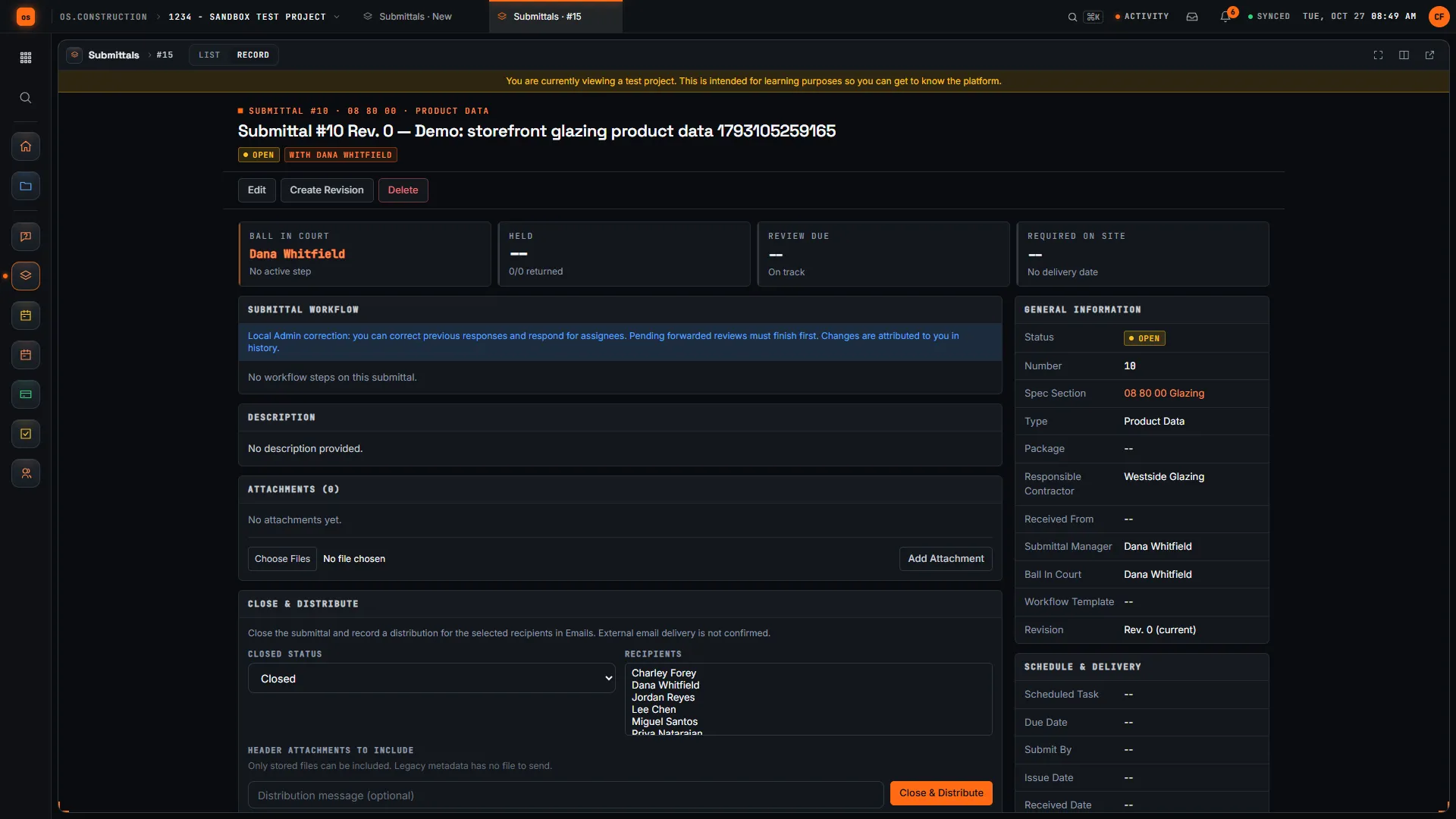
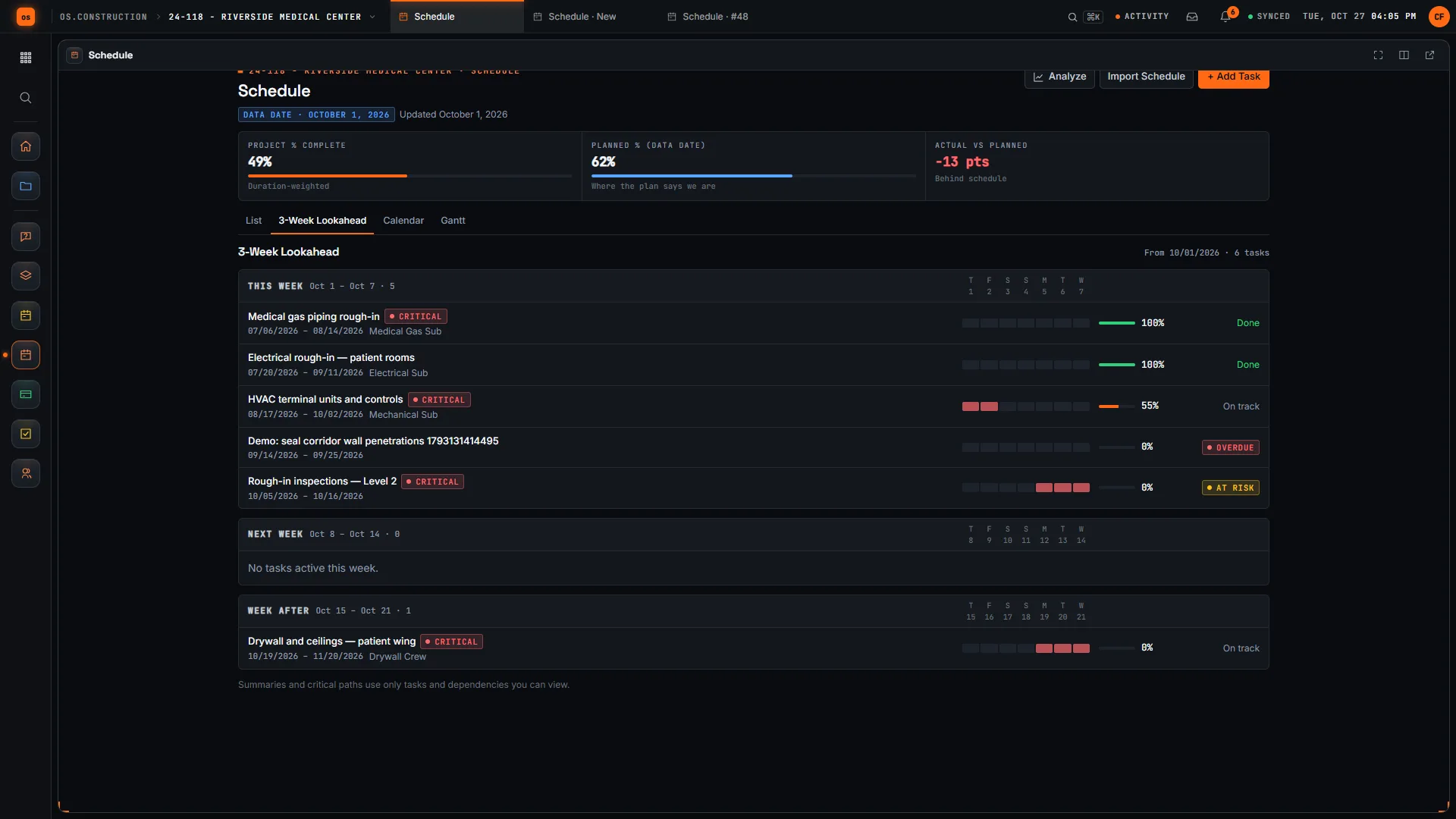
Rather click than read? Open the interactive demo: open RFI-212, turn it into CO #14, approve it and watch the budget and Pay App #9 update, on sample data in your browser.
Exactly what ships today.
Status comes from the app's own export, not from this page's copy. Live is in the product now; Preview is in the product with limits we document; Planned is not built yet.
- LiveSubmittalsRegister, packages, create from spec sections, ordered workflows, revisions and delivery tracking.
- LiveSpecificationsThe spec sections submittals are generated from and filed under.
- LiveScheduleA submittal can be tied to a scheduled task and shows under Linked Submittals on the activity.
- LiveDrawingsLinked Drawings connects a submittal to the sheets it covers.
- LiveRFIsRFIs link to submittals from their Related Items.
- LivePurchase RequestsStarted from an approved submittal revision, reviewed by someone other than the requester, then converted to one draft PO.
Where we don't fit yet
- A purchasing handoff, not full buyout. An approved submittal can start a purchase request that becomes one draft PO after an independent review. Linking a submittal to an existing subcontract is planned, and delivery is still recorded by your team.
- No closeout package assembly. Gathering approved product data into O&M manuals is planned. Approved files stay as attachments on each submittal today.
- Dates are not driven by the schedule. Submit-by, due, lead time and required on-site dates are entered by your team. Moving a schedule activity does not recalculate them.
- No register export in the app. The documented CSV and PDF exports do not include the submittal log yet. Use the REST API to pull it into a spreadsheet or another system.
Submittals, specifications, drawings, purchase requests and the schedule are live today. Subcontract links and closeout packages are planned. See the full list on the changelog and the platform overview.
Your books, your data.
Permissions per tool
Permission templates set each tool to none, read only, standard or admin, enforced the same way in the app and the API.
MFA and SCIM
Authenticator-app sign-in for every user, and SCIM 2.0 provisioning from your identity provider.
Change history
Tracked changes record who changed which fields and when, shown as item history and in the activity feed.
Your data, exportable
Export lists to CSV and key records to PDF. Leaving should never mean losing your history.
REST API · 2,549 endpoints
Project and accounting records are available through the documented REST API, with OAuth tokens and signed webhooks for the tools you keep.
We don't hold SOC 2 or any other security certification today, and we won't imply that we do. Read exactly what is in place, or go straight to the API documentation.
What to look for in submittal software.
Whatever you end up buying, these are the questions worth asking in a demo. They come from how submittals slip on real jobs, not from any one product's feature list.
Who it's for
General contractors and construction managers who keep the register and forward submittals to the design team, and specialty contractors who prepare them. Project engineers usually run it day to day, architects and engineers review in it, and buyers and superintendents watch the dates.
Register setup from the spec
Typing a register from a full project manual takes days. Ask whether the software can start one from spec sections, and how it handles items the spec does not call out by section.
Multi-step review in order
Most submittals pass through the GC, then the architect, sometimes a consultant. Check that steps run in sequence, that each has its own due date, and that a reviewer can forward to someone else without breaking the chain.
Action codes that match your stamps
Approved, approved as noted, revise and resubmit, rejected, for record only. The codes should match how your design team stamps submittals, and the status should follow from the response rather than being set by hand.
Revisions that keep their history
A resubmittal is a new revision of the same item, not a new item. Ask to see revision 0 and revision 1 side by side, each with its own review.
Dates tied to the work
Required on-site date, lead time and submit-by date are what make a register useful. See how a submittal links to the schedule activity it feeds, and whether its dates move with the schedule or stay as entered.
Who can see what
Subs need to see their own submittals, the design team needs to review, and some items are private. Check the permission model before you invite outside companies.
A recorded distribution
When review ends, the final response has to reach the sub and the field. Look for a record of who got it, when, and with which attachments.
Closeout and getting data out
Approved product data feeds the O&M manuals at closeout. Ask how you will gather it, which export formats exist, and whether there is an API.
Common questions.
What is submittal software?
Software that keeps the submittal register and routes each submittal through review: shop drawings, product data, samples and the rest, with who has it, when it is due, every reviewer's response and each revision.
Can it build a submittal register from the spec?
Yes. On the Packages tab, Create from Spec Sections generates one draft submittal for each specification section you pick, with the section number and title filled in and a default submittal type, responsible contractor and submittal manager. Spec sections come from the Specifications tool.
How does the approval workflow work?
Each submittal can carry ordered steps, from a saved workflow template or set by hand, each with a person, a role and a due date. The first step holds the ball in court. When everyone in the active step has responded, the next step is sent. A rejecting response sends it back to the submitter instead.
What happens when a submittal comes back revise and resubmit?
Create Revision starts the next revision with its own workflow. The Revisions card lists every revision with its status and marks which one is current, so the history of the item stays in one place.
Does it connect to the schedule?
A submittal can be tied to a scheduled task, and it shows under Linked Submittals on that activity. Its submit-by, due, lead time and required on-site dates are entered on the submittal; they are not recalculated when the schedule moves.
Can an approved submittal start the purchase?
Yes. A buyer can start a purchase request from a current, approved submittal revision. The form suggests the title, the responsible vendor and the required on-site date; the buyer enters quantities and costs. Someone other than the requester reviews it, and conversion creates one draft purchase order. The request keeps a pinned link to the exact submittal revision, and if that submittal is later superseded the buyer is prompted to compare the source.
Can subcontractors and architects work in it?
Yes. Add their firm to the project Directory and invite each person with a permission template. The default Subcontractor template can work RFIs, submittals and punch items and read everything else, and you can narrow it.
Read, calculate, then try it.
From the blog
Free tools
Terms on this page: Submittal · Submittal register · Ball in court · CSI MasterFormat · Look-ahead schedule · O&M manuals · Closeout · Commitment
Route a submittal on the sample project.
Start a 14-day free trial with the Riverside sample project already set up, or click through the interactive demo on sample data in your browser first.