Approve a change order once. Stop retyping it everywhere else.
Track exposure from the first RFI, price it, get it signed, and let the approved change update the budget, the subcontract and the next pay app as the same linked record, instead of re-keying it between PM software, a pricing spreadsheet and accounting.
14-day free trial. Pricing for paid plans isn't set yet.
One change order, every place it matters.
CO #14 started as RFI-212: missing fire dampers behind an L3 corridor wall. Watch the same record reach the budget, the subcontract, Pay App #9 and the books. Then flip the switch to count the re-keys in a typical stack.
Read this diagram as text
One record. The same record moves through every stage, and each stage links to the one before:
- RFI: RFI-212 is answered: add fire dampers at the L3 corridor.
- Change event: A change event opens from RFI-212. The exposure shows on the forecast before anything is signed.
- Change order: CO #14 is approved at $86,400, linked to the RFI and the change event.
- Budget + commitment: Budget line 23-330 and the Summit Mechanical subcontract update from CO #14.
- Owner billing: CO #14 arrives on Pay App #9 as a new G703 line.
- Job cost: Subcontractor bills post against the same commitment and cost code.
- WIP + GL: WIP reads the approved contract, posted cost and billings. Nothing was retyped.
Today, copied between tools. RFI, change event and change order live in PM software. CO #14 is exported and retyped into a budget spreadsheet, typed again onto the pay app (as $86,040 instead of $86,400), retyped into accounting, exported to a WIP workbook, and the over/under entry is retyped into the general ledger. That is four re-keys, four copies and one amount that no longer matches.
Sample figures from an illustrative job. WIP and the general ledger are part of the Accounting module.
Where change orders leak margin.
- Failure 01
Exposure nobody priced
An RFI answer adds scope, but no change event is opened. The cost is incurred before anyone forecasts it, and the margin is gone before the change order is drafted.
- Failure 02
Pricing that lives in a spreadsheet
The sub's quote is retyped from a PDF, markups are added in Excel, and the total is typed back into PM software. One transposed digit and the change order, the budget and the pay app disagree.
- Failure 03
Approved, but not billed
The owner signed, but the line never reached the pay app, or the sub's commitment was never changed. You pay the sub this month and bill the owner next month, if someone remembers.
From RFI to pay app, one linked chain.
Different contracts use different names. The app keeps each stage as its own linked record, so the history of every stage is kept and nothing is retyped.
- 01
Start from the RFI
Set the RFI as the change event's origin and add a rough amount by cost code. The exposure is visible on the job the day the question is answered, long before a signature.
Answers failure 01 - 02
Price it as a potential change order
Potential change orders carry cost, markup and sub quotes. Use one, two or three tiers per project (PCO, change order request, package) to match how your owner wants changes submitted.
Answers failure 02 - 03
Pass it to the sub from the same event
Create a potential change order against the subcontract or PO from the same change event, so the owner and sub changes share one origin, or add a commitment change order directly. Approved, it raises the revised commitment.
Answers failure 03 - 04
Budget and billing follow approval
Approved owner changes appear in approved budget changes, closing the event posts its budget amounts by cost code, and executed owner change orders flow into owner billing on the pay app.
Answers failure 03 - 05
Rejected and voided stay on record
A change can be rejected or voided at any stage and stays in the history, which matters when the cost was already incurred.
The chain, in the app.
Real screens on the illustrative Riverside job: the change event with its chain strip, then the pay app where the approved change is billed.
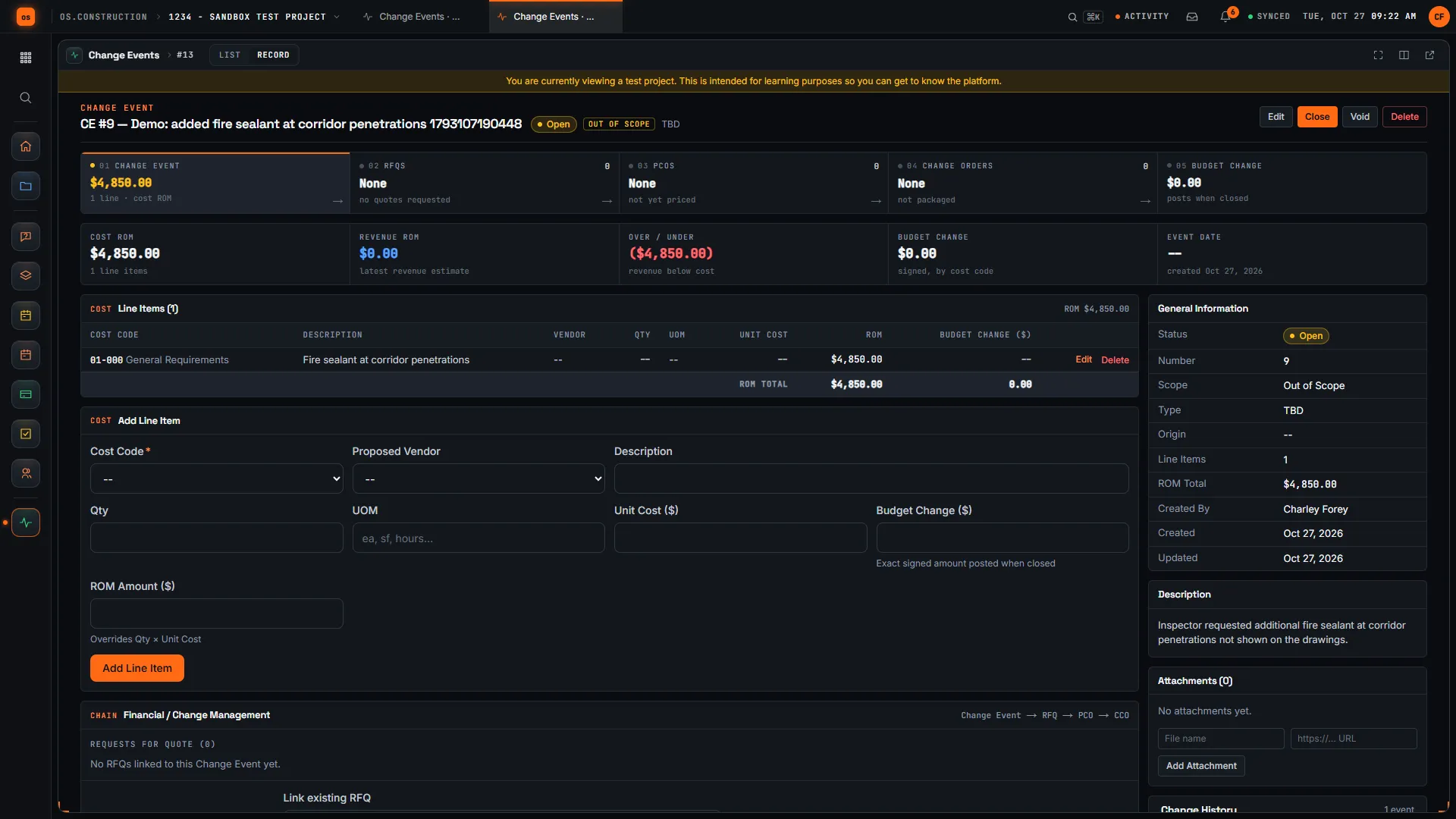
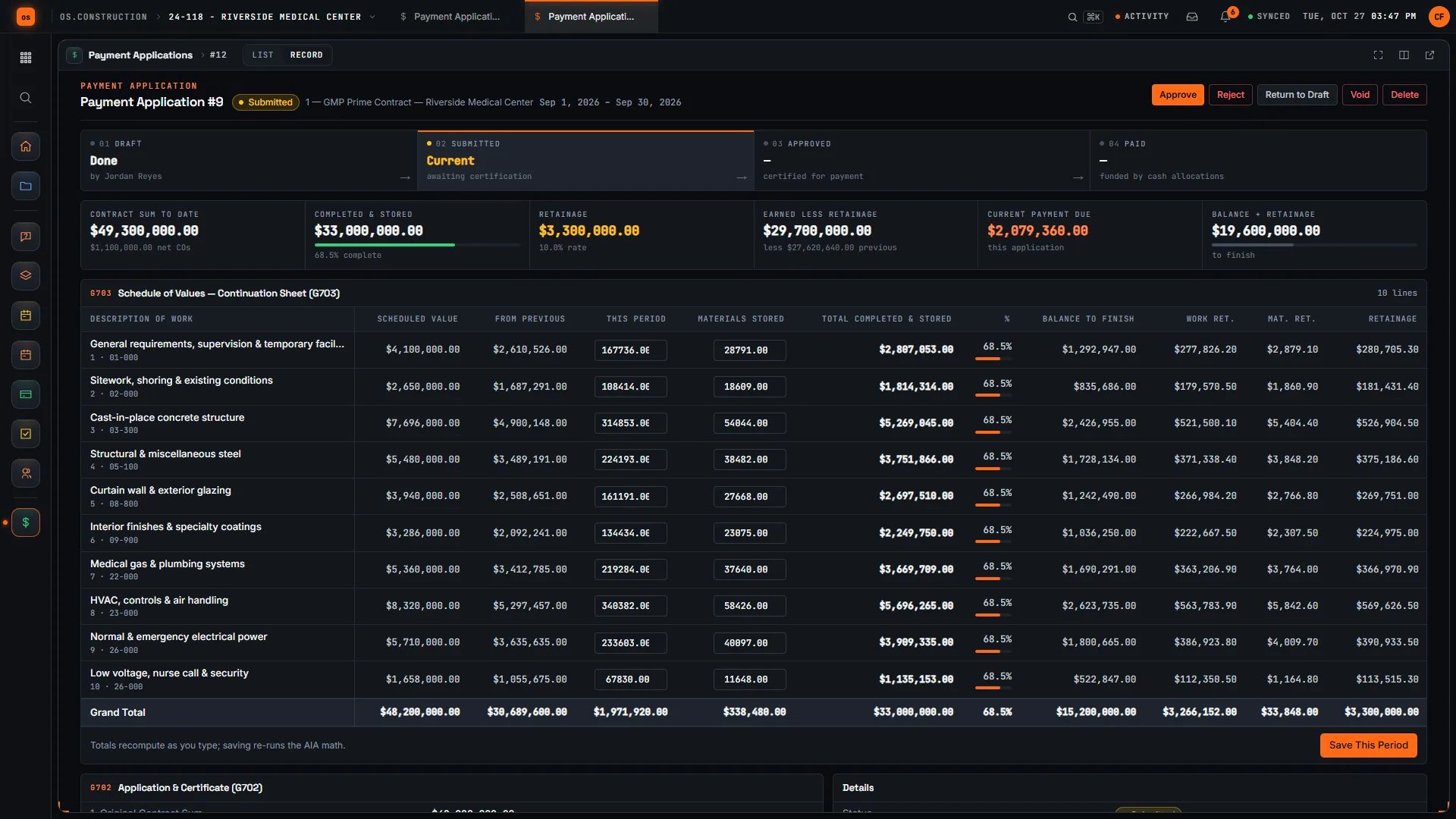
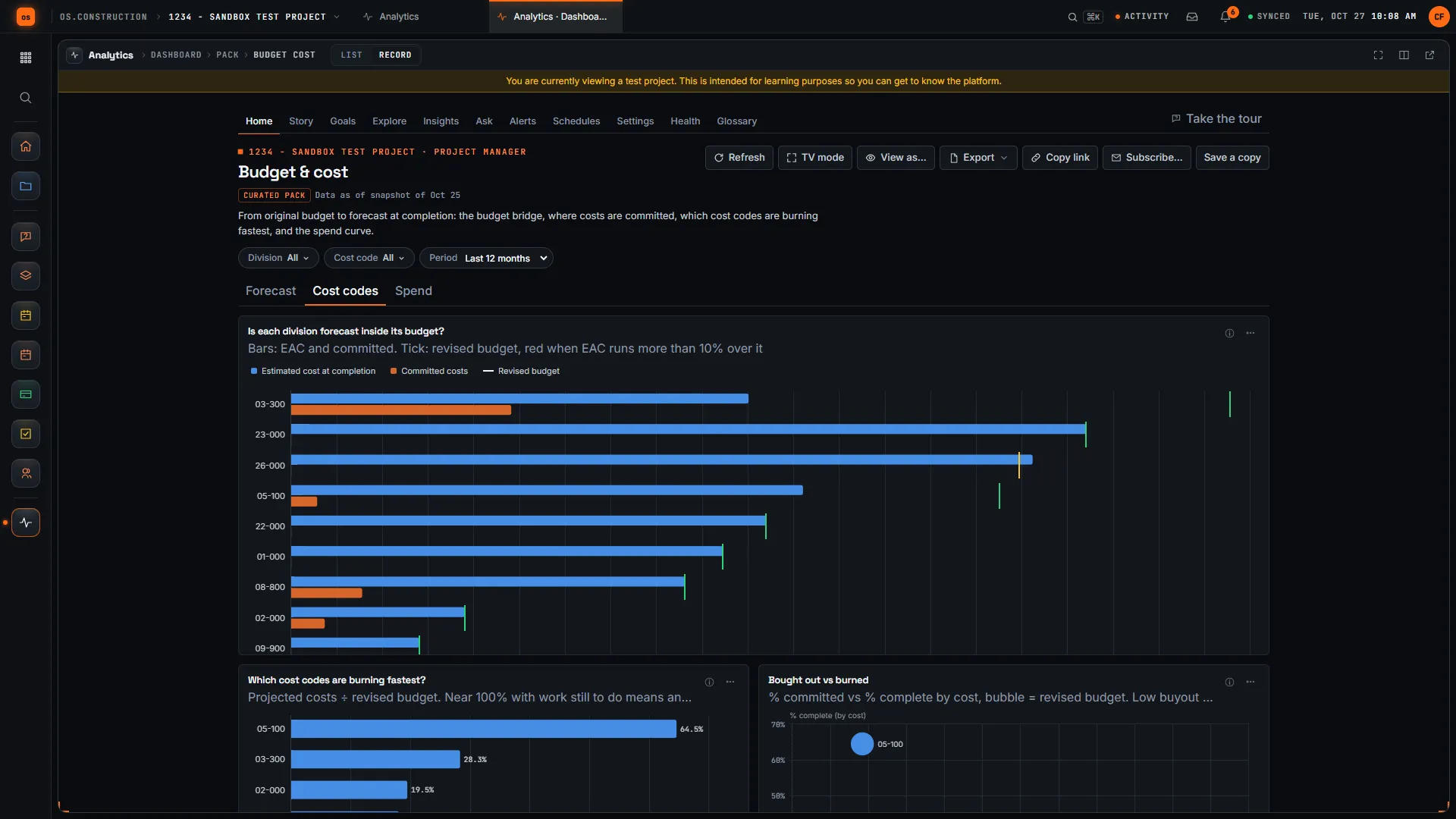
Rather click than read? Open the interactive demo: open RFI-212, turn it into CO #14, approve it and watch the budget and Pay App #9 update, on sample data in your browser.
Exactly what ships today.
Status comes from the app's own export, not from this page's copy. Live is in the product now; Preview is in the product with limits we document; Planned is not built yet.
- LiveRFIsRFIs with ball in court, due dates and official responses; an RFI can be a change event's origin.
- LiveChange EventsPossible changes with scope, rough amounts and budget change by cost code.
- LiveChange OrdersPotential change orders, requests and packages in one, two or three tiers.
- LiveCommitmentsSubcontract and PO change orders that raise the revised commitment.
- LiveBudgetApproved and pending budget changes, with posting history.
- LivePrime ContractsApproved owner change orders change the contract sum.
- LivePayment ApplicationsExecuted change orders flow into owner billing on G702/G703-style pay apps.
- LiveT&M TicketsTime and materials tickets from the field, ready to price.
- LiveAccounts ReceivableA certified pay app becomes an AR invoice with its source linked.
- PlannedRFI agentAI that would turn field notes into RFIs. Not built; you write RFIs yourself today.
The change order chain is live today. The company books it reaches (AR, job cost and WIP) are in the Accounting module, which is also live. See the full list on the changelog and the platform overview.
Your books, your data.
Permissions per tool
Permission templates set each tool to none, read only, standard or admin, enforced the same way in the app and the API.
MFA and SCIM
Authenticator-app sign-in for every user, and SCIM 2.0 provisioning from your identity provider.
Change history
Tracked changes record who changed which fields and when, shown as item history and in the activity feed.
Your data, exportable
Export lists to CSV and key records to PDF. Leaving should never mean losing your history.
REST API · 2,549 endpoints
Project and accounting records are available through the documented REST API, with OAuth tokens and signed webhooks for the tools you keep.
We don't hold SOC 2 or any other security certification today, and we won't imply that we do. Read exactly what is in place, or go straight to the API documentation.
Common questions.
What is change order software?
Software that tracks a change to the contract from the first sign of it to the moment it is billed: the change event, the priced potential change order, owner approval, the matching subcontract change, and the budget and billing updates that follow.
What is the difference between a change event and a change order?
A change event records that something may change the work, often with only a rough estimate. A change order is the approved change to the contract. Tracking the event first puts the exposure on the forecast before anything is signed.
Can an RFI become a change order?
Yes. Set the RFI as the change event's origin RFI, price the event as a potential change order, and approve and execute it as a change order. Each stage links to the one before, so the RFI and its answer stay attached.
How does an approved change order update the budget and the subcontract?
Approved owner change orders change the contract sum and appear in approved budget changes. From the same change event, the sub's side becomes a potential change order against the subcontract or a commitment change order, which raises the revised commitment. Closing the event posts its budget-change amounts by cost code, and every posting revision is kept.
Does the change order show up on the owner pay app?
Yes. Executed owner change orders flow into owner billing on payment applications, so the change is billed from the approved record instead of being retyped onto the continuation sheet.
Can I use one, two or three change order tiers?
Yes, per project. With one tier a potential change order is the change order itself; with two, potential change orders roll up into a change order package; with three, they go to a change order request and then a package.
Can I get change order data out?
Yes. Export lists to CSV, read every change event and change order through the REST API, or subscribe to signed webhooks to keep another system in step.
Read, calculate, then try it.
From the blog
- Change events vs change orders: tracking exposure before it's signed
- The real cost of re-keying a change order
- Markup vs margin: the pricing mistake hiding in your change orders
- Retainage, lien waivers and pay apps on one record
- Log a potential change as a change event
- Field to ledger: why daily logs are financial documents
Free tools
Explainers and docs
- Life of a change order
- Change events vs change orders: the full lifecycle
- From field question to paid change order
- T&M tickets: from the field to a priced change
- How a change order is priced: the markup stack, layer by layer
- Change events and change orders (guide)
- Change events and potential change orders (concepts)
Terms on this page: Change event · Potential change order · Change order · Construction change directive · RFI · Commitment · Schedule of values · AIA G703 · T&M ticket
Turn RFI-212 into CO #14 yourself.
The interactive demo walks the whole chain on sample data in your browser. Or start a 14-day free trial with a sample project already set up.