Bill from the contract. Not from last month's spreadsheet.
Build the G702 and G703 from the contract's schedule of values, add executed change orders without retyping them, calculate retainage per line, and submit for approval. The pay app reads the same record as the budget and the books instead of being a fresh copy.
14-day free trial. Pricing for paid plans isn't set yet.
One approved change, one pay app line.
CO #14 was approved at $86,400. Watch it arrive on Pay App #9 as a G703 line, then flip the switch to see the same line retyped by hand in a typical stack.
Read this diagram as text
One record. The same record moves through every stage, and each stage links to the one before:
- RFI: RFI-212 is answered: add fire dampers at the L3 corridor.
- Change event: A change event opens from RFI-212. The exposure shows on the forecast before anything is signed.
- Change order: CO #14 is approved at $86,400, linked to the RFI and the change event.
- Budget + commitment: Budget line 23-330 and the Summit Mechanical subcontract update from CO #14.
- Owner billing: CO #14 arrives on Pay App #9 as a new G703 line.
- Job cost: Subcontractor bills post against the same commitment and cost code.
- WIP + GL: WIP reads the approved contract, posted cost and billings. Nothing was retyped.
Today, copied between tools. RFI, change event and change order live in PM software. CO #14 is exported and retyped into a budget spreadsheet, typed again onto the pay app (as $86,040 instead of $86,400), retyped into accounting, exported to a WIP workbook, and the over/under entry is retyped into the general ledger. That is four re-keys, four copies and one amount that no longer matches.
Sample figures from an illustrative job. WIP and the general ledger are part of the Accounting module.
Where pay apps go wrong.
- Failure 01
A spreadsheet copy of the contract
The schedule of values is retyped every month, last period's numbers are pasted forward, and a change order is typed onto the continuation sheet. One transposed digit and the pay app no longer matches the contract.
- Failure 02
Retainage figured one way for everything
The contract has one rate for work and another for stored materials, or a reduction part way through. A single rate across the sheet means the G702 is wrong, and a wrong pay app comes back unpaid.
- Failure 03
Billed, but not the same as the books
The owner bill, the change order log and the ledger each hold their own version of the numbers, so the pay app, job cost and WIP disagree at month end and someone reconciles them by hand.
From contract to certified pay app, one linked record.
The pay app reads the contract and the change orders directly, so what is left for you is the part only you know: how much work was done this period.
- 01
Start from the contract
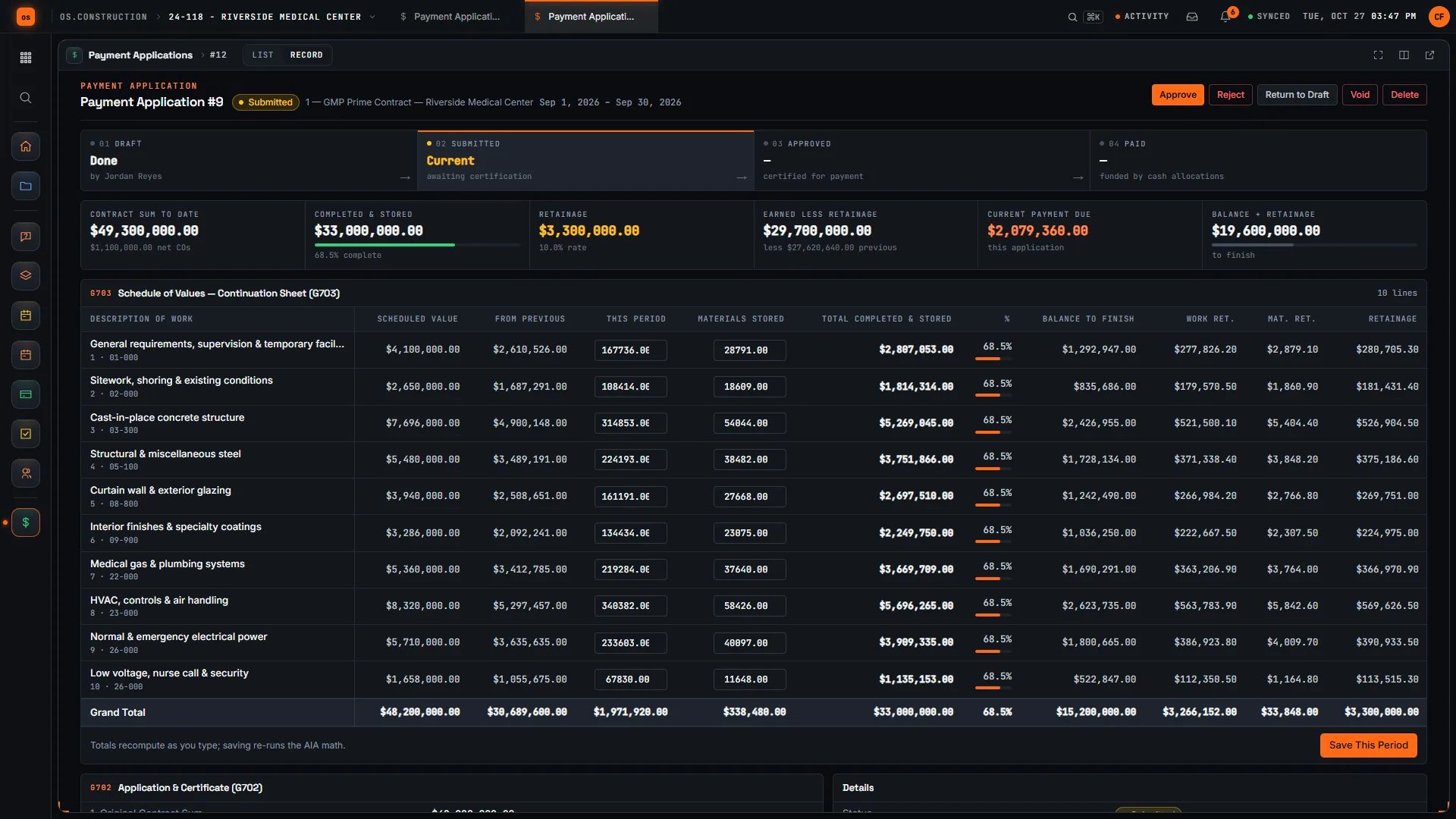
Create a pay app against a prime contract, subcontract or PO. The schedule of values fills the G703, and From Previous comes from the earlier pay apps. Application numbers are assigned for you.
Answers failure 01 - 02
Enter this period and stored materials
Type This Period and Materials Stored per line. Totals update as you type. Stored material that is later installed moves into This Period and comes off Materials Stored, so it takes the work retainage rate.
Answers failure 01 - 03
Retainage per line, work and materials
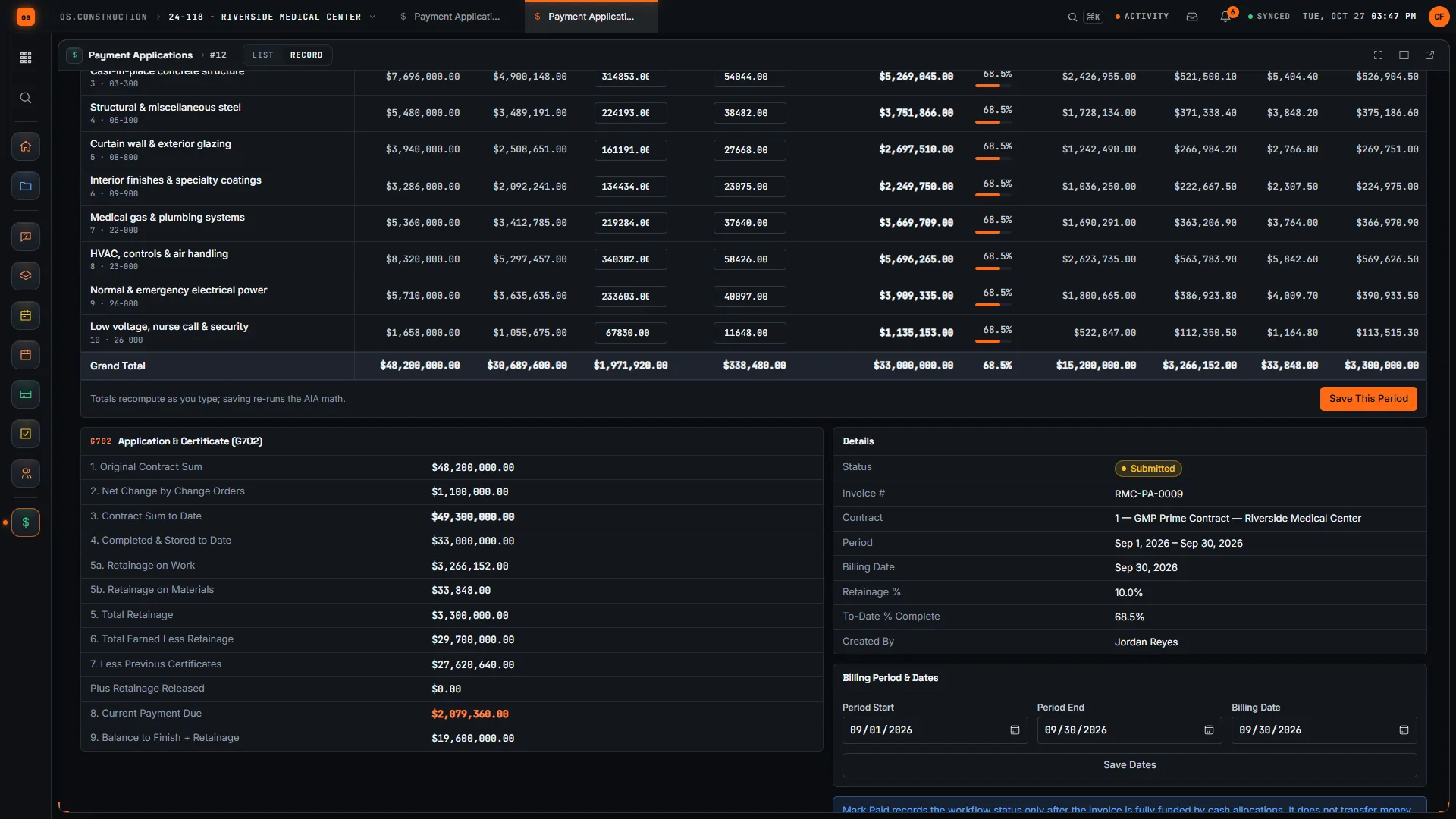
Set work and materials retainage rates separately, and enter any retainage released this period. The G702 shows retainage on work and on materials, and the line 8 current payment due.
Answers failure 02 - 04
Executed change orders land on line 2
Executed owner change orders on the contract are added to the net change automatically. Pending changes are not, so nothing unsigned is billed.
Answers failure 03 - 05
Submit, approve, mark paid
Submit, approve or reject, with admin permission needed to approve. Mark Paid is only available once Cash Ledger entries fully fund the pay app. Approved pay apps are not edited quietly: changing one means reverting the approval.
Answers failure 03
The pay app, in the app.
Real screens on the illustrative Riverside job: the G703 continuation sheet where This Period is typed, then the G702 with retainage split into work and materials.
Rather click than read? Open the interactive demo: open RFI-212, turn it into CO #14, approve it and watch the budget and Pay App #9 update, on sample data in your browser.
Exactly what ships today.
Status comes from the app's own export, not from this page's copy. Live is in the product now; Preview is in the product with limits we document; Planned is not built yet.
- LivePayment ApplicationsG702/G703-style pay apps against a prime contract, subcontract or PO, with split retainage, stored materials and approval.
- LivePrime ContractsThe owner contract and its schedule of values, which the pay app reads.
- LiveCommitmentsSubcontracts and POs, so you can review sub pay apps against the commitment.
- LiveChange OrdersExecuted change orders are added to line 2 automatically.
- LiveBudgetThe cost side the billing is compared against.
- LiveAccounts ReceivableA certified pay app becomes an AR invoice with its source linked, and retainage is tracked on the receivable.
- LiveWork in Progress (WIP)Billings feed over and under billing on the WIP schedule.
- LiveAccounts PayableSubcontractor and supplier lien waivers are recorded against AP payments, with a lien waiver hold that keeps the bill out of payment runs until a covering waiver is on file.
Pay applications are live today. The company books they reach (AR and WIP) are in the Accounting module, which the product data lists as live. Sub and supplier lien waivers are tracked in AP; waivers you give the owner are still prepared outside the app. See the full list on the changelog and the platform overview.
Your books, your data.
Permissions per tool
Permission templates set each tool to none, read only, standard or admin, enforced the same way in the app and the API.
MFA and SCIM
Authenticator-app sign-in for every user, and SCIM 2.0 provisioning from your identity provider.
Change history
Tracked changes record who changed which fields and when, shown as item history and in the activity feed.
Your data, exportable
Export lists to CSV and key records to PDF. Leaving should never mean losing your history.
REST API · 2,549 endpoints
Project and accounting records are available through the documented REST API, with OAuth tokens and signed webhooks for the tools you keep.
We don't hold SOC 2 or any other security certification today, and we won't imply that we do. Read exactly what is in place, or go straight to the API documentation.
Common questions.
What is pay application software?
Software that builds the periodic progress bill from the contract instead of from a spreadsheet copy of it: schedule of values lines, executed change orders, retainage and the G702 summary, with an approval step before it goes out.
Does os.construction produce AIA G702 and G703 pay applications?
It builds pay apps in the AIA G702/G703 layout: the G703 continuation sheet with This Period and Materials Stored per line, and the G702 summary calculated from those lines. It is G702/G703-style billing in the app, not a licensed copy of the AIA forms, so check what your owner requires.
Which contracts can a pay app be created against?
A prime contract, a subcontract or a purchase order. The schedule of values is filled in from that contract, so the same tool serves the owner bill and the bills you review from subs.
How does it handle retainage?
Retainage is calculated per line, with separate work and materials rates when the contract has two, and any retainage released this period is entered on the pay app. The G702 shows retainage on work and on materials.
How are stored materials handled?
Materials Stored is what is on hand and not yet installed, to date. It is carried forward from the previous pay app at the materials retainage rate. When the material is installed you add it to This Period and lower Materials Stored by the same amount.
Do executed change orders appear on the pay app?
Yes. Line 2 of the G702 adds executed change orders on the contract automatically, and only executed ones, so a pending change cannot slip onto the bill.
Does it track lien waivers?
On the payables side, yes: subcontractor and supplier lien waivers are recorded against AP payments in Accounting, and a bill under a lien waiver hold cannot be selected for a payment run until a covering waiver is on file. Waivers you sign for the owner are not generated from the pay app; prepare and notarize those the way your contract and state require.
Does Mark Paid move money?
No. Mark Paid records the status and is only available once cash entries in the Cash Ledger fully fund the pay app. The app does not move money.
Can I get pay app data out?
Yes. Export lists to CSV, read pay applications through the REST API, or subscribe to signed webhooks to keep another system in step.
Read, calculate, then try it.
From the blog
Terms on this page: Pay application · AIA G702 · AIA G703 · Schedule of values · Retainage · Retainage release · Stored materials · Lien waiver · Commitment
Build Pay App #9 yourself.
The interactive demo walks a G702/G703 pay app on sample data in your browser. Or start a 14-day free trial with a sample project already set up.