Free pay application template and builder
A G702/G703-style pay app that does the math and checks it: schedule of values, stored materials, retainage with reductions, change orders and previous certificates. Print it, export it to Excel, and roll it forward next month.
- Free
- No signup
- Runs in your browser
- Saved on this device only
Columns we read: item, description, scheduled value, previous (work completed from previous applications), this period, stored materials, and an optional retainage %. Lines whose description names a change order ("CO #3", "change order") become change order lines; "pending" ones stay off the contract sum. Total rows are skipped. Nothing is uploaded.
SummaryLive
- Current payment due
- $0
- Contract sum to date
- $0
- Completed & stored
- $0
- Retainage held
- $0
- Balance to finish
- $0
- incl. retainage
Certified beforeDue nowRetainage heldLeft to bill
| Additions | Deductions |
|---|
Checks before you submit
Continuation sheet
Type This period in dollars, or a % to date and the builder works out this period. Enter moves down a column. Stored materials are carried to date; when they're installed, add them to This period and lower Stored by the same amount.
| AItem | BDescription of work | Type | CScheduled value | DFrom previous | EThis period | G÷C% to date | F priorStored, last app | FStored to date | GCompleted & stored | HBalance to finish | %Ret. % | IRetainage | Delete |
|---|---|---|---|---|---|---|---|---|---|---|---|---|---|
Application history (this browser)retainage ledger
| App # | Period to | Contract sum | Completed & stored | Retainage held | Released | Earned less ret. | Payment due |
|---|
Each roll forward stores the closed application here, in this browser only.
How to fill out a pay application
- Load your schedule of values. Paste the SOV from Excel or Google Sheets, drop a CSV, start blank, or load the Riverside sample. Each line needs a scheduled value; change orders get their own lines.
- Enter this period. Type the work completed this period in dollars, or the percent complete to date and let the builder work out the period amount.
- Carry stored materials. Enter materials stored to date (not yet installed). When stored material is installed, add it to this period and lower stored by the same amount.
- Set retainage. Set the work and stored-materials rates, any per-line override, and a reduction rule such as 10% to 5% once the job is 50% complete.
- Tie line 7. Enter previous certificates for payment, normally line 6 of the last application. The builder shows what your previous columns imply.
- Clear the checks. Fix anything flagged: lines over 100%, stored materials that left storage without being billed, pending change orders on the bill, an SOV that does not tie to the contract.
- Print or export. Print the summary and continuation sheet (or save as PDF), or download Excel with live formulas or CSV.
- Roll forward next month. Roll forward closes the application: this period moves into previous, stored materials carry, and line 7 becomes this application's line 6.
The math, line by line
G  completed & stored  = D from previous + E this period + F stored to date
%  percent complete      = G ÷ C scheduled value
H  balance to finish     = C − G
I  retainage             = (D + E) × work rate + F × stored rate

1  original contract sum            = base SOV lines
2  net change by change orders      = approved CO lines
3  contract sum to date             = 1 + 2
4  completed and stored to date     = Σ G
5  retainage                        = Σ I − retainage released
6  total earned less retainage      = 4 − 5
7  less previous certificates       = line 6 of the last application
8  CURRENT PAYMENT DUE              = 6 − 7
9  balance to finish, incl. ret.    = 3 − 6
What reviewers reject, and what the checks catch
- Over-billing a line. Completed and stored past the scheduled value means a missing change order or a typo.
- Stored materials that vanished. If stored drops by more than the work billed, the material was installed but never billed, or was removed.
- Unapproved change orders. Pending changes are tracked but never added to line 2 or the totals.
- An SOV that doesn't tie. Enter the original contract sum and the builder checks line 1 against the base lines.
- Line 7 drift. Compared with the previous columns, and after a roll forward with the stored previous application, line by line.
- Retainage math. Rates out of range, releases larger than what is held, a reduction not yet reached.
The sample is Riverside Medical Center Pay App #9 (fictional sample data): ten lines including CO #14 for fire dampers ($86,400), $2,310,400 billed this period and $2,079,360 due. Walk through the same numbers cell by cell in the anatomy of a pay app.
Related: schedule of values, stored materials, retainage, G702 and G703 in the glossary; the retainage calculator and ledger; change order pricing; and retainage, lien waivers and pay apps on one record.
A working tool, not legal or accounting advice. Your contract governs rates, reductions, stored-material backup and lien waiver requirements.
Watch the explainer · 2:02
What is a schedule of values?
- 0:00The contract sum, line by line
- 0:18Who prepares it
- 0:39Billing against the lines
- 0:57Change orders get their own lines
- 1:17Front-loading
- 1:39The SOV in os.construction
Read the transcript
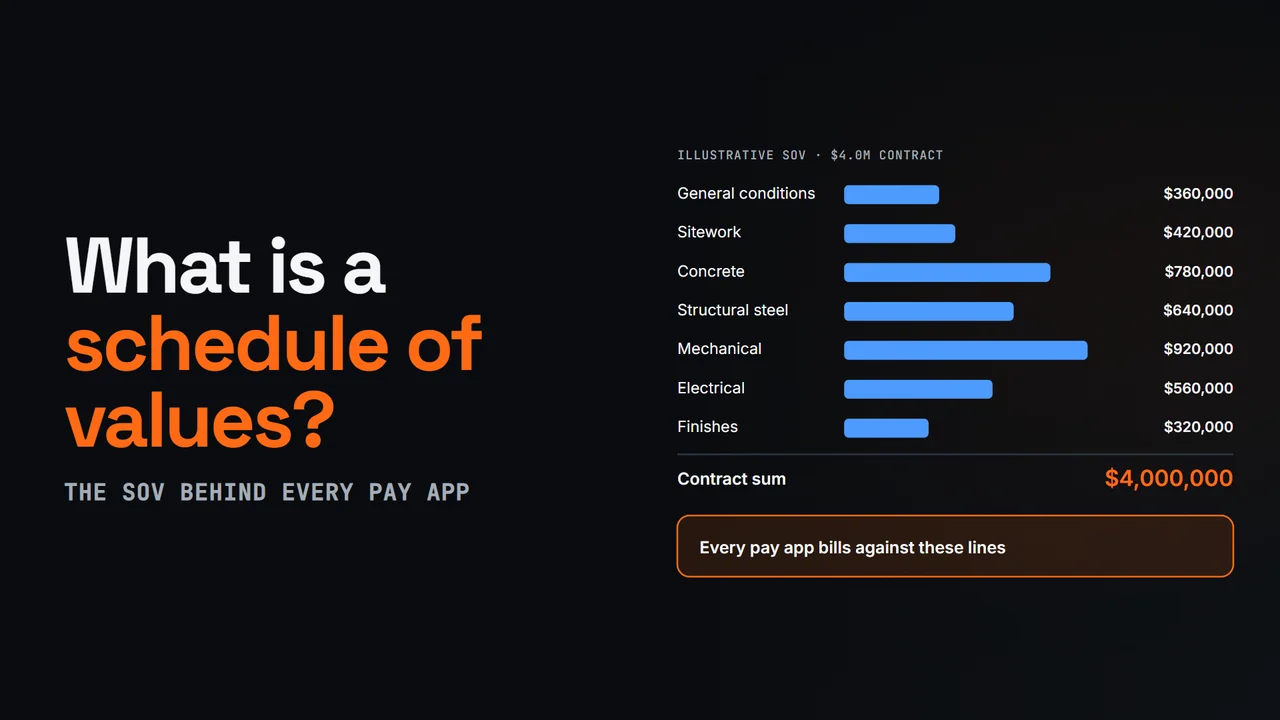
A schedule of values, or SOV, breaks the contract sum into line items, such as general conditions, sitework, concrete, steel, mechanical and electrical, each with a dollar value. The lines add up to the contract sum, and every pay app bills against them.
The contractor prepares it. Under AIA A201, section nine point two, on stipulated sum and GMP contracts, the contractor submits it before the first application for payment. The architect reviews the values and can ask for backup. Once it's accepted, it's the basis for reviewing every pay app.
Each month, the continuation sheet reports every line: work from previous applications, work this period, materials stored, total to date, percent complete, balance to finish and retainage. The summary page rolls those columns up into the current payment due.
Approved change orders change the contract sum, so each one is added, usually as its own line. On the sample Riverside job, change order fourteen, eighty-six thousand four hundred dollars for fire dampers, becomes its own line, and the SOV now totals forty-nine point three million. Pending changes stay off the bill.
Front-loading means putting more value on early lines, like mobilization or general conditions, than the work is worth, so more is billed early. It helps the contractor's cash flow, but leaves the owner paying ahead of the work, which is why architects look for it. A good SOV has lines you can measure progress on, each tied to cost codes.
In os.construction, prime contracts, subcontracts and purchase orders each hold a schedule of values. Payment applications fill the continuation sheet from the contract's SOV, add executed change orders and carry the previous column forward, so nobody retypes the SOV each month.
Video page with chaptersMore in Construction concepts explained
When the spreadsheet stops scaling
Pay apps that read the contract instead of a copy of it.
- The SOV comes from the contract, and From Previous fills from the last pay app, so nothing is retyped each month.
- Executed change orders land on line 2 automatically. A pending change can't slip onto the bill.
- Work and materials retainage are set separately and calculated per line, with retainage released entered on the pay app.
- Draft, Submitted, Approved, Paid, with Mark Paid only once Cash Ledger entries fund it.
Pay application questions
What is the difference between a G702 and a G703?
They are the two pages of the most common pay application layout. The G703-style continuation sheet has one row per schedule of values line (columns A through I: item, description, scheduled value, from previous application, this period, materials stored, completed and stored, balance to finish, retainage). The G702-style summary rolls those columns into lines 1 to 9 and the current payment due. G702 and G703 are AIA document numbers; this builder follows the same widely used layout but is not an AIA document.
How is the current payment due calculated?
Line 3 contract sum to date (original plus approved change orders), line 4 completed and stored to date, line 5 retainage, line 6 = line 4 − line 5, line 7 previous certificates, and line 8 current payment due = line 6 − line 7. On the Riverside sample, $33,000,000 completed and stored less $3,300,000 retainage is $29,700,000; less $27,620,640 previously certified leaves $2,079,360 due.
How do stored materials work on a pay application?
Materials delivered but not installed are billed in the stored materials column, to date, and often carry their own retainage rate. They are not in "from previous" or "this period". When they are installed, the value moves into this period and stored drops by the same amount, so the install is not new billing. If stored drops by more than the work billed, material left storage without being billed, and the builder flags it.
How does a retainage reduction from 10% to 5% at 50% complete work?
There are two common readings, and the builder supports both. "Beyond the milestone": the first 50% of the contract stays at 10% and later work is held at 5%. "All work": once the job reaches 50%, retainage on everything drops to 5% and the excess already held is released on that application. The milestone can be measured on the whole contract or line by line. Bill a reduction only when the contract allows it and the owner has approved it.
Why doesn't line 7 match my previous pay application?
Line 7 should equal line 6 of the last certified application. It drifts when the owner short paid or adjusted the last application, when retainage rates or releases changed, or when someone retyped column D. The builder compares line 7 with what your previous columns imply and, after a roll forward, with the stored previous application line by line.
Can I bill a change order that hasn't been approved?
No. Only approved (executed) change orders belong on line 2 and on the continuation sheet. Mark unapproved changes as "Pending CO": they stay visible but are left out of the contract sum and totals, and any billing on them is flagged as an error.
Is this an official AIA form?
No. It follows the common G702/G703 layout so reviewers recognize it, but it is not an AIA document and os.construction is not affiliated with The American Institute of Architects. If your contract requires the AIA documents themselves, use licensed AIA forms; you can still use this builder to do and check the math.
Is my data uploaded anywhere?
No. Files and pasted cells are read in your browser and the application is saved only in this browser's local storage so it is there next month. "Forget everything saved in this browser" clears it. We count that the tool was used, never names or amounts.
Can I open the export in Excel?
Yes. The Excel download has a summary sheet and a continuation sheet; completed and stored, percent, balance to finish and the totals are live formulas. The CSV opens in any spreadsheet. Free-text cells are escaped so they can't run as formulas.