Construction WIP should not be a reconciliation project.
Build the WIP schedule from records that already exist: approved change orders on the contract, posted job cost, posted billings and the PM's frozen cost to complete. With one data core from field to ledger, month-end WIP becomes a review instead of a rebuild from four exports.
14-day free trial. Pricing for paid plans isn't set yet.
WIP is the last stop. It should read, not rebuild.
Every column of a WIP schedule starts somewhere upstream. Follow CO #14 from the field into the contract value, cost and billings WIP reads, then flip the switch to see the version that ends in a spreadsheet.
Read this diagram as text
One record. The same record moves through every stage, and each stage links to the one before:
- RFI: RFI-212 is answered: add fire dampers at the L3 corridor.
- Change event: A change event opens from RFI-212. The exposure shows on the forecast before anything is signed.
- Change order: CO #14 is approved at $86,400, linked to the RFI and the change event.
- Budget + commitment: Budget line 23-330 and the Summit Mechanical subcontract update from CO #14.
- Owner billing: CO #14 arrives on Pay App #9 as a new G703 line.
- Job cost: Subcontractor bills post against the same commitment and cost code.
- WIP + GL: WIP reads the approved contract, posted cost and billings. Nothing was retyped.
Today, copied between tools. RFI, change event and change order live in PM software. CO #14 is exported and retyped into a budget spreadsheet, typed again onto the pay app (as $86,040 instead of $86,400), retyped into accounting, exported to a WIP workbook, and the over/under entry is retyped into the general ledger. That is four re-keys, four copies and one amount that no longer matches.
Sample figures from an illustrative job. WIP and the general ledger are part of the Accounting module.
Three reasons WIP takes a week.
- Failure 01
Four exports and a spreadsheet
Contract value from PM software, cost and billings from accounting, cost to complete from emails to PMs. Someone stitches them together after the month closes, and the WIP describes a month that ended weeks ago.
- Failure 02
Change orders the contract column hasn't seen
An approved change order sits in project software but not in the workbook's contract value. Percent complete looks right, earned revenue is wrong, and over or under billing moves for a reason nobody can see.
- Failure 03
A number nobody can trace
The bank or the surety asks why a job's under billing jumped. The answer is spread across a formula, a pasted value and a PM's reply on the 26th. There is no trail from the figure back to the record.
Every column, read from its source.
WIP computes a snapshot for an entity at an ended period. Each input comes from a record someone already approved, and each revision keeps its trace.
- 01
Contract value from the contract record
Executed prime contracts plus approved prime change orders. A change order approved on the project is in the contract column without anyone retyping it, and a change made after the cutoff keeps its captured period value.
Answers failure 02 - 02
Cost and billings from posted records
Cost to date is posted job cost. Billed to date is posted AR on income accounts less posted credit memos, with retainage included. These are the same postings your financial statements read.
Answers failure 01 - 03
PM forecasts, frozen at the period end
PMs save dated cost-to-complete inputs. Once the last one for the period end is approved, or the period is soft-closed, the estimate freezes, so the WIP for that period cannot drift.
Answers failure 01 - 04
A calculation trace on every row
Open a snapshot and each job shows its calculation trace, the change in earned revenue against the prior revision, links to the forecast and job cost, a CSV export and the audit trail.
Answers failure 03 - 05
Approve, post, tie out
A controller other than the preparer approves. Posting books under billings, over billings and loss provisions on an auto-reversing journal, and the WIP-to-GL reconciliation flags any difference from job-tagged GL revenue and cost.
Answers failure 03
The math WIP runs (cost-to-cost)
| Line | Where it comes from |
|---|---|
| Revised contract | Executed prime contracts + approved prime change orders |
| Estimated total cost | Job cost forecast, frozen at the period end |
| Percent complete | Posted cost to date ÷ estimated total cost |
| Earned revenue | Percent complete × revised contract |
| Over / (under) billing | Posted billed to date − earned revenue |
Try it on your own numbers with the free over/under billing calculator.
The inputs WIP reads, in the app.
Real screens on the illustrative Riverside job: the forecast behind estimated cost, the billing behind billed to date, and committed cost by code.
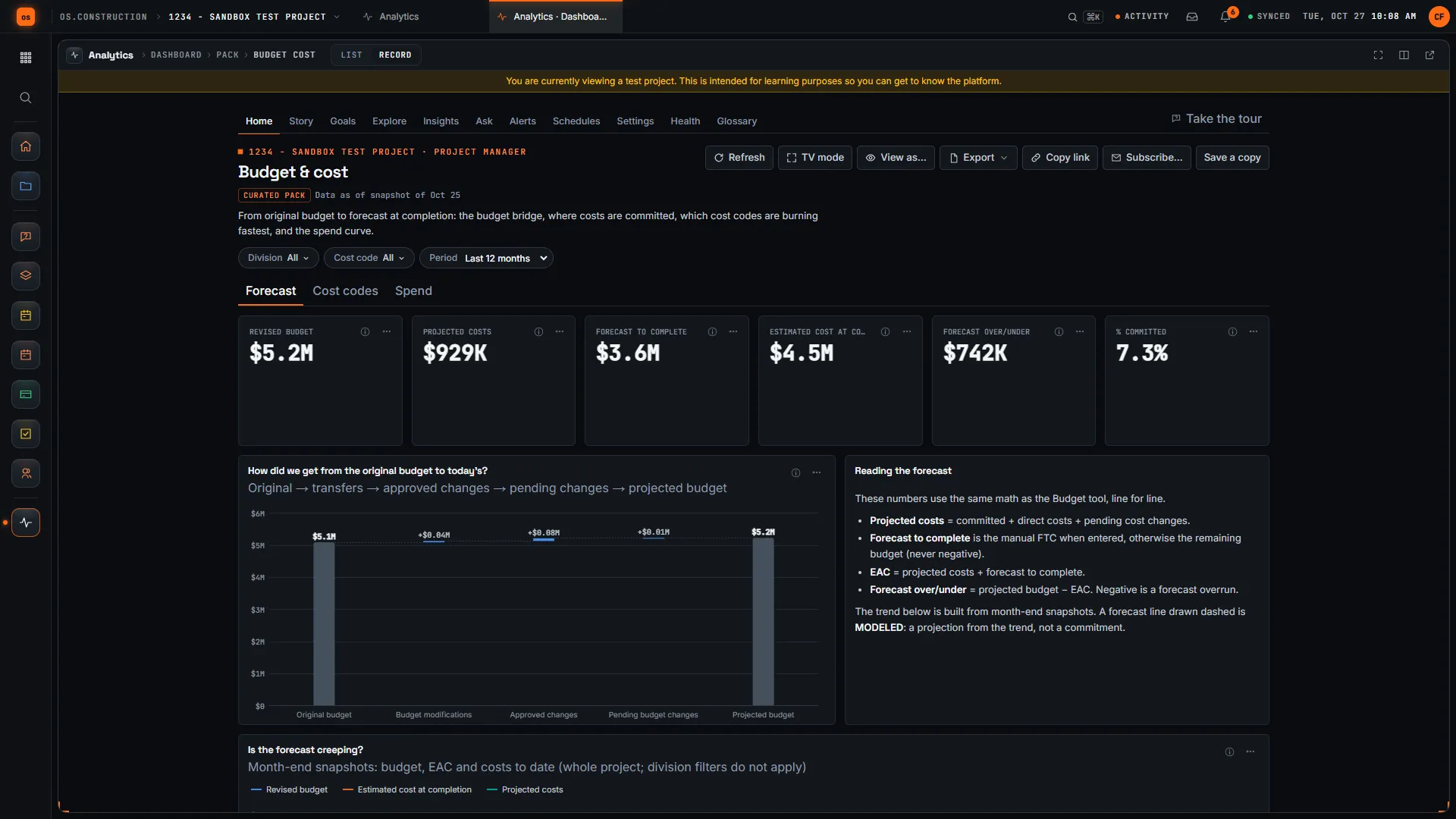
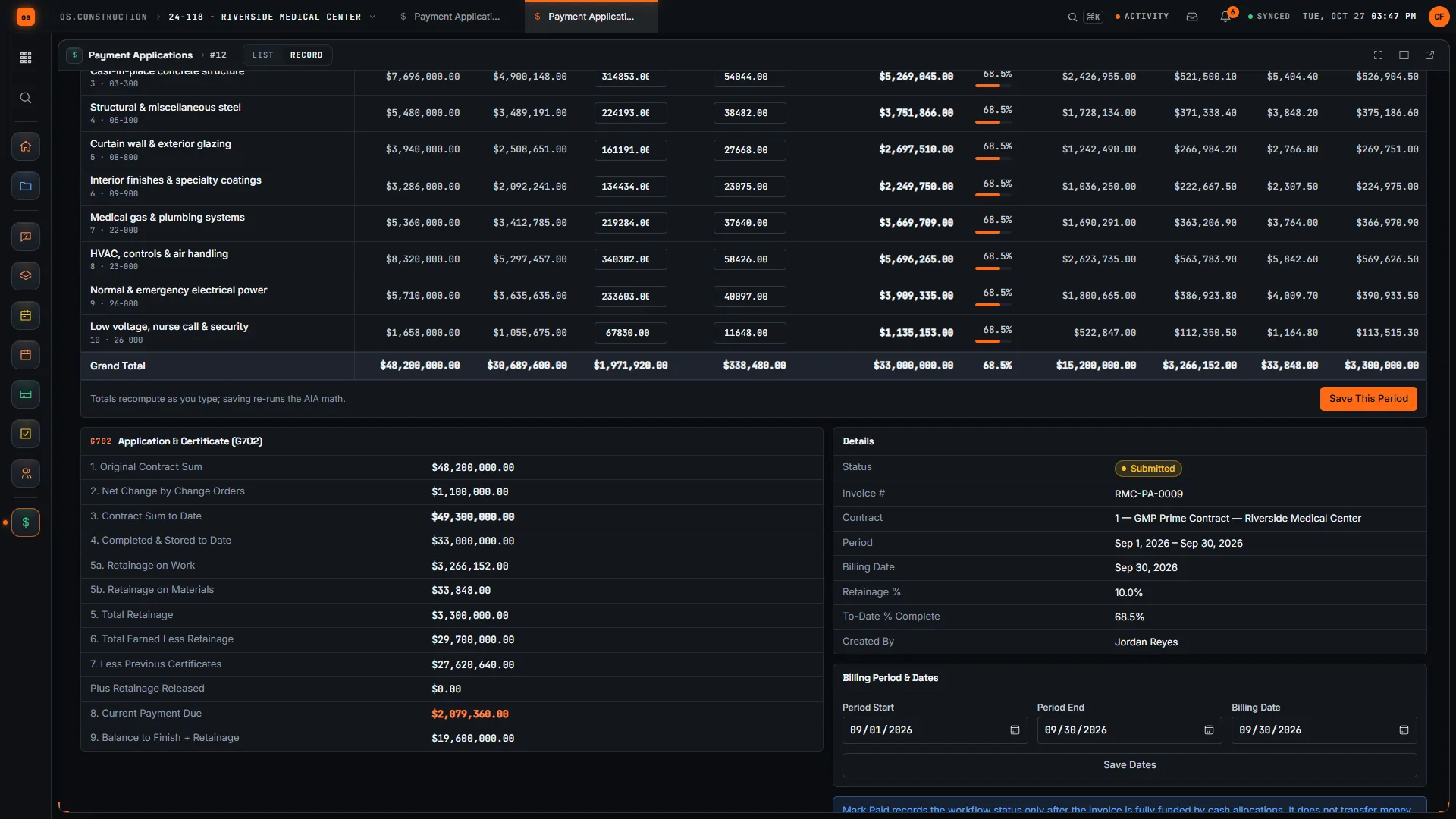
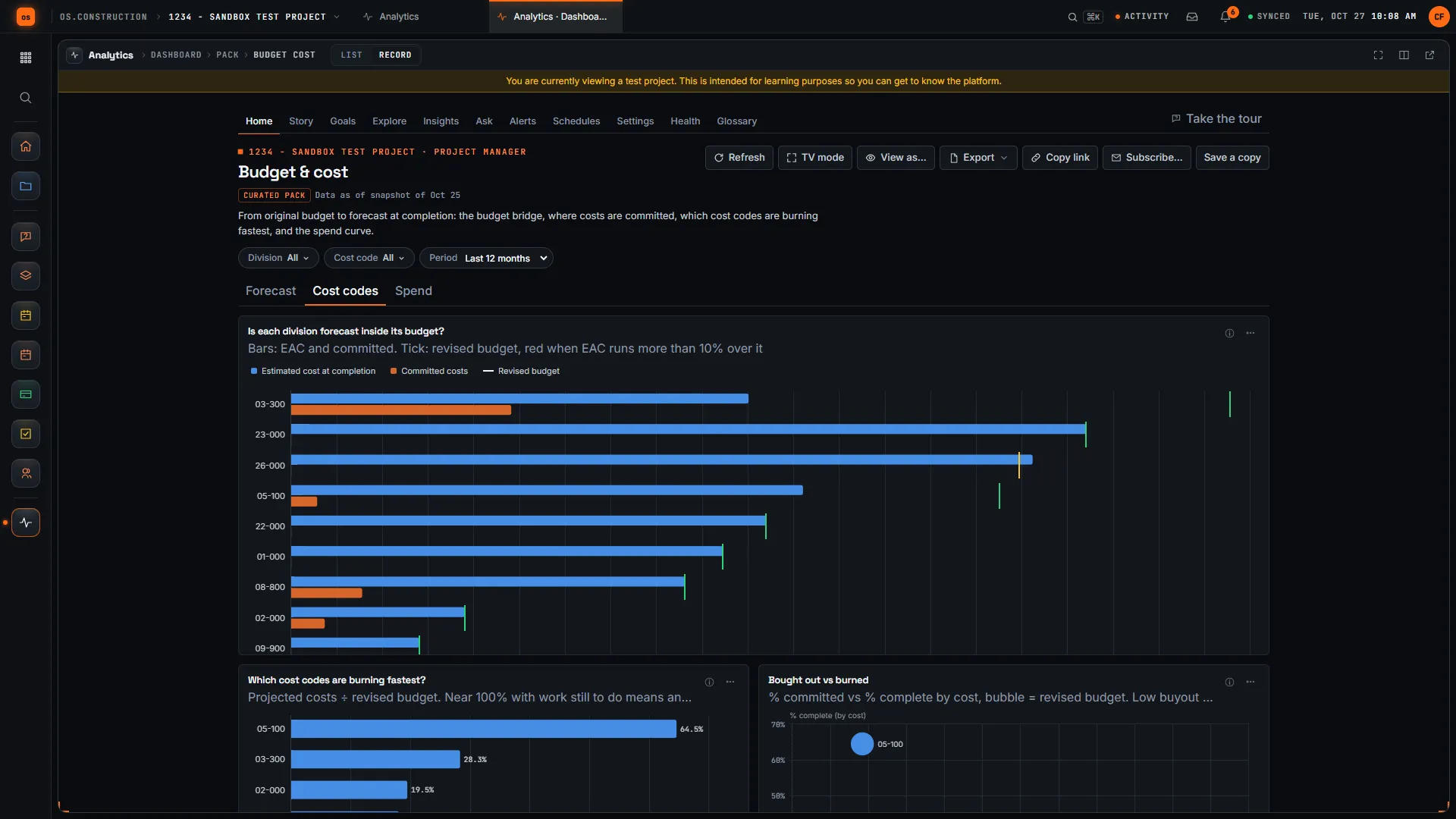
Rather click than read? Open the interactive demo: open RFI-212, turn it into CO #14, approve it and watch the budget and Pay App #9 update, on sample data in your browser.
Exactly what ships today.
Status comes from the app's own export, not from this page's copy. Live is in the product now; Preview is in the product with limits we document; Planned is not built yet.
- LiveWork in Progress (WIP)Compute a snapshot per entity and period, approve independently, post the over/under journal.
- LiveJob Cost ForecastForecast from budget, approved commitments and posted job cost, with dated PM cost to complete.
- LiveFinancial ReportsWIP schedule, completed contracts, WIP-to-GL reconciliation and margin fade alerts.
- LiveFiscal PeriodsPeriod locks and a close checklist; soft close freezes the WIP forecast.
- LiveAccounts ReceivableCertified pay apps become AR invoices, the source of billed to date.
- LivePrime ContractsThe executed contract and schedule of values WIP reads.
- LiveChange OrdersApproved prime change orders flow into the revised contract.
- LiveBudgetBudget and forecast by cost code.
- LivePayment ApplicationsG702/G703-style owner billing with retainage.
- PlannedRisk agentAI that would watch cost and schedule nightly for early fade. Not built; WIP does not use it.
WIP and the rest of Accounting are live: they run in the product with documented limits, and historical source completeness is not certified. See the full list on the changelog and the platform overview.
Your books, your data.
Permissions per tool
Permission templates set each tool to none, read only, standard or admin, enforced the same way in the app and the API.
MFA and SCIM
Authenticator-app sign-in for every user, and SCIM 2.0 provisioning from your identity provider.
Change history
Tracked changes record who changed which fields and when, shown as item history and in the activity feed.
Your data, exportable
Export lists to CSV and key records to PDF. Leaving should never mean losing your history.
REST API · 2,549 endpoints
Project and accounting records are available through the documented REST API, with OAuth tokens and signed webhooks for the tools you keep.
We don't hold SOC 2 or any other security certification today, and we won't imply that we do. Read exactly what is in place, or go straight to the API documentation.
Common questions.
What is a WIP schedule in construction?
A work-in-progress schedule lists every open job with its contract value, estimated total cost, cost to date, percent complete, earned revenue, billed to date and the resulting over or under billing. Banks and sureties read it to judge whether jobs are holding their planned margin and whether billing is ahead of or behind the work.
How does os.construction calculate over and under billing?
For cost-to-cost jobs, percent complete is cost to date divided by estimated total cost, earned revenue is percent complete times the revised contract, and over or under billing is billed to date minus earned revenue. Supported as-invoiced jobs recognize revenue equal to billings.
Where do the WIP inputs come from?
Contract value is executed prime contracts plus approved prime change orders. Cost to date is posted job cost. Billed to date is posted AR on income accounts less posted credit memos. Estimated cost comes from the job cost forecast and the PM cost to complete for the period end.
Does WIP post to the general ledger?
Yes, after approval. A controller other than the preparer approves a revision, and posting books under billings, over billings and loss provisions on a journal at the period end that reverses automatically on the first day of the next period. Posting the same revision again changes nothing.
What happens when a job is missing data?
The other jobs still compute. Jobs the snapshot leaves out are listed as exceptions that the approver must acknowledge with a note. A job that cannot compute, for example while a PM input is pending, blocks approval until a new revision resolves it with a fix or an override.
Can I hand the WIP to my bank or surety?
The WIP schedule report shows the posted snapshot in force on a date, and the completed contracts and WIP-to-GL reconciliation reports read the same posted rows. Historical source completeness is not certified, so review the inputs and apply your own revenue recognition policy before you send it.
Is WIP live today?
Yes. WIP is part of the Accounting module, which is live: it runs in the product with documented limits. The change orders, budgets, commitments and pay apps that feed it are live.
Read, calculate, then try it.
From the blog
Free tools
Terms on this page: WIP schedule · Over billing · Under billing · Percent complete · Cost-to-cost method · Earned revenue · Estimate at completion · Cost to complete · Loss provision · Margin fade · ASC 606
Make WIP a review, not a rebuild.
Click through the change order that feeds the contract column in the interactive demo, or start a 14-day free trial with a sample project already set up.