Budget, commitments and cost: one ledger
The budget doesn't ask accounting for numbers. It reads the job's own commitments, change orders and direct costs, every time you open it. Build Riverside's cost picture column by column, from original budget to estimated cost at completion.
Riverside's budget and cost, column by column
- Column 1 · Budget · sample data
Original budget
Each budget line is a cost code plus a cost type (Labor, Equipment, Materials, Subcontracts or Other). You enter the original amount, or quantity × unit cost. Once it's final, Lock Budget keeps the original what you bid.
Riverside original cost budget: $42,640,000 - Columns 2–4
Modifications and approved changes
Transfers between lines are Modifications, so contingency drawdown stays visible. Approved Budget Changes come from approved prime contract change orders and approved Budget Changes; a change event can also post its budget-change amounts by cost code when it's closed.
$42,640,000 + $0 + $860,000 = $43,500,000 revised - Columns 5–6
Pending changes make the projected budget
Prime contract change orders still in pricing, pending or proceeding show as Pending Budget Changes. Drafts don't count anywhere.
$43,500,000 + $300,000 = $43,800,000 - Commitments
Subcontracts and POs become committed cost
A subcontract counts once it's Approved (or Complete); a PO once it's Approved. Approved commitment change orders add to it. Out for signature, its lines sit in Pending Cost Changes instead; drafts don't count.
Committed: $36,800,000, 84.6% of revised budget - Direct and pending cost
Everything not on a commitment
Direct Costs are costs that aren't on a subcontract or PO, counted when approved, pending or revise-and-resubmit. Pending commitment lines and change orders add Pending Cost Changes.
$1,650,000 direct + $500,000 pending cost - Projected costs
Money already spoken for
Committed plus direct plus pending cost changes. If a cost code has cost but no budget line, it still appears, tagged No budget line, so cost never drops out of the report.
$36,800,000 + $1,650,000 + $500,000 = $38,950,000 - Forecast tab
Forecast to complete: where the PM earns their keep
By default, forecast to complete is projected budget minus projected costs, never below zero: $4,850,000 here, which would just say "we'll land on budget". The PM knows the remaining mechanical work is running heavy and types a manual forecast on those lines.
$38,950,000 + $4,729,800 manual FTC = $43,679,800 EAC - At completion
A thin cushion, said out loud
Projected budget minus EAC is +$120,200. Against the $49,300,000 contract, EAC leaves $5,620,200 of margin (11.4%). Capture a snapshot at month-end, and the Variance tab shows what moved next month.
Summit Mechanical's subcontract
A subcontract holds the contract company, retainage, inclusions and exclusions, a schedule of values by cost code, its change orders and the invoices billed against it. Its status decides where it lands in the budget.
- DraftNot counted yet
- Out For BidNot counted yet
- Out For SignaturePending Cost Changes
- ApprovedCommitted Costs
- CompleteCommitted Costs
Purchase orders go Draft, Processing, Submitted, Partially Received, Received, Approved, Closed: approved lines are committed, and processing, submitted or received lines are pending cost. Terminated and Void are also subcontract statuses.
Subcontract amount illustrative; CCO-03 is the Riverside sub change behind CO #14. The Revised Contract card adds original amount, approved PCOs and approved CCOs.
Sub invoices are entered against the commitment's SOV: this period, materials stored, and retainage at the commitment's rate. The budget reads committed cost from the commitment, not from a spreadsheet someone updates on Fridays.
The same numbers, by cost code
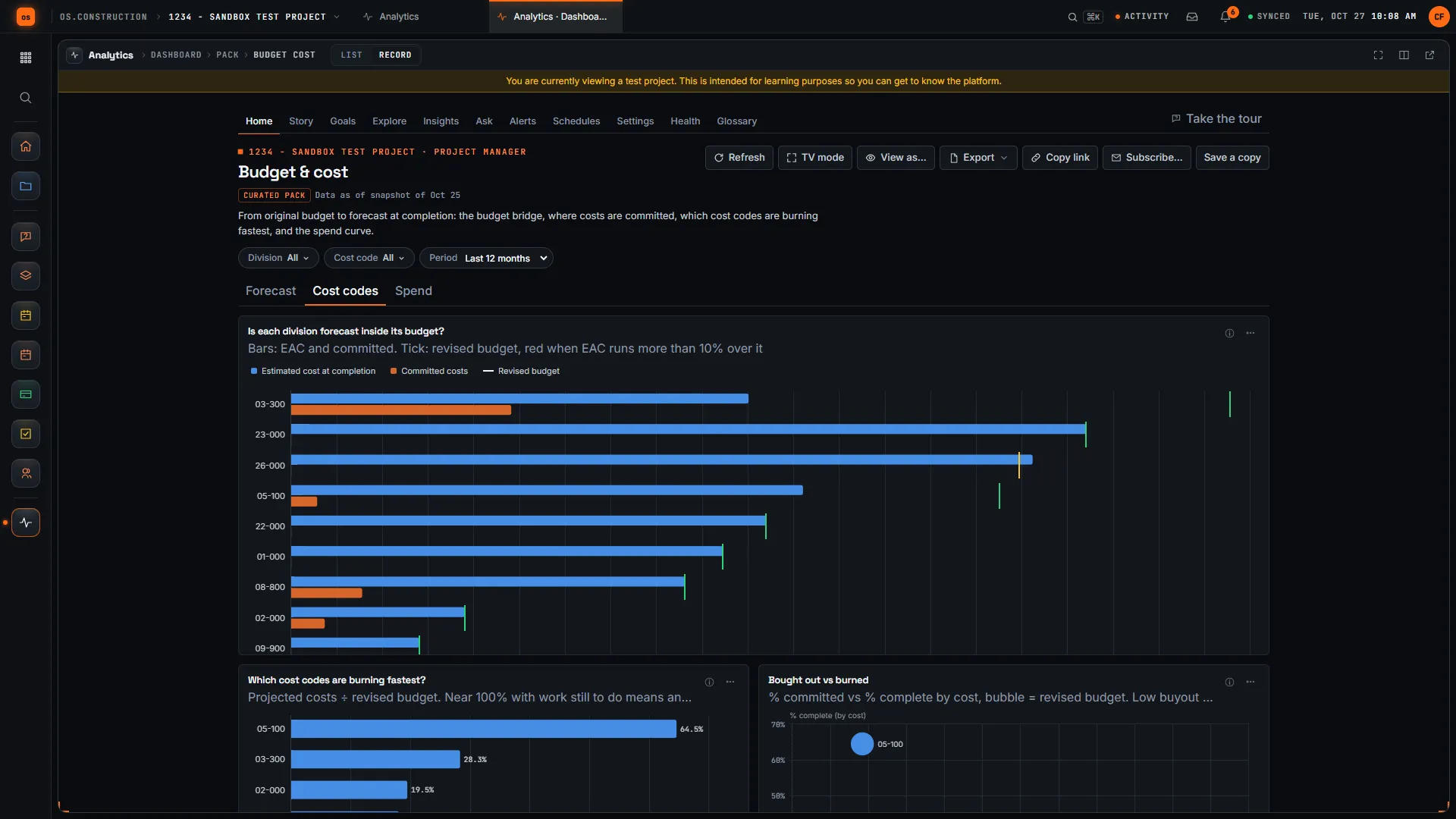
The Budget tool shows these columns line by line, grouped by division. Analytics' Budget & cost pack (preview) reads the same math and draws it: here EAC and committed cost against each line's revised budget, on a test project with seeded data.
Every column, as a table
| Column | Comes from | Riverside |
|---|---|---|
| Original budget | Entered per cost code and cost type | $42,640,000 |
| Modifications | Transfers between lines | $0 |
| Approved budget changes | Approved prime contract COs and Budget Changes | $860,000 |
| Revised budget | Original + modifications + approved | $43,500,000 |
| Pending budget changes | Prime COs in pricing, pending or proceeding | $300,000 |
| Projected budget | Revised + pending | $43,800,000 |
| Committed costs | Approved subcontracts, POs and commitment changes | $36,800,000 |
| Direct costs | Approved, pending or revise-and-resubmit direct costs | $1,650,000 |
| Pending cost changes | Commitment lines and changes not yet approved | $500,000 |
| Projected costs | Committed + direct + pending | $38,950,000 |
| Forecast to complete | Default projected budget − projected costs; manual override | $4,729,800 (manual) |
| Est. cost at completion | Projected costs + forecast to complete | $43,679,800 |
| Over/under at completion | Projected budget − EAC | +$120,200 |
Keep going
Keep exploring
Related across os.construction
- DocsSubcontracts and commitment changesHow subcontracts and purchase orders are structured, how commitment change orders follow owner changes, and how sub invoices, retainage and compliance are checked against the commitment.
- DocsCommitments and change ordersSubcontracts, purchase orders, owner change orders and commitment change orders, and how one change flows from the field to the contract, the commitment and the budget.
- BlogThe 3-way match, explained for construction APThe textbook 3-way match is a purchase order, a receiving report and an invoice. Construction AP needs a version that works for subcontracts, progress billing, retainage and lien waivers. Here's what to match, and where it breaks.
- ExplainerChange events vs change orders: the full lifecycleWhat a change event is, what a PCO and change order are, and where each one shows up in the budget, the contract and the pay app in os.construction.
- ExplainerBidding: from bid package to awarded commitmentRun a bid package in os.construction: release, invite, level the quotes, recommend and award, then turn the awarded bid into a draft subcontract.
- GlossaryBuyoutThe process after award of turning the estimate into signed subcontracts and purchase orders, locking in actual costs and scope for each trade.
Sample project included
Try this workflow on the sample project
Every trial workspace includes a sample project with sample data, so you can follow these steps in the app before touching a live job.
Want this on live job data?
Budget, commitments, change orders and direct costs are live in os.construction. Company Accounting tracks posted job costs separately; review and reconcile the project and accounting views.
14-day free trial. Pricing for paid plans isn't set yet. Talk to us. Already have an account? Sign in →
All figures are illustrative sample data, not a real project. Contract terms and state law decide how retainage, stored materials and change orders work on your job. Check both.