Critical path calculator with total and free float
Type or paste your activities, durations and logic. The calculator runs the forward and backward pass, finds the critical path, and shows early and late dates, total float and free float for every activity, with a Gantt chart, a network diagram and every step of the math written out.
Sample data: Second-floor office tenant improvement (illustrative), a fictional job of 13 activities. Edit it or import your own.
Prefer a spreadsheet? Get the free construction schedule (Gantt) template for Excel
How this is calculated
The calculator uses the precedence diagramming method (activity on node), the way Primavera P6 and Microsoft Project draw logic. Every relationship puts a bound on the successor in the forward pass and on the predecessor in the backward pass:
Relationship   Forward pass (successor ES ≥ …)     Backward pass (predecessor LF ≤ …)
FS + lag       pred EF + lag                       succ LS − lag
SS + lag       pred ES + lag                       succ LS − lag + pred duration
FF + lag       pred EF + lag − succ duration       succ LF − lag
SF + lag       pred ES + lag − succ duration       succ LF − lag + pred duration

ES = max(bounds, 0)      EF = ES + duration      Project finish = max(EF)
LF = min(bounds, finish) LS = LF − duration
Total float = LS − ES    Free float = min over successors of the gap on early dates
Critical = total float 0
Watch the explainer · 1:53
Critical path and float in 2 minutes
- 0:00What sets the finish date
- 0:16An illustrative network
- 0:36The forward pass
- 0:57The backward pass
- 1:13Total float and free float
- 1:33Run it on your schedule
Read the transcript
The critical path is the chain of activities that sets the finish date. Delay one of them, and the finish moves by the same amount. To find it you need three things: the activities, their durations, and the logic of what waits for what.
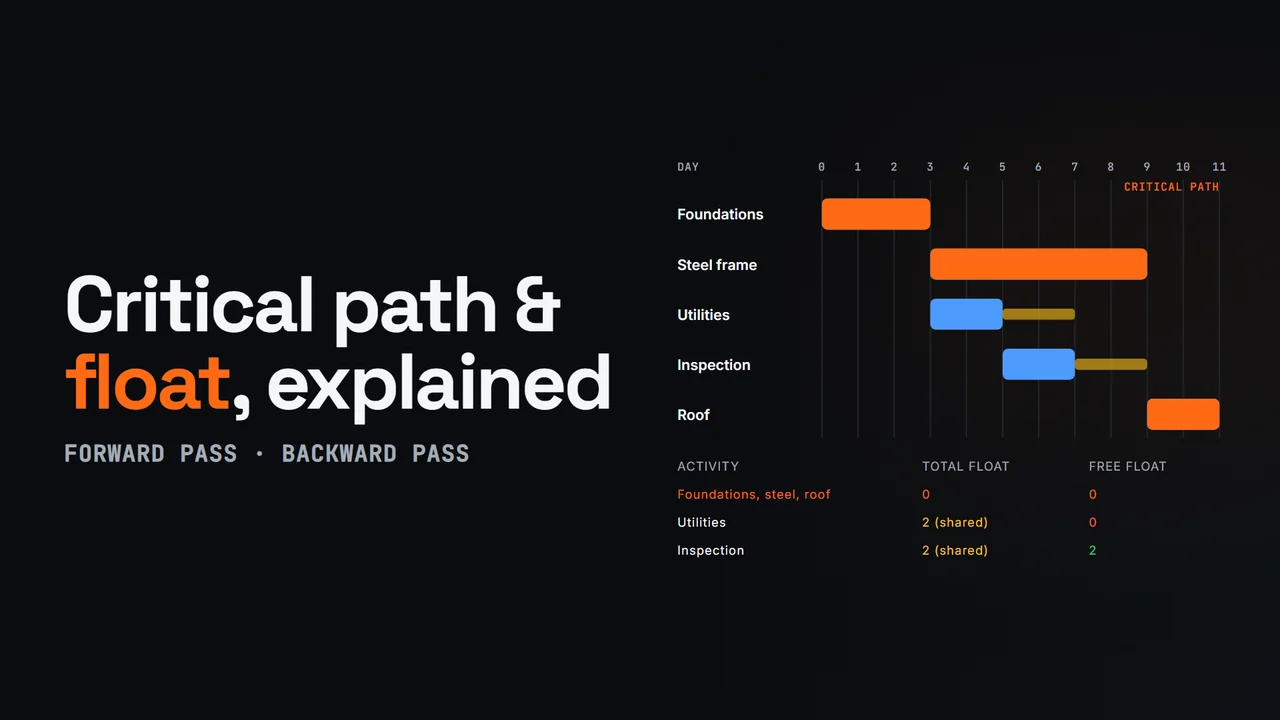
Take an illustrative five-activity job. Foundations take three days. Then two paths run side by side: steel frame, six days, and underground utilities, two days, followed by a two-day utility inspection. The roof takes two days, and it waits for both paths.
The forward pass finds the earliest dates. Each activity starts when its last predecessor finishes, and early finish is early start plus duration. Steel finishes at day nine. The utility inspection finishes at day seven. The roof waits for the later one, so it starts at nine and finishes at eleven. The job takes eleven days.
The backward pass works back from day eleven to find the latest dates. The roof must start by day nine, so the inspection must finish by nine and start by seven, and the utilities must start by day five. One calendar, no date constraints.
Total float is late start minus early start. Foundations, steel and the roof have zero, so they're the critical path. The utility work has two days of total float, but it's shared. The utilities have no free float, because any slip pushes the inspection. The inspection has two days of free float.
Try your own activities in the free critical path calculator, which writes out every step of the math. In the os.construction schedule, the Planner calculates total and free float for every activity, and the longest path.
Video page with chaptersMore in Construction concepts explained
What is the critical path method?
The critical path method (CPM) calculates the earliest and latest each activity can start and finish from three inputs: durations, logic (which activity waits for which) and a start date. The critical path is the chain of activities with no float, the sequence that sets the finish date. Shorten it and the job finishes sooner; delay any activity on it and completion moves with it.
Two passes through the network do all the work. The forward pass gives early dates, the backward pass gives late dates, and the difference between them is float. That is all this calculator does, transparently, so you can check a schedule by hand or teach the method with real numbers. GAO's Schedule Assessment Guide treats a valid critical path and reasonable float as two of its ten best practices for a reliable schedule, and both depend on logic being complete.
Critical path method example: a tenant-improvement job
The sample loaded above is an illustrative 13-activity office fit-out. Its critical path is A → B → D → E → F → G → H → J → K → L → M, and the project takes 38 working days. Here are the passes for the activities that show each rule:
| Activity | Logic | Forward pass | Backward pass | Float |
|---|---|---|---|---|
| E MEP rough-in (8 d) | D SS+3 | ES = D ES 8 + 3 = 11; EF = 19 | LF = min(F LS 19, I LS 24) = 19 | TF 0, critical |
| C HVAC unit procurement (20 d) | A | ES = A EF 3; EF = 23 | LF = I LS 24; LS = 4 | TF 1, FF 0 |
| I Set rooftop unit (4 d) | C, E | ES = max(C 23, E 19) = 23 | LF = J LS 28; LS = 24 | TF 1, FF 1 |
| G Hang drywall (7 d) | F | ES = F EF 20; EF = 27 | LF = min(H SS+3: 23 − 3 + 7, J LS 28) = 27 | TF 0, critical |
| L Punch and clean (4 d) | K FF+2, J | ES = max(K EF 36 + 2 − 4, J EF 32) = 34 | LF = M LS 38 | TF 0, critical |
The interesting activity is the rooftop unit. Procurement (C) has one day of total float but no free float: if the unit arrives a day late, installation (I) starts a day late, and installation then has nothing left either. Two days late and the ceiling grid, everything after it and substantial completion all move a day. That is the conversation a float column is for. Open Show the math in the calculator for all 39 steps.
How to calculate total float and free float
Total float = late start − early start. It is how far an activity can slip before the project finish moves. Free float = the smallest gap to any successor on early dates. It is how far an activity can slip before it disturbs the next activity. Free float can never exceed total float.
Float belongs to a path, not to one activity. In the sample, C and I share the same single day: use it on procurement and installation has none. Adding the float of activities on the same path double-counts it, which is one of the mistakes covered in total float versus free float. Who may use float is a contract question the arithmetic does not answer.
How SS, FF and SF relationships and lags change the math
Finish-to-start is the default and the easiest to read. Start-to-start and finish-to-finish with a lag model overlapping work, such as rough-in starting three days after framing starts. Start-to-finish is rare. Every type is handled exactly as P6 does it in a single-calendar network, and the calculator flags dangling logic: an activity whose only successors hang off its start, so a late finish would drive nothing.
- Lags are waiting time in working days. Keep them for real waits (cure time, a required notice period) and make them visible; lags and leads covers what to check.
- Leads (negative lags) let a successor start before its predecessor finishes. They are legal but hard to verify, and many specifications limit them.
- Open ends: activities without a successor default their late finish to the project finish, which can overstate float. Tie everything to a finish milestone.
Where a hand calculation stops and a real schedule starts
This calculator uses one continuous working-day timeline. Real schedules add calendars per activity, date constraints that can create negative float, progress against a data date, and scheduling options such as retained logic. Each changes the numbers, and a zero-float filter is no longer guaranteed to match the longest path. Read constraints and negative float and calendars before you compare these results with a P6 file, and try the critical path lab to watch a path switch.
Related: critical path, float, longest path, trace logic, look-ahead schedule and DCMA 14-point assessment in the glossary; the schedule forensics library, activity durations and logic and GAO and DCMA schedule reviews; and how os.construction calculates CPM. To watch the two passes and a slip step by step, read how the critical path works.
How to calculate the critical path
- List the activities. Give each activity a short unique ID, a name and a duration in working days. Use 0 for milestones such as notice to proceed or substantial completion.
- Add the logic. In the predecessors column, list what each activity waits for: B for finish-to-start, or B SS+3, B FF+2, B SF-1 for other relationship types and lags. Every activity except the first should have a predecessor and every activity except the last a successor.
- Run the forward pass. The calculator gives every activity an early start equal to the latest date its predecessors allow and an early finish of early start plus duration. The largest early finish is the project duration.
- Run the backward pass. Starting from the project finish, each activity gets a late finish equal to the earliest date its successors allow and a late start of late finish minus duration.
- Read the float. Total float is late start minus early start. Free float is the gap before an activity delays any successor. Activities with zero total float form the critical path, highlighted in orange.
- Check and export. Open Show the math to audit every step, switch between the Gantt and the network diagram, and export the table as CSV for Excel.
Questions experts ask
How do you calculate total float?
Total float = late start − early start (equivalently late finish − early finish when durations are fixed). Get the early dates from a forward pass and the late dates from a backward pass. In the sample, the HVAC unit procurement has an early start of 3 and a late start of 4, so it has 1 working day of total float.
How do you calculate free float?
Free float is the smallest gap between an activity and its successors on early dates. For a finish-to-start link it is the successor's early start − lag − the activity's early finish; take the minimum across all successors. An activity with no successors measures to the project finish. In the sample, rooftop unit installation finishes at 27 and the ceiling grid starts at 28, so it has 1 day of free float.
What is the difference between total float and free float?
Total float is how far an activity can slip before it delays project completion. Free float is how far it can slip before it delays the next activity. Free float is never more than total float. An activity can have total float and no free float: any slip moves the next trade, even though the finish date holds.
Is the critical path always the longest path?
In a simple network with one calendar and no date constraints, yes: the path with zero total float is the longest path through the logic. In real schedules, constraints, multiple calendars and progress can produce critical activities that are not on the longest path, which is why P6 offers both a total float threshold and a longest path option.
What does negative float mean?
Negative float means the network cannot meet an imposed date, such as a contract completion constraint: the late dates come out earlier than the early dates. This calculator has no date constraints, so its float is never negative. See the guide to constraints and negative float.
Why does the calculator start at day 0 instead of day 1?
It counts time boundaries: an activity with early start 0 and duration 3 works days 1 to 3 and finishes at boundary 3, so the next activity starts at 3. Some textbooks start at day 1 and set early finish to start + duration − 1. Both conventions give the same durations, float and critical path.
How do I enter a lag or a lead?
Add the type and a signed number after the predecessor ID: D SS+3 means start 3 working days after D starts; K FF+2 means finish at least 2 days after K finishes; B-2 is finish-to-start with a 2-day lead. Lags and leads are in working days.
Can I paste a schedule from P6 or Microsoft Project?
Yes, if you export the activity table to Excel or CSV with an ID, name, duration and predecessors column. The calculator reads common headers such as Activity ID, Task Name, Duration and Predecessors. It does not read XER or project XML files and ignores calendars, constraints and progress.
Is my schedule uploaded anywhere?
No. The calculation runs in your browser. The activities are kept in this browser's storage and in the share link, which carries them in the address itself.
Sources
Checked 2026-11-17. Method references only. Your contract and schedule specification decide which scheduling rules apply to a project.
- GAO Schedule Assessment Guide: Best Practices for Project Schedules (GAO-16-89G), U.S. Government Accountability Office (December 2015).Used for: the best practices on sequencing all activities, confirming a valid critical path and reasonable total float, and the definitions of total and free float
- Recommended Practices, AACE International (current).Used for: professional practice on developing activity logic and identifying the critical path (including RP 49R-06, Identifying the Critical Path)
- About Float (Primavera P6 help), Oracle (current).Used for: how P6 defines total float and free float, used to match the relationship math
When the spreadsheet version stops scaling
The same math on a real schedule, with calendars, constraints and progress.
This calculator is a teaching and checking tool. In os.construction the Schedule module runs a native CPM engine on the project's own schedule, next to the RFIs, submittals and daily logs that explain why dates move.
- CPM Planner with a P6-validated engine: WBS, calendars, FS/SS/FF/SF logic with lags, P6 constraints and progress (live).
- Total float, free float, the critical flag and the ordered longest path calculated separately, with Trace Logic and "Why this date?" traces (live).
- Import XER or Microsoft Project XML, then work in Gantt, three-week lookahead and calendar views (live).
- Portfolio views with float and DCMA grade for every project schedule (live).
Stop re-keying the numbers behind this math.
Project Financials tracks job costs and billing. The Accounting module includes reviewed WIP snapshots, posting and close. Learn the apps and review historical source coverage before a cutover.
Email gets you product updates: what shipped and what's next. Start a free trial → Founding program →
You're subscribed.
We'll email you when something ships. The live tools are open now: start a 14-day free trial →
Want a say in what ships? Finish your founding application (2 min) →