An ASI log that catches the ones that cost money.
An architect’s supplemental instruction is not supposed to change the contract sum or time. This log gives every ASI a review date and flags the ones with a cost or time impact and no PCO, CCD or change order behind them, plus a printable ASI form with the fields to capture.
What’s in the workbook
The download is one Excel file (72 KB) with 3 sheets: Instructions, ASI log, Summary. The formulas are live, the inputs are marked, and it opens in Excel for Windows and Mac, Excel for the web, Google Sheets and LibreOffice. This is the ASI log sheet with the sample data:
Formula in O9: =IF($A9="","",IF(AND(LEN(I9)>3,OR(J9="",J9="None"),M9<>"Void"),"Impact claimed, no change document",IF(AND(OR(M9="Open",M9="Under review"),H9<>"",$K$2>H9),"Review overdue",IF(AND(L9="No",M9<>"Void"),"Not distributed to subs",""))))| A | B | C | E | G | H | I | J | L | M | N | O | |
|---|---|---|---|---|---|---|---|---|---|---|---|---|
| 1 | ASI log (architect’s supplemental instructions) | |||||||||||
| 2 | Project | Riverside Medical Center (sample) | Review period (days) | 7 | As of | |||||||
| 3 | Blue cells on yellow are inputs. An ASI changes the work without changing the contract sum or time; if it does affect cost or time, it needs a change document. Days open count from issue to the as-of date while an ASI is open, under review or disputed. Sample data is illustrative. | |||||||||||
| 4 | ASI # | Date issued | Title / instruction | Origin | Received by GC | Review due | Cost or time impact? | Change document | Distributed to subs | Status | Days open | Flag |
| 5 | ASI-001 | 6/4/2026 | Revise door hardware set 7 at stair doors | Design coordination | 6/5/2026 | 6/12/2026 | No | None | Yes | Incorporated | ||
| 6 | ASI-002 | 6/18/2026 | Relocate floor box in conference 214 | RFI answer | 6/18/2026 | 6/25/2026 | Yes: cost | PCO | Yes | Distributed | ||
| 7 | ASI-003 | 7/9/2026 | Add blocking for owner-furnished monitors, L2 | Owner request | 7/10/2026 | 7/17/2026 | Yes: cost | None | Yes | Distributed | Impact claimed, no change document | |
| 8 | ASI-004 | 8/13/2026 | Clarify sealant color at storefront | Design coordination | 8/13/2026 | 8/20/2026 | No | None | Yes | Incorporated | ||
| 9 | ASI-005 | 9/24/2026 | Revise ceiling height at corridor C to clear ductwork | Design coordination | 9/25/2026 | 10/2/2026 | Yes: cost and time | CCD | Yes | Disputed | 39 | |
| 10 | ASI-006 | 10/22/2026 | Change paint color schedule, patient rooms | Owner request | 10/23/2026 | 10/30/2026 | TBD | None | No | Under review | 11 | Review overdue |
| 11 | ASI-007 | 10/29/2026 | Add fire extinguisher cabinet at stair 2 | Code / inspector | 10/29/2026 | 11/5/2026 | Yes: cost | PCO | No | Open | 4 | Not distributed to subs |
| 12 | ||||||||||||
| 13 | ||||||||||||
Sheets
- Instructions
- What an ASI is, how to set the review period and how to work the flags.
- ASI log
- 40 rows with status, impact and change-document drop-downs, review due dates, days open and flags.
- Summary
- ASIs by status, impacts claimed, impacts with no change document, overdue reviews and average days open.
Built in
- Live formulas: change an input and every total, flag and chart updates
- Frozen header rows and columns, so labels stay put as you scroll
- Drop-down lists and value checks on the input cells
- Conditional formatting for flags and overruns
- An Instructions sheet with every column defined
- Prints landscape, one page wide, with the header row repeated
Worked example: seven ASIs on Riverside
Illustrative log from the sample file, as of 11/2/2026, with a 7-day review period. 7 ASIs are logged and 4 carry a cost or time impact.
1 of those has no change document: ASI-003 added blocking the owner asked for, the drywall sub priced it, and nobody wrote a PCO. That is how ASIs leak money.
ASI-005 lowered a corridor ceiling to clear ductwork and is disputed under a construction change directive, open 39 days. ASI-006 is past its review date, and ASI-007 has not reached the subs yet.
The formulas in the file
Review dueASI log · H5
=IF(OR($A5="",G5=""),"",G5+$H$2)Received by GC + the review period in H2.
Days openASI log · N9
=IF(OR($A9="",B9="",NOT(OR(M9="Open",M9="Under review",M9="Disputed"))),"",$K$2-B9)As-of date − date issued while the ASI is open, under review or disputed.
FlagASI log · O7
=IF($A7="","",IF(AND(LEN(I7)>3,OR(J7="",J7="None"),M7<>"Void"),"Impact claimed, no change document",IF(AND(OR(M7="Open",M7="Under review"),H7<>"",$K$2>H7),"Review overdue",IF(AND(L7="No",M7<>"Void"),"Not distributed to subs",""))))Impact claimed with no change document, review overdue, or not distributed to subs.
Impact with no change documentSummary · B15
=COUNTIF('ASI log'!$O$5:$O$44,"Impact claimed, no change document")Count of ASIs flagged as impact claimed with no PCO, CCD or CO.
ASI log template: printable version
os.construction · free template- Project
- Architect
- Contractor
- Review period (days)
- As of
ASI log (sample rows)
| ASI # | Date issued | Title / instruction | Sheets and spec sections | Received by GC | Review due | Cost or time impact? | Change document | Status | Flag |
|---|---|---|---|---|---|---|---|---|---|
| ASI-001 | 6/4/2026 | Revise door hardware set 7 at stair doors | A-601; 08 71 00 | 6/5/2026 | 6/12/2026 | No | None | Incorporated | |
| ASI-002 | 6/18/2026 | Relocate floor box in conference 214 | E-201 | 6/18/2026 | 6/25/2026 | Yes: cost | PCO | Distributed | |
| ASI-003 | 7/9/2026 | Add blocking for owner-furnished monitors, L2 | A-501; 06 10 00 | 7/10/2026 | 7/17/2026 | Yes: cost | None | Distributed | Impact claimed, no change document |
| ASI-004 | 8/13/2026 | Clarify sealant color at storefront | 07 92 00 | 8/13/2026 | 8/20/2026 | No | None | Incorporated | |
ASI form: the fields to capture
| Field | Entry |
|---|---|
| ASI number and date issued | |
| Project and contract | |
| Issued to (contractor) and issued by (architect) | |
| Instruction: what changes, in plain words | |
| Drawings, sheets and specification sections affected | |
| Attachments (sketches, revised sheets) | |
| Origin (RFI answer, coordination, owner request, code) | |
| Statement: issued without change in contract sum or time | |
| Contractor response: no impact / cost or time impact claimed, with notice date | |
| Architect signature and date | |
| Owner signature and date, if the contract requires it | |
| Contractor received by and date |
Sample rows are illustrative and marked for deletion. Your contract, drawings and specifications govern. Template from os.construction/resources/templates/asi-log
Using the ASI log template
- Set the review period: the days you allow to price an ASI, or the notice period your contract gives for claiming that an instruction changes cost or time, whichever is shorter.
- Log each ASI the day it arrives, with the sheets and spec sections it touches and the RFI it answers, if any.
- Send it to every affected sub the same day and ask one question: does this change your cost or time? Record the answer as the impact.
- If there is an impact, give notice under your contract before the review date and record the change document: a PCO for pricing, a construction change directive if the owner directs the work before price is agreed, or a change order.
- Post the ASI to the current set and mark it incorporated. Work the flags weekly so no priced ASI is left without paper.
- ASI issuedArchitect, no sum or time change
- ReviewedSubs asked: cost or time?
- No impactDistributed and incorporated
- Impact claimedNotice within the contract periodRe-review: back to “Reviewed”
- PCO, CCD or COPriced and approved
Text version
- ASI issued: Architect, no sum or time change
- Reviewed: Subs asked: cost or time?
- No impact: Distributed and incorporated
- Impact claimed: Notice within the contract period
- PCO, CCD or CO: Priced and approved
Re-review: from “Impact claimed” back to “Reviewed”.
Do this in os.construction instead of a spreadsheet
In os.construction an ASI lives in Drawings: revisions are uploaded and compared, markups are saved in layers, a set is released to the team and a revision can be sent to named people or linked to an RFI. When an instruction changes cost or time, the change starts as a change event with the RFI as its origin and becomes a potential change order priced against the prime contract. There is no dedicated ASI register, so keep this log alongside the drawing revisions.
Watch the explainer · 2:00
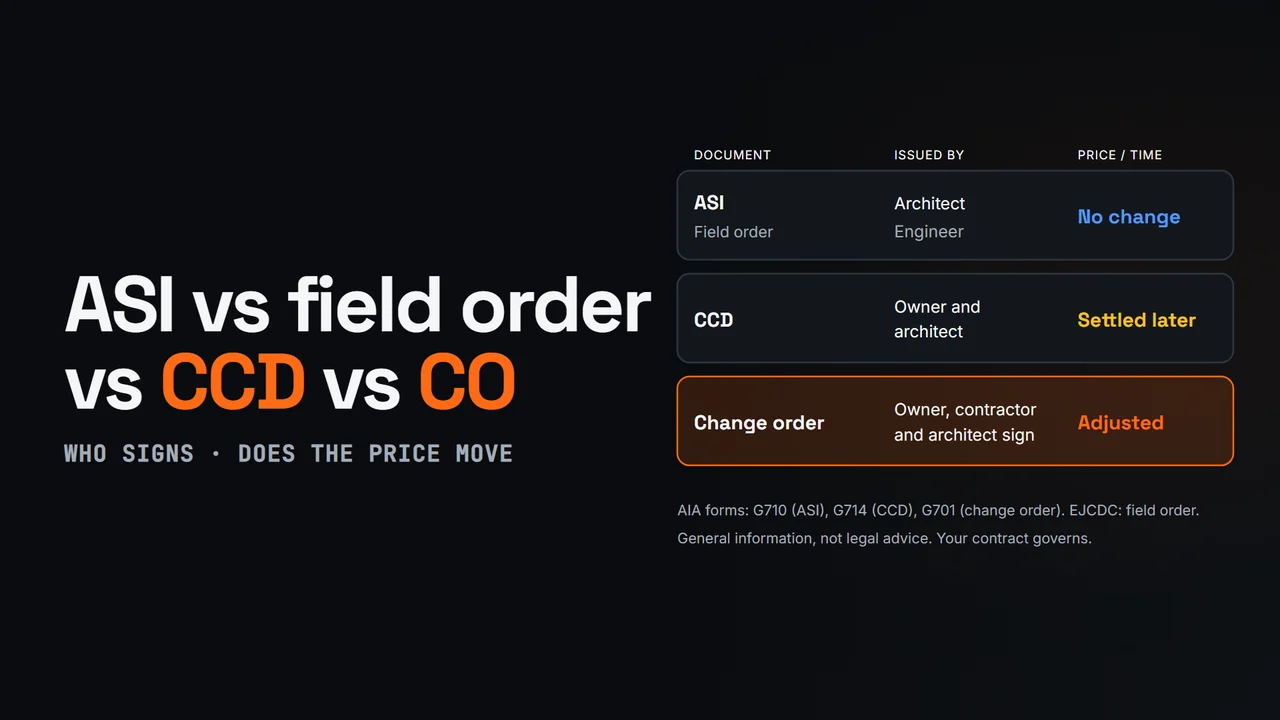
ASI vs field order vs CCD vs change order
- 0:00Four change documents
- 0:14ASI (AIA G710)
- 0:35Field order (EJCDC)
- 0:53CCD (AIA G714)
- 1:13Change order (AIA G701)
- 1:30Recap
- 1:41One change chain
Read the transcript
Four documents can change what gets built on a job: the ASI, the field order, the construction change directive and the change order. They differ in who issues them, and whether the price or the schedule moves.
An architect's supplemental instruction, or ASI, comes from the architect. On AIA contracts it's form G710. It clarifies the documents or orders a minor change, with no change to the contract sum or time. If you think it does cost money or time, say so in writing before you proceed.
A field order plays the same role on many engineering contracts. Under EJCDC general conditions, the engineer issues it for a minor change with no change in price or times. Some owners use the term loosely, for work directed now and priced later, so read how your contract defines it.
A construction change directive, or CCD, is for real changes when the price isn't agreed yet. The owner and architect sign it, AIA form G714, and the contractor proceeds. The price is settled later, often from documented time and materials, so track that cost on its own code.
A change order is the agreement itself. The owner, contractor and architect sign it, AIA form G701, and it adjusts the contract sum, the contract time, or both. A CCD usually ends up as a change order once the price is settled.
So, ASI and field order: minor, with no price or time change. CCD: do the work now, settle the price later. Change order: the signed change to price or time.
In os.construction, a potential change starts as a change event, linked to the RFI behind it, gathers pricing and T&M tickets, and carries through to a change order on the same project record.
Video page with chaptersMore in Construction concepts explained
Try it on the sample project
Every trial workspace includes a sample project to run this workflow on. 14-day free trial. Pricing for paid plans isn't set yet.
Questions about the ASI log template
What is an ASI in construction?
An architect’s supplemental instruction: a written instruction from the architect that clarifies or makes a minor change to the work without changing the contract sum or contract time. AIA publishes a standard form for it (G710); many architects use their own.
What should an ASI include?
A number and date, the project, who issued it and to whom, the instruction in plain words, the drawings and spec sections affected with any attachments, the statement that it does not change sum or time, and signatures. This page’s printable form lists the fields.
What if an ASI changes cost or time?
Then it is not really a minor change. Notify the architect and owner within the period your contract sets, price it, and move it to a change order, or to a construction change directive if the owner wants the work done before the price is agreed. The log flags any ASI with an impact and no change document.
What is the difference between an ASI and an RFI?
An RFI is a question from the contractor; an ASI is an instruction from the architect. An ASI is often how an RFI answer that changes the drawings gets issued, which is why the log keeps the linked RFI.
Is this an AIA document?
No. It is an original log and form with equivalent fields. It does not reproduce AIA G710 or any other copyrighted form.
Keep going
- Pillar guideFrom RFI to change order: ASI, CCD, CO
- Free toolChange order markup calculator
- os.constructionChange order software
- GlossaryArchitect's Supplemental Instructions (ASI)
- GlossaryBulletin
- GlossaryChange Order (CO)
- GlossaryConstruction Change Directive (CCD)
- GlossaryPotential Change Order (PCO)
- GlossaryRequest for Information (RFI)
- Free resourceFrom RFI to change order: ASI, CCD, CO
- Free resourceASI meaning in construction
- Free resourceChange order log template (Excel)
- TemplatePunch list template
- TemplateMeeting minutes template
- TemplateInspection checklist starter pack
- TemplateT&M ticket template
- TemplateRFI writing checklist
- TemplateDaily log checklist
- TemplateChange event log
- TemplateBack charge notice and log
- TemplateThree-week look-ahead template
- TemplateSafety observation log
- TemplateAction item tracker
- TemplateCloseout and TCO checklist
- TemplateNotice to proceed template
- TemplateJob cost report template
- TemplateConstruction schedule (Gantt) template
- TemplateChange order log template
- TemplateBid tabulation and leveling template
- TemplateCash flow projection template
- TemplateBuyout log template
Keep exploring
Related across os.construction
- ExplainerRFI to Change Order: ASI (G710), CCD, COHow an RFI becomes an ASI (AIA G710), field order, CCD (G714) or change order (G701): who signs each, cost and time impact, and when to use which.
- BlogAIA G710 vs G714 vs G701: which form for which changeG710 is the architect's no-cost instruction. G714 directs changed work before the price is agreed. G701 records an agreed change in sum and time. Here is who signs each, what each one does to the contract, and the mistakes that turn a G710 into free work.
- Free toolRFI response time calculatorPaste your RFI log: median turnaround, share answered in the contract period, late open RFIs.
- PlatformRole guide: Project managerA GC project manager’s week in os.construction.
- Free toolRFI writing checklistFree checklist for writing construction RFIs.
- PlatformChange order management (use case)How os.construction handles change order management on one record.