Mechanical contractor software for long-lead equipment and late retainage.
On commercial mechanical work, the money is decided by things that happen far from the pay app: an air handler submittal stuck in review, a chiller stored off site, a TAB report nobody sent. os.construction keeps submittals, purchase orders, billing, payroll and closeout on the same record.
14-day free trial. Pricing for paid plans isn't set yet.
How money moves on a mechanical job.
Equipment drives both the schedule and the cash. The submittal releases the order, the stored equipment bills before it is set, and the last slice of retainage waits on startup, balancing and closeout paperwork.
Mechanical billing and cost, line by line
| What | How it usually works | In os.construction |
|---|---|---|
| Equipment submittals | Air handlers, chillers, boilers, rooftop units and pumps can’t be ordered until the submittal is approved, and lead times run long. A slow review becomes a late delivery. | Submittals carry ordered approval workflows, revisions, Lead Time, Required On-Site Date and Confirmed and Actual Delivery Dates, so the lead time is visible next to the ball in court. |
| Equipment purchase orders | Big-ticket equipment is a commitment by cost code, often with deposits, partial deliveries and freight. | Purchase orders have their own SOV and statuses from Draft through Partially Received and Received to Closed. Approved POs count as committed cost on the budget. |
| Stored equipment | Billing equipment before it is set protects your cash. Off-site storage usually needs extra backup: bill of sale, insurance, a bonded warehouse. | Materials Stored per SOV line, carried forward until installed, with a separate retainage rate on stored material if your contract uses one. |
| Labor across trades | Pipefitters, sheet metal workers and plumbers under different locals, sometimes on prevailing wage, plus shop fabrication hours. | Payroll handles union locals and bargaining rates with fringes and prevailing wage determinations, and posts labor and burden to the job by cost code. |
| Closeout and retainage | Startup reports, test and balance, commissioning sign-off, O&M manuals, warranties and attic stock. The final retainage check waits for all of it. | Inspections run startup and pre-functional checklists. In Accounting, a final retainage release is refused until the closeout documents you require are recorded as received. |
General information about common contract terms, not legal advice. Retainage, stored materials, lien and prevailing wage rules vary by contract and by state.
Where mechanical cash gets stuck.
- Failure 01
The submittal that delayed the chiller
Review took six weeks instead of two, nobody connected that to the lead time, and the equipment lands after the date the schedule needed it. The overtime to recover lands on your job cost.
- Failure 02
Stored equipment without the backup
The rooftop units are sitting in a yard across town. The GC won’t pay for them without a bill of sale and insurance certificate, and the pay app goes in without the line, so you carry the cost for another month.
- Failure 03
Retainage held hostage by paperwork
The work was done months ago. The last payment waits on a TAB report, a warranty letter and an O&M binder that three different people were supposed to send.
Five workflows, one record.
Each step is a shipped workflow with a docs page. Because they share cost codes and the same contract record, the submittal, the PO, the pay app and the release all point at the same job.
- 01
Track equipment submittals against lead time
Each submittal carries an ordered approval workflow, revisions when it comes back Revise and Resubmit, and delivery tracking: lead time, required on-site date and confirmed and actual delivery. Ball in court comes from the workflow.
Answers failure 01Docs: submittals → - 02
Commit the equipment on a purchase order
Create the PO against the vendor with an SOV by cost code. It shows as pending cost until approved, then as committed cost on the budget, and its status tracks deliveries through Partially Received and Received.
Answers failure 01Docs: commitments → - 03
Bill stored and installed equipment
On the pay app, enter Materials Stored and This Period per line. Stored amounts carry forward until installed, and the G702 summary computes retainage on work and on stored material.
Answers failure 02Docs: payment applications → - 04
Run startup and closeout checklists
Build an inspection template once, for example equipment startup or pre-functional checks, and run it per unit. A failed item can require an observation and a photo before the inspection closes.
Answers failure 03Docs: inspections → - 05
Release retainage against closeout documents
In Accounts Receivable, record the closeout documents a contract needs. A final retainage release is refused until they are received, so the request goes out with the backup the GC asked for.
Answers failure 03Docs: Accounts Receivable →
Submittals, billing and checklists, in the app.
Real screens on sample data: a submittal record, the continuation sheet with Materials Stored, and an inspection created from a checklist template.
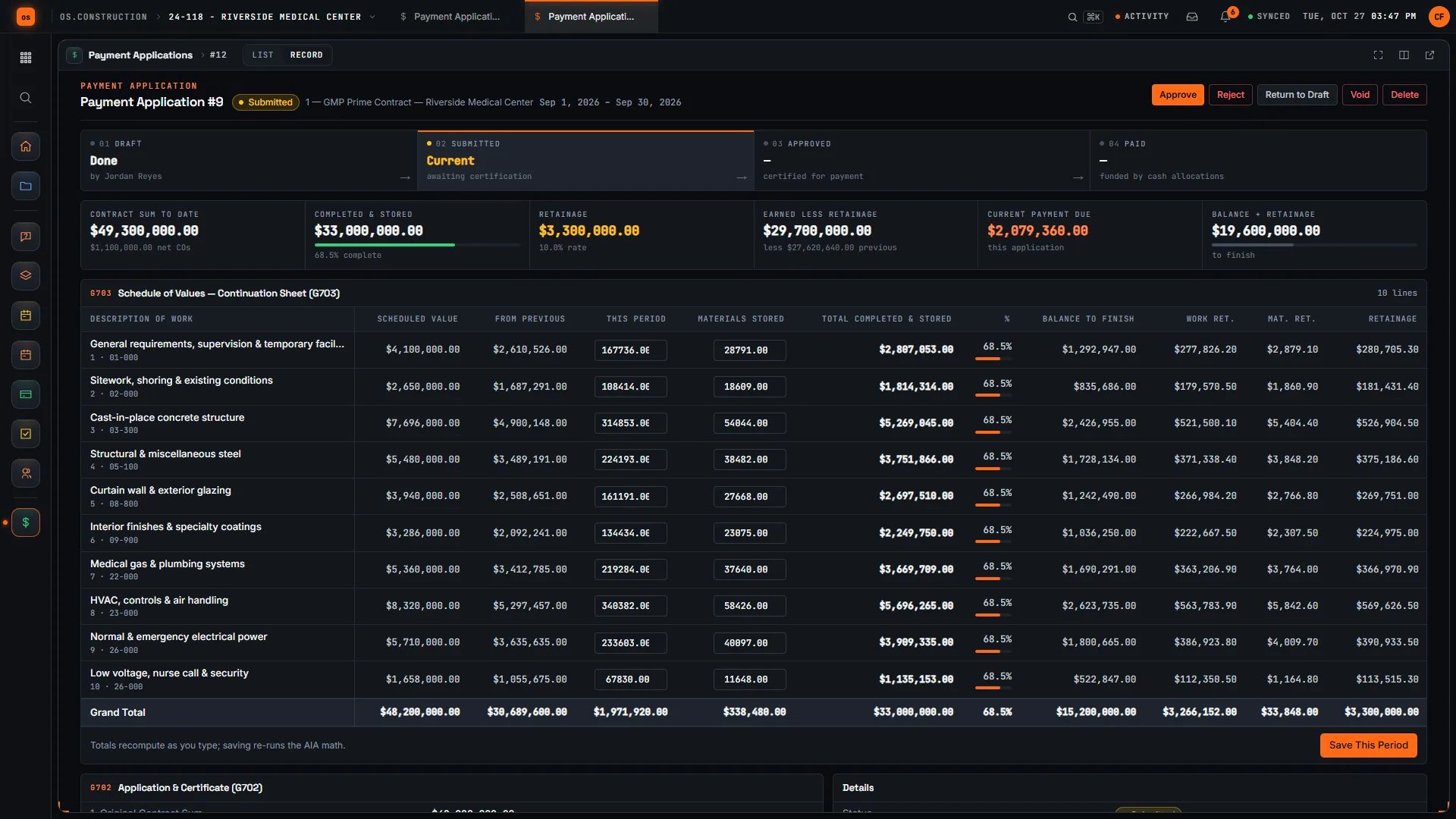
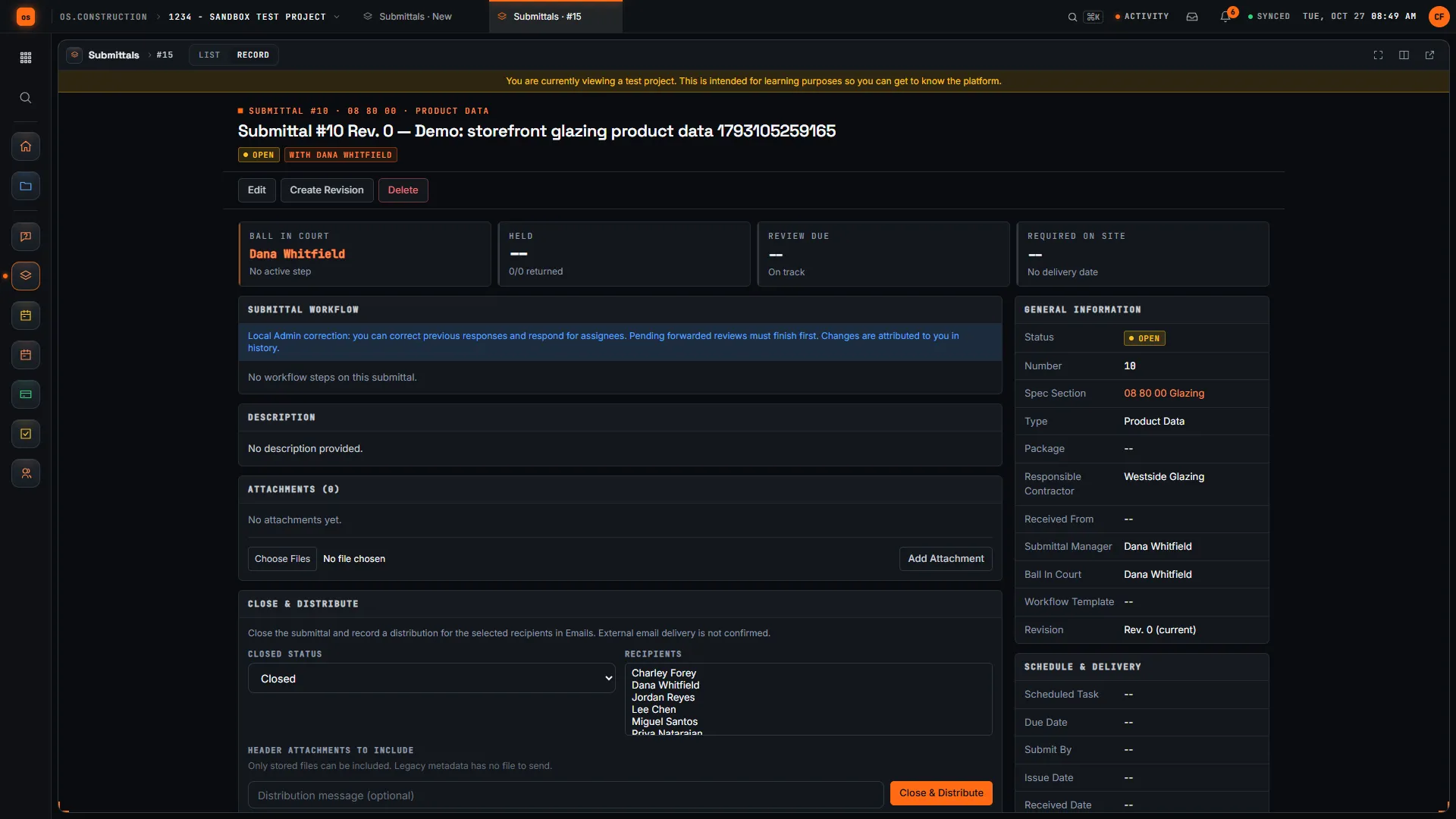
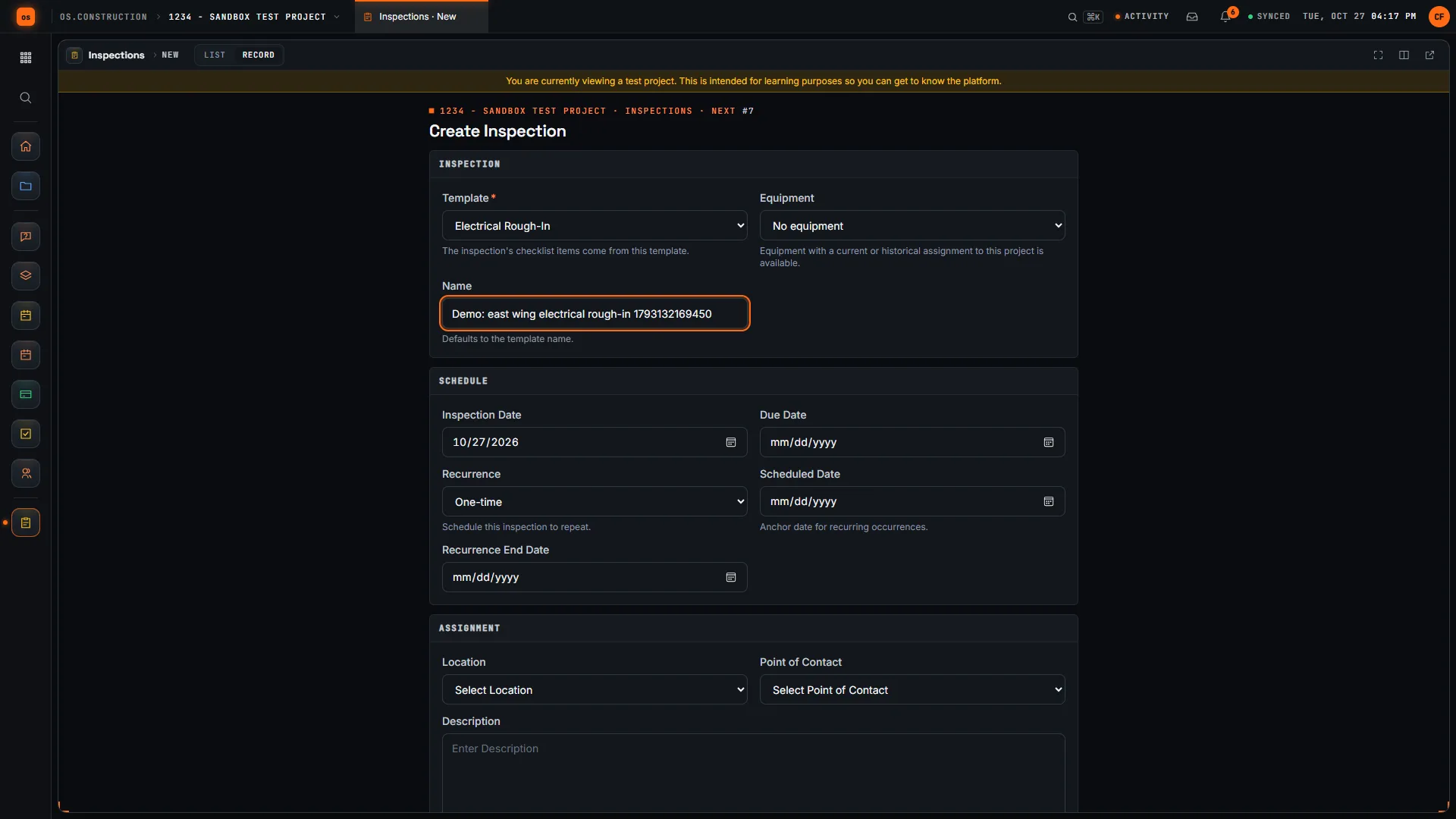
Rather click than read? Open the interactive demo: open RFI-212, turn it into CO #14, approve it and watch the budget and Pay App #9 update, on sample data in your browser.
Exactly what ships today.
Status comes from the app's own export, not from this page's copy. Live is in the product now; Preview is in the product with limits we document; Planned is not built yet.
- LiveSubmittalsOrdered approval workflows, revisions and delivery tracking.
- LiveCommitmentsEquipment purchase orders and subcontracts with an SOV by cost code.
- LivePayment ApplicationsInstalled work and stored materials with separate retainage rates.
- LiveInspectionsStartup and pre-functional checklists with pass, fail and follow-up.
- LiveCoordination IssuesCoordination problems tracked as records with an owner.
- LivePayrollUnion locals and bargaining rates, prevailing wage, labor and burden to jobs.
- LiveAccounts ReceivableRetainage receivable and final releases gated by closeout documents.
- LiveJob Cost ForecastCost-to-complete forecasts by cost code with an independent approver.
Where we don't fit yet
- HVAC service and maintenance agreements. There is no service dispatch, preventive-maintenance agreement billing, refrigerant tracking or technician scheduling. Commercial project work fits; a service department needs a field-service product.
- Clash detection and fabrication. Coordination issues are tracked as records, but there is no clash detection, no sheet metal or piping fabrication software link and no load calculation.
- A dedicated commissioning module. Startup and functional checks run on inspection checklists. There is no test-script library or commissioning-authority workflow of its own.
- Your GC's billing portal. There is no integration with general contractors' own pay app portals. Where a GC requires its portal, you still key the numbers there, from a pay app that already reconciles to your books.
- Native phone apps. Field tools run in the phone browser today. Native apps with offline capture are planned, not built.
Project tools and Accounting are live: they run in the product with documented limits. See the full list on the changelog and the platform overview.
Your books, your data.
Permissions per tool
Permission templates set each tool to none, read only, standard or admin, enforced the same way in the app and the API.
MFA and SCIM
Authenticator-app sign-in for every user, and SCIM 2.0 provisioning from your identity provider.
Change history
Tracked changes record who changed which fields and when, shown as item history and in the activity feed.
Your data, exportable
Export lists to CSV and key records to PDF. Leaving should never mean losing your history.
REST API · 2,549 endpoints
Project and accounting records are available through the documented REST API, with OAuth tokens and signed webhooks for the tools you keep.
We don't hold SOC 2 or any other security certification today, and we won't imply that we do. Read exactly what is in place, or go straight to the API documentation.
Common questions.
Is this HVAC software for service companies?
No. os.construction is built for project work: commercial mechanical, HVAC and plumbing subcontracts billed against a schedule of values. It has no dispatch board, maintenance-agreement billing or technician scheduling.
Can I bill equipment stored off site?
If your contract allows it, enter it in Materials Stored on the pay app line, with the backup the contract requires, often a bill of sale, insurance and proof of storage. Stored amounts carry forward until installed, and retainage can run at a separate rate on stored material.
How do submittals connect to the schedule and the order?
Each submittal records lead time, required on-site date and confirmed and actual delivery dates next to its approval workflow, so the review time and the delivery risk sit on one record. The purchase order lives in Commitments on the same project and cost codes.
Can it handle payroll for several union locals?
Payroll models union locals, collective bargaining rates and fringes, and prevailing wage determinations, and posts labor and burden to jobs. It is general information, not payroll or legal advice; agreements and prevailing wage rules vary, so confirm with a qualified professional.
How does retainage release work at closeout?
In Accounts Receivable an approver records the closeout documents a contract requires, such as consent of surety, final lien waivers and a completed punch list. A release that empties the contract’s retainage is refused until they are received. Partial releases are not gated.
Is it live, and how do I try it?
Yes. Project tools and Accounting are live. Start a 14-day free trial with no card; a sample project is already set up.
Read, calculate, then try it.
From the blog
Free tools
Terms on this page: Submittal · Submittal register · Purchase order · Stored materials · Retainage · Retainage release · Commissioning · O&M manuals · Warranty period · Union fringe · Closeout
From equipment submittal to retainage release, on one record.
Click through a change from the field to the pay app in the interactive demo, or start a 14-day free trial with a sample project already set up.