Electrical contractor software for the gear, the tickets and the hours.
Commercial electrical work is material-heavy and labor-heavy at the same time. Switchgear sits stored on site for months, the field adds work every week, and labor productivity decides the margin. os.construction keeps the pay app, the T&M tickets, payroll and job cost on one record.
14-day free trial. Pricing for paid plans isn't set yet.
How money moves on an electrical job.
The top lane is the work and what it costs you. The bottom lane is what you bill, what the GC holds back and what you pay your crews. On a typical commercial electrical subcontract, money leaks at three points: stored gear, extra work and labor hours.
Electrical billing and cost, line by line
| What | How it usually works | In os.construction |
|---|---|---|
| Progress billing on the SOV | The GC sets the format. SOV lines are often split by area, floor or system, sometimes labor and material separately, and billed by percent complete each month. | Your contract with the GC is the prime contract on your project. The pay app fills its lines from that SOV and does the G702/G703 math; executed change orders land on line 2 without retyping. |
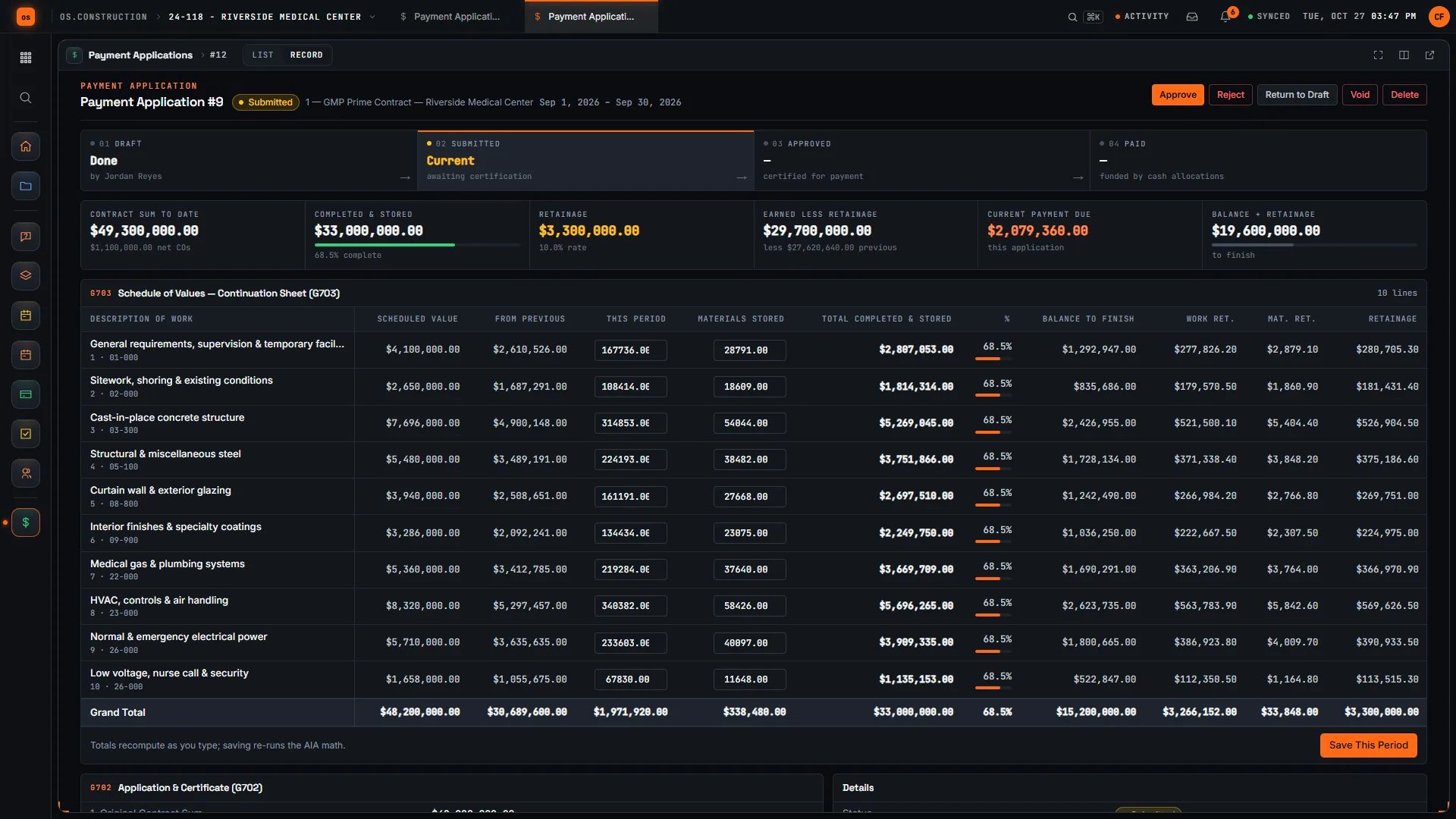
| Stored materials | Switchgear, panels, fixtures and wire are bought early and stored before install. Most contracts let you bill them with an invoice, proof of delivery and sometimes insurance or bonded-storage paperwork. | Materials Stored is its own column. A new pay app carries forward what is still stored, and retainage can run at a different rate on stored material than on installed work. |
| Retainage | Withheld from every payment at the contract rate. Some states cap or regulate it; the release usually waits for closeout documents. | Retainage is tracked per line and per contract. In Accounting, a final release can require the closeout documents you record, such as final lien waivers. |
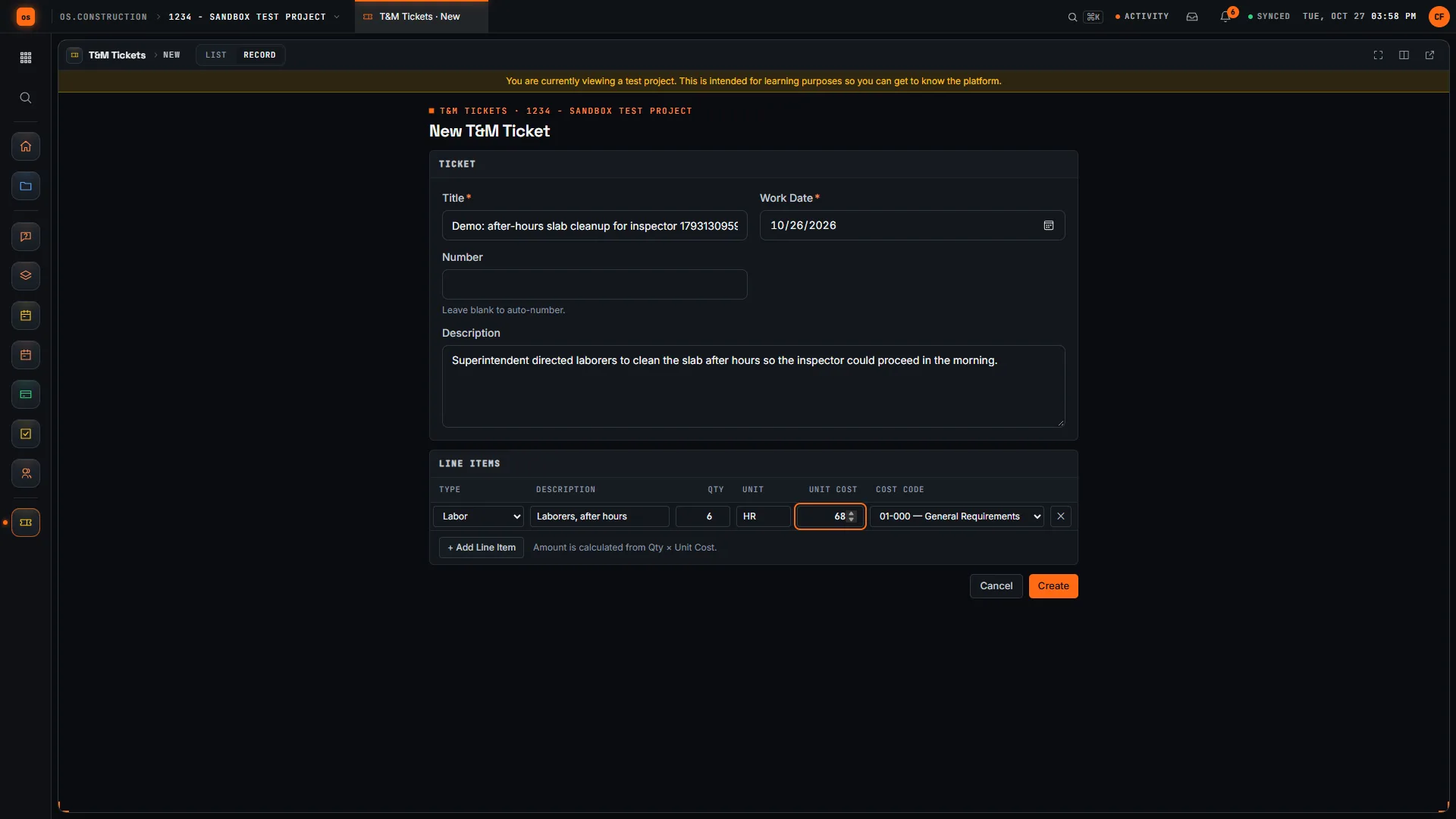
| T&M and field changes | Extra work directed in the field is easy to do and easy to lose. Without a same-day ticket with hours, material and a signature, it becomes an argument. | T&M Tickets hold labor, equipment and material lines with cost codes, a typed signer name and an approval. The approved ticket is the backup for the change order. |
| Labor | The largest and most volatile cost. Inside wiremen under a local agreement, prevailing wage on public work, certified payroll every week. | Payroll models union locals, bargaining rates and fringes, wage determinations, and produces the WH-347 data set. Posted runs put labor and burden on the job by cost code. |
General information about common contract terms, not legal advice. Retainage, stored materials, lien and prevailing wage rules vary by contract and by state.
Where electrical margin goes missing.
- Failure 01
Stored gear billed wrong, or not at all
The switchgear arrived in March and was set in June. Whoever builds the pay app has to remember what was stored last month, what got installed and what is still on the floor. Miss it and you finance the GC’s project; double-bill it and the GC finds out.
- Failure 02
T&M that dies in the truck
The foreman did the extra work, but the paper ticket was never signed, or it reached the office three weeks later with hours nobody can confirm. Extra work that never gets billed is cost the job already paid for.
- Failure 03
The labor overrun shows up at closeout
Hours flow from timecards to payroll to the accounting system, and the job cost report arrives a month after the hours were burned. By the time anyone sees the rough-in running hot, the trim phase is half done.
Five workflows, one record.
Each step below is a shipped workflow with its own docs page. They share one data core, so the ticket, the pay app, payroll and the forecast read the same cost codes.
- 01
Bill the GC from your SOV, stored gear included
Create the pay app against your contract, enter this period’s work and Materials Stored per line, and let the G702 summary compute retainage on work and on stored material. Stored amounts carry forward until the gear is installed.
Answers failure 01Docs: payment applications → - 02
Write the T&M ticket before the crew leaves
The foreman records labor, equipment and material lines against cost codes, with the work date and the GC super’s name in Signed By. Editing a line after approval sends the ticket back to Draft, so an approved ticket always matches what was approved.
Answers failure 02Docs: T&M tickets → - 03
Price the change and put it on the next bill
Tickets don’t link to change events automatically yet, so attach the approved ticket as backup when you open the change event. Price the PCO, get it approved, and the executed change order joins the contract the pay app bills against.
Answers failure 02Docs: change events and PCOs → - 04
Run union and prevailing wage payroll
Approved time imports into the pay run. Gross-to-net covers union and prevailing wage rates with fringes; certified payroll produces the WH-347 data set and a California DIR eCPR file. Posting puts labor and burden on the job.
Answers failure 03Docs: Payroll → - 05
Forecast labor while it can still be fixed
Pick a projection method per cost code, including unit rate, and have a second person approve the cost to complete. The forecast feeds WIP at month-end, so over and under billing reflect the hours actually burned.
Answers failure 03Docs: Job Cost Forecast →
The ticket, the bill and the inspection, in the app.
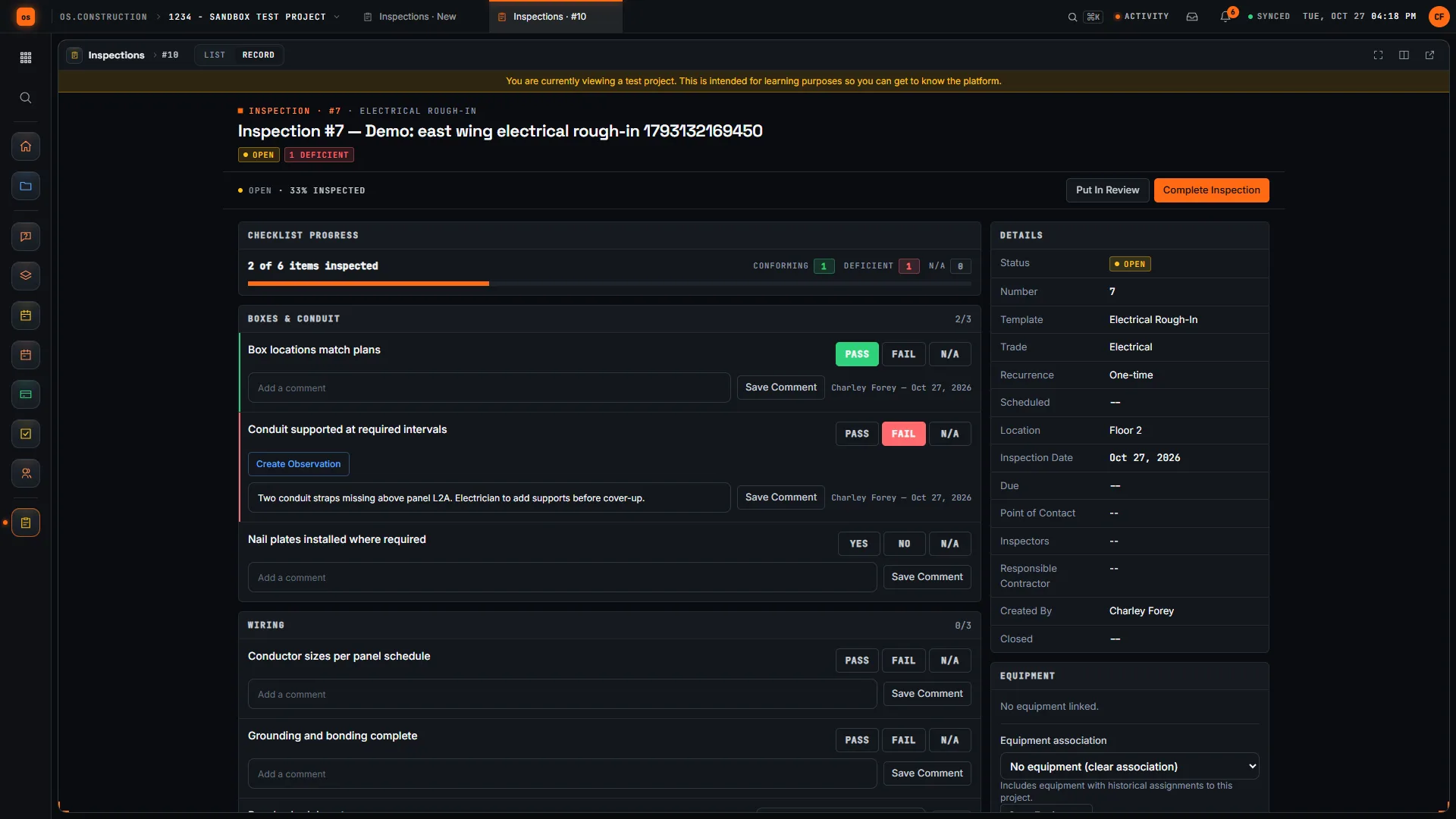
Real screens on sample data: a T&M ticket being written, the continuation sheet with Materials Stored, and an electrical rough-in inspection with a failed item.
Rather click than read? Open the interactive demo: open RFI-212, turn it into CO #14, approve it and watch the budget and Pay App #9 update, on sample data in your browser.
Exactly what ships today.
Status comes from the app's own export, not from this page's copy. Live is in the product now; Preview is in the product with limits we document; Planned is not built yet.
- LiveT&M TicketsLabor, equipment and material lines with cost codes, signer name and approval.
- LivePayment ApplicationsG702/G703-style billing with stored materials and separate retainage rates.
- LiveChange OrdersApproved tickets become the backup for priced change orders.
- LiveTimesheetsCrew hours by cost code, approved before payroll.
- LiveInspectionsRough-in and pre-cover checklists with pass, fail and follow-up.
- LivePayrollUnion locals, prevailing wage, certified payroll (WH-347), labor and burden to jobs.
- LiveJob Cost ForecastCost-to-complete forecasts by cost code with an independent approver.
- LiveAccounts ReceivableBill certified pay apps, track retainage receivable and collections.
- LiveWork in Progress (WIP)Month-end over and under billing from posted cost and billings.
Where we don't fit yet
- Service and dispatch. There is no service-call dispatch, technician scheduling board, flat-rate price book or maintenance-agreement billing. If most of your revenue is service and small residential work, a field-service product fits better than we do today.
- Estimating and takeoff. There is no electrical estimating database, labor-unit library or takeoff. Your estimate comes in as the budget and SOV by cost code.
- Certified payroll outside federal and California formats. The WH-347 data set and California DIR eCPR file ship; other states’ formats are not built, and wage determinations are entered by hand (no SAM.gov import).
- Lien deadline reminders. Preliminary notice and lien deadlines are not calculated for you. Lien waiver holds on payables are in Accounts Payable; your own notice dates still live with you and your counsel.
- Your GC's billing portal. There is no integration with general contractors' own pay app portals. Where a GC requires its portal, you still key the numbers there, from a pay app that already reconciles to your books.
- Native phone apps. Field tools run in the phone browser today. Native apps with offline capture are planned, not built.
Project tools and Accounting are live: they run in the product with documented limits. See the full list on the changelog and the platform overview.
Your books, your data.
Permissions per tool
Permission templates set each tool to none, read only, standard or admin, enforced the same way in the app and the API.
MFA and SCIM
Authenticator-app sign-in for every user, and SCIM 2.0 provisioning from your identity provider.
Change history
Tracked changes record who changed which fields and when, shown as item history and in the activity feed.
Your data, exportable
Export lists to CSV and key records to PDF. Leaving should never mean losing your history.
REST API · 2,549 endpoints
Project and accounting records are available through the documented REST API, with OAuth tokens and signed webhooks for the tools you keep.
We don't hold SOC 2 or any other security certification today, and we won't imply that we do. Read exactly what is in place, or go straight to the API documentation.
Common questions.
What is the best software for an electrical contractor?
It depends on your work mix. Service and small residential electricians need dispatch, price books and quick invoicing, which os.construction does not do. Commercial electrical subcontractors need SOV billing with stored materials and retainage, T&M tickets, union or prevailing wage payroll and job cost that ties to the books. That second list is what os.construction is built for.
Can I bill switchgear before it is installed?
If your contract allows it, yes. Enter the amount in Materials Stored on the pay app line. It stays in stored materials, carried forward on each new pay app, until you bill it as installed work. Retainage can run at a separate rate on stored materials. Keep the invoices, delivery proof and any insurance or storage paperwork your contract asks for.
How does a T&M ticket become a change order?
The foreman writes the ticket with labor, equipment and material lines and cost codes, and submits it with the signer’s name. A reviewer approves it. You then open a change event with the approved ticket as backup (tickets don’t link to change events automatically yet), price and approve the change order, and the executed change order joins the contract the next pay app bills against.
Does it handle IBEW and other union payroll, and prevailing wage?
Payroll models union locals, collective bargaining rates and fringes, prevailing wage determinations with base rate plus fringe per classification, and produces the WH-347 certified payroll data set plus a California DIR eCPR file. Wage determinations are entered by hand. This is general information, not legal or payroll advice; prevailing wage rules vary by jurisdiction, so confirm your obligations with a qualified professional.
Do my general contractors need to use os.construction?
No. You run your side on your own: your contract with the GC is the prime contract on your project, and you bill it from your SOV. If the GC requires its own billing portal, you still enter the numbers there.
Does it replace QuickBooks or our accounting system?
Accounting includes the general ledger, AP, AR, banking, payroll, job cost, WIP and close, and it is live. Supported imports are staged and reconciled before cutover. Evaluate it on a completed job and reconcile before you change your system of record.
Is it live, and how do I try it?
Yes. Start a 14-day free trial with no card; a sample project is already set up. AI agents are planned and not part of the product.
Read, calculate, then try it.
From the blog
Free tools
Terms on this page: T&M ticket · Stored materials · Schedule of values · Retainage · Union fringe · Prevailing wage · Certified payroll · WH-347 · Labor burden · Pay-when-paid · Change order
Bill the gear, the tickets and the hours from one record.
Write a T&M ticket and watch it reach the bill in the interactive demo, or start a 14-day free trial with a sample project already set up.