Design-build software for one contract and one record.
In design-build you hold the design and the construction under one owner agreement, so you also hold the cost of your own design gaps. os.construction carries the job from pursuit through design, buyout, the field and the books on one data core.
14-day free trial. Pricing for paid plans isn't set yet.
How money moves in design-build.
One contract with the owner, two kinds of cost. The design-builder pays its design team and its trades, bills the owner on one contract, and absorbs the cost of fixing its own design.
Design-build billing and cost, line by line
| What | How it usually works | In os.construction |
|---|---|---|
| One owner agreement | Design and construction sit under one contract, often with the price set at a design milestone, as a lump sum or a guaranteed maximum price. | The prime contract holds the SOV and approved change orders. Progress contracts bill by pay app; milestone, GMP and cost-plus contracts bill through the Accounting API with the cap counted from what AR already billed. |
| Design consultants | The architect and engineers work for you, not the owner. Their fees are your cost. | Hold each consultant as a subcontract commitment with an SOV by cost code; their invoices post to job cost like any other commitment. |
| Buyout during design | Trade pricing often starts before drawings are complete, and buyout savings or overruns land on your margin. | Bidding releases packages, levels bids line by line, records an approved award and creates the subcontract or PO from the awarded lines. |
| Owner changes vs design corrections | If the owner adds scope, it is a change order. If your design missed something, the fix is usually yours to absorb. | Change events record their origin RFI and a rough cost. Only owner-approved changes reach the prime contract; internal fixes stay as budget and cost. |
| Margin on the whole job | Design fee, construction and changes all roll into one contract, and one WIP line. | WIP computes earned revenue and over or under billing from the approved contract, posted cost and posted billings, with an independent approver. |
General information about common contract terms, not legal advice. Retainage, stored materials, lien and prevailing wage rules vary by contract and by state.
Where design-build margin slips.
- Failure 01
Design fixes billed as owner changes, or absorbed by accident
A field question gets priced as a change order, but the root cause was your own drawings. Or the reverse: real owner scope gets fixed quietly because no one traced it. Either way the relationship or the margin pays.
- Failure 02
Buyout that never reaches the budget
Trade pricing is leveled in spreadsheets during design. The awarded numbers are retyped into subcontracts, and the budget still shows the estimate.
- Failure 03
Two sets of books for one contract
Design fees are tracked one way, construction another. The WIP line for the job is assembled by hand at month-end, and nobody sees the combined margin until it moves.
Five workflows, one record.
Each step is a shipped workflow with a docs page or explainer. Pursuit, design commitments, buyout, changes and WIP share the same project and cost codes.
- 01
Track the pursuit in CRM
Owner contacts, companies and opportunities with relationship timelines and a pipeline forecast. Marking an opportunity Won creates nothing by itself; Review new project creates the project and moves its CRM history in.
Docs: Construction CRM → - 02
Hold design consultants as commitments
Create a subcontract for the architect and each engineer with an SOV by cost code and retainage if you hold it. Their invoices are entered against the commitment.
Answers failure 03Docs: commitments → - 03
Level bids and award buyout
Release a bid package, record bidder invitations, level submitted bids line by line, record and approve an award with a second admin, then create the subcontract or PO from the awarded lines.
Answers failure 02Explainer: bidding to an awarded commitment → - 04
Separate owner changes from design fixes
A change event records its origin RFI, a rough cost, whether it is in or out of scope and a type such as Owner Change or Contingency. Owner-directed scope moves to a priced change order on the prime contract; corrections you absorb stay as budget changes and cost.
Answers failure 01Docs: change events and PCOs → - 05
Close the month on the whole contract
WIP reads the executed contract plus approved changes, posted cost and posted billings, and a controller other than the preparer approves before it posts.
Answers failure 03Docs: job cost and WIP →
Pursuit, change and forecast, in the app.
Real screens on sample data: the CRM pipeline, a change event with its chain from event to budget change, and the budget forecast.
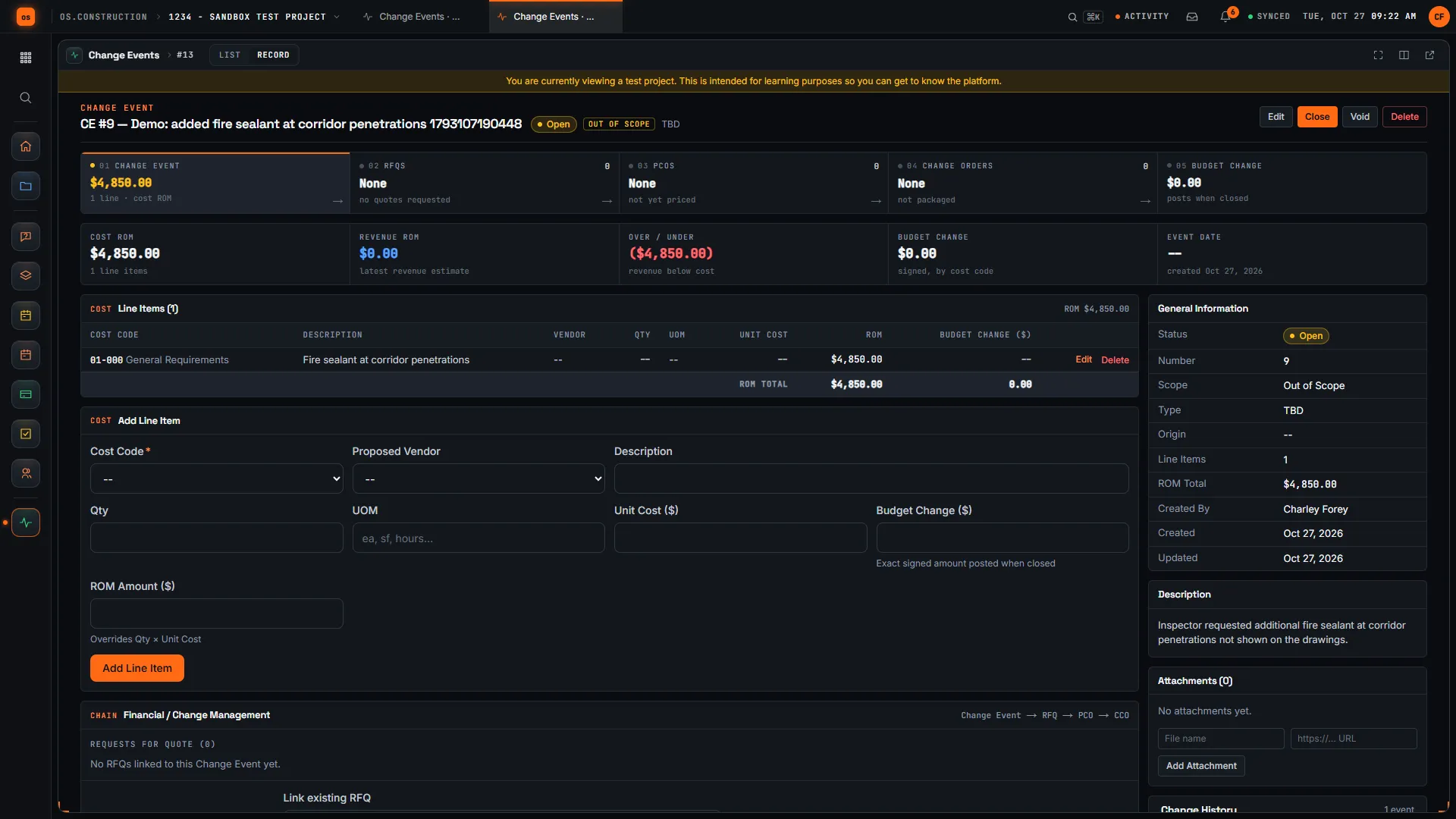
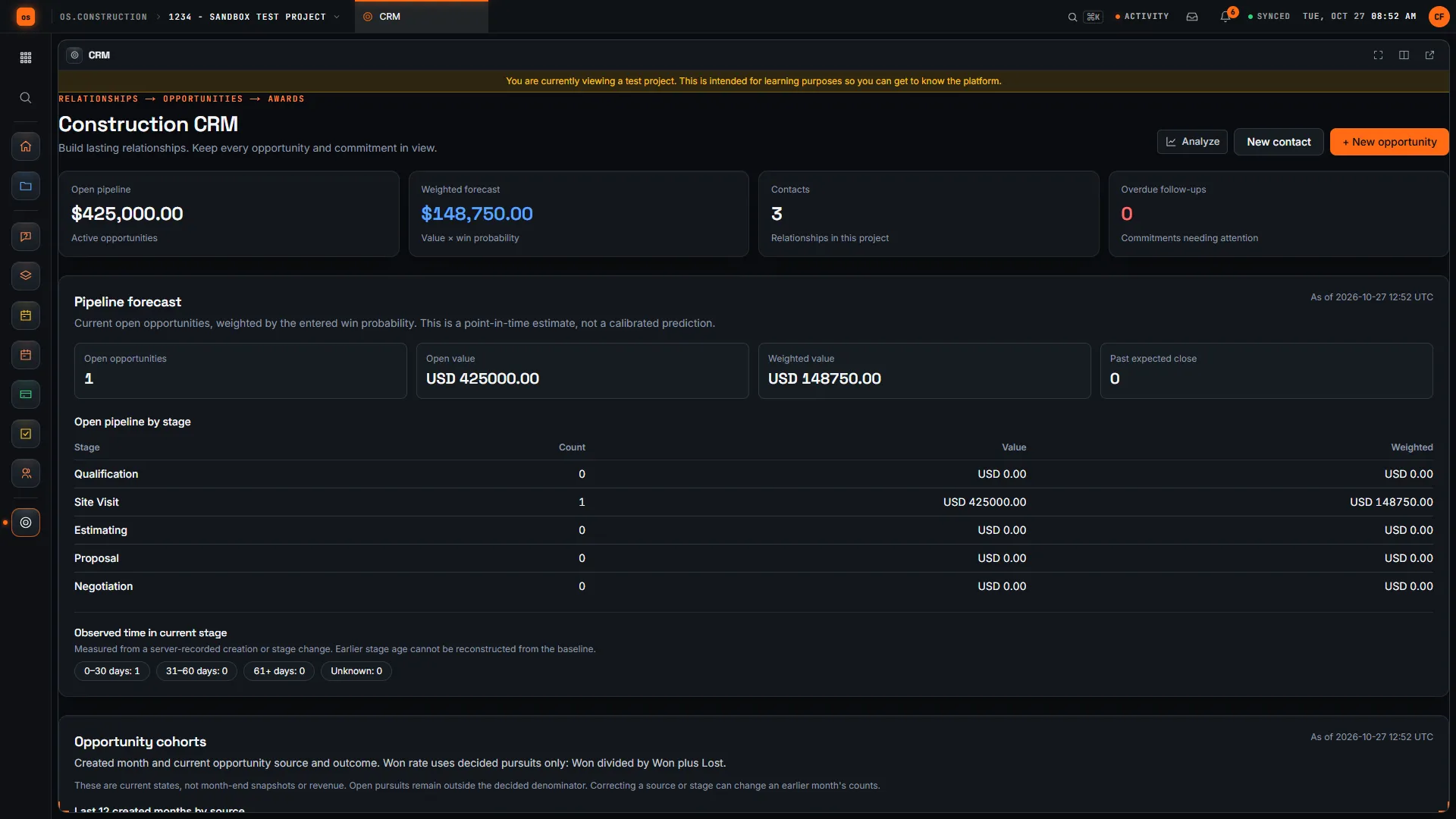
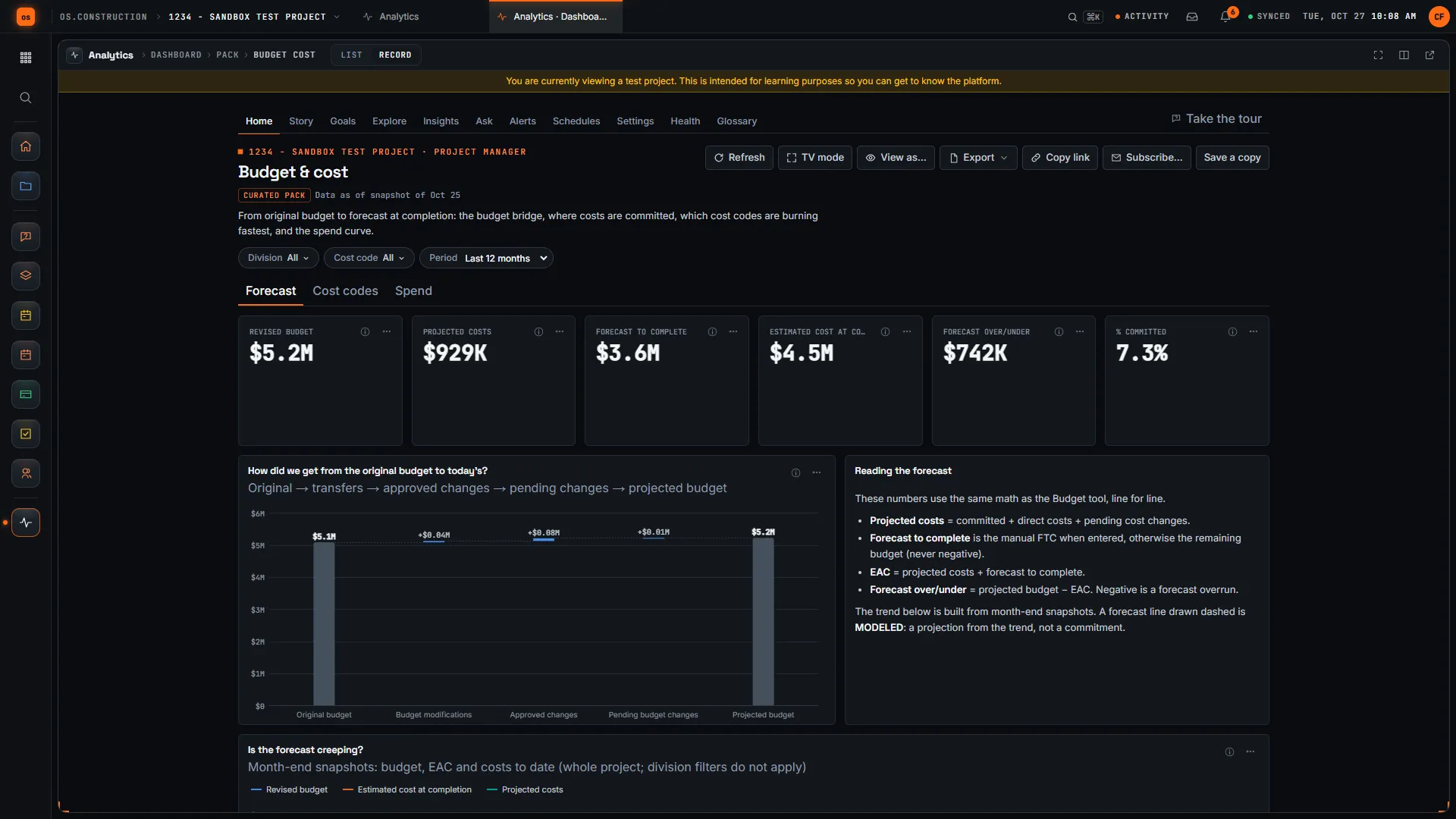
Rather click than read? Open the interactive demo: open RFI-212, turn it into CO #14, approve it and watch the budget and Pay App #9 update, on sample data in your browser.
Exactly what ships today.
Status comes from the app's own export, not from this page's copy. Live is in the product now; Preview is in the product with limits we document; Planned is not built yet.
- LiveCRMOwner contacts, companies, opportunities and a weighted pipeline.
- LiveBiddingBid packages, leveling, approved awards and commitments from awarded lines.
- LiveCommitmentsDesign consultants and trades as subcontracts and POs.
- LiveChange EventsOrigin RFI, rough cost and the path to a priced change.
- LiveDrawingsDrawing sets and revisions on the project.
- LivePrime ContractsThe owner contract and SOV that billing and WIP read.
- LiveAccounts ReceivablePay app billing on screen; milestone, GMP and cost-plus billing through the API.
- LiveWork in Progress (WIP)Month-end over and under billing on the whole contract.
Where we don't fit yet
- Design authoring. os.construction doesn’t author drawings or BIM models. Drawings and models are managed and viewed on the project, but designed elsewhere.
- Professional-services accounting for an in-house design studio. There is no architecture-firm style project accounting: no staff utilization, billing multipliers or hourly fee billing for in-house designers.
- Milestone and GMP billing screens. Milestone, GMP and cost-plus contracts bill through the Accounting API, which prices caps and fees into a draft invoice. A GMP pay app built from job cost with its backup is planned.
- Native phone apps. Field tools run in the phone browser today. Native apps with offline capture are planned, not built.
Project tools and Accounting are live: they run in the product with documented limits. See the full list on the changelog and the platform overview.
Your books, your data.
Permissions per tool
Permission templates set each tool to none, read only, standard or admin, enforced the same way in the app and the API.
MFA and SCIM
Authenticator-app sign-in for every user, and SCIM 2.0 provisioning from your identity provider.
Change history
Tracked changes record who changed which fields and when, shown as item history and in the activity feed.
Your data, exportable
Export lists to CSV and key records to PDF. Leaving should never mean losing your history.
REST API · 2,549 endpoints
Project and accounting records are available through the documented REST API, with OAuth tokens and signed webhooks for the tools you keep.
We don't hold SOC 2 or any other security certification today, and we won't imply that we do. Read exactly what is in place, or go straight to the API documentation.
Common questions.
What is design-build software?
Software that carries one design-build contract from pursuit through design, buyout, construction and closeout, with the money on the same record: design consultants as costs, trade buyout, owner changes, billing and margin on the whole job. Design authoring tools are separate.
How do I keep owner changes separate from design corrections?
Start every change as a change event with its origin RFI and a rough cost. Owner-directed scope becomes a priced change order on the prime contract. A correction to your own design stays as a budget change and cost on your side. Your owner agreement decides which is which.
Can I bill the design fee by milestone?
Yes, through the Accounting API: set the prime contract’s billing method to milestone and send the accepted milestones; Accounts Receivable creates a draft invoice that follows normal approval. Progress billing by pay app works on screen.
Does it support GMP design-build contracts?
GMP contracts bill through the Accounting API, which prices fee and the GMP cap from what AR already billed and supports one GMP settlement with shared savings. A GMP pay app built from job cost, with its backup, is planned.
How is design-build different from CM at risk?
In design-build the contractor holds the design contract; in CM at risk the owner holds the designer and the CM joins early under a GMP. See our project delivery methods guide for a side-by-side comparison.
Is it live, and how do I try it?
Yes. Project tools, CRM, Bidding and Accounting are live. Start a 14-day free trial with no card; a sample project is already set up.
Read, calculate, then try it.
From the blog
Free tools
Terms on this page: Design-build · Design-bid-build · Preconstruction · GMP · Lump sum · Bid leveling · Buyout · Change event · RFI · WIP schedule · Value engineering
Carry the whole design-build contract on one record.
Open an RFI, turn it into a change order and watch the budget and pay app update in the interactive demo, or start a 14-day free trial.