Concrete contractor software for pours, crews and equipment.
Concrete margin is made on pour day. Crew size, pump hours, the weather and whether the deck passed inspection decide what a cubic yard really cost you. os.construction puts the pour plan, the daily log, equipment use and billing on the same record.
14-day free trial. Pricing for paid plans isn't set yet.
How money moves on a concrete job.
Quantities placed drive the bill, crews and equipment drive the cost, and the daily log is the record you lean on when a back charge arrives.
Concrete billing and cost, line by line
| What | How it usually works | In os.construction |
|---|---|---|
| Unit price or lump sum | Flatwork, paving and site concrete are often bid per cubic yard, square foot or linear foot; structural packages more often bill a lump sum SOV by percent complete. | Lump sum work bills on the pay app from the SOV. Unit price contracts bill through the Accounting API: you send the period’s quantities and Accounts Receivable prices them at contract rates, with a quantity tolerance, into a draft invoice for approval. |
| Owned equipment | Pumps, forming systems, screeds and trowel machines are your fleet. If they aren’t charged to jobs, the bid’s equipment line is fiction and the fleet looks free. | Fixed Assets sets operating, standby and idle rates, posts approved equipment logs or usage to a job and cost code, and reports recovery against depreciation and costs. |
| Crews and productivity | Finishers and laborers by the hour, overtime when a pour runs late, productivity per yard or square foot. | The daily log records manpower by company, workers, hours and cost code. Job cost forecasts can project a cost code by unit rate, and Payroll posts labor and burden to the job. |
| Weather and pour sequence | Cold, heat and rain move pours. Location matters: deck by deck, pour by pour. | Location-based planning shows trades moving through floors and zones as a flowline, and the daily log records observed weather and delays for each day. |
| Back charges | GCs back-charge for cleanup, washout, damaged work and delay. Without dated photos and a signed inspection, you pay. | Pre-pour inspections, daily logs and photos are dated records on the same project, ready when a back charge has to be answered. |
General information about common contract terms, not legal advice. Retainage, stored materials, lien and prevailing wage rules vary by contract and by state.
Where concrete margin gets poured away.
- Failure 01
Equipment that never hits the job
The pump and the forming system ran all month, but no one charged them to the job. The job looks profitable, the fleet looks like overhead, and next year’s bids use the wrong equipment rate.
- Failure 02
Quantities billed from memory
Yards placed live in tickets, a foreman’s notebook and a spreadsheet. The monthly bill is assembled from all three, and the quantity on the bill doesn’t match the quantity on the cost report.
- Failure 03
The back charge you can’t answer
Three months later the GC charges you for slab cleanup and a damaged embed. Without the dated inspection, photos and daily log from that pour, you can’t show what the deck looked like when you left.
Five workflows, one record.
Each step is a shipped workflow with a docs page, on one data core, so the pour, the crew, the equipment and the bill share the same cost codes.
- 01
Plan pours by location
In the Planner, read the schedule as a Line of Balance flowline: trades moving through decks and zones, with conflicts and buffers marked, or generate a takt plan.
Docs: location-based planning → - 02
Inspect before the pour
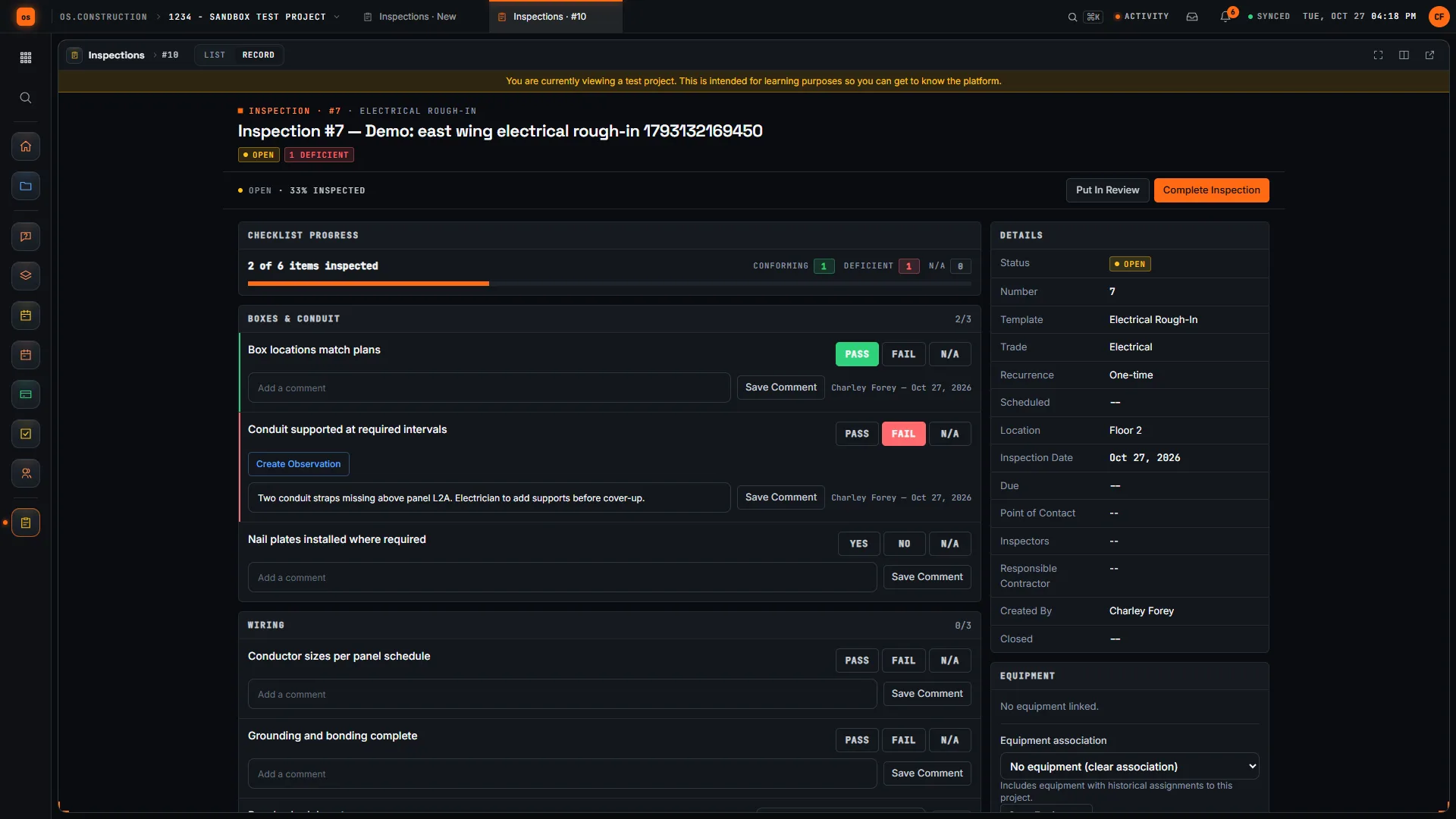
Run a pre-pour checklist from a template: rebar, embeds, forms, sleeves. A failed item can require an observation and a photo before the inspection can be completed, and the signed inspection is dated evidence.
Answers failure 03Docs: inspections → - 03
Log the pour day
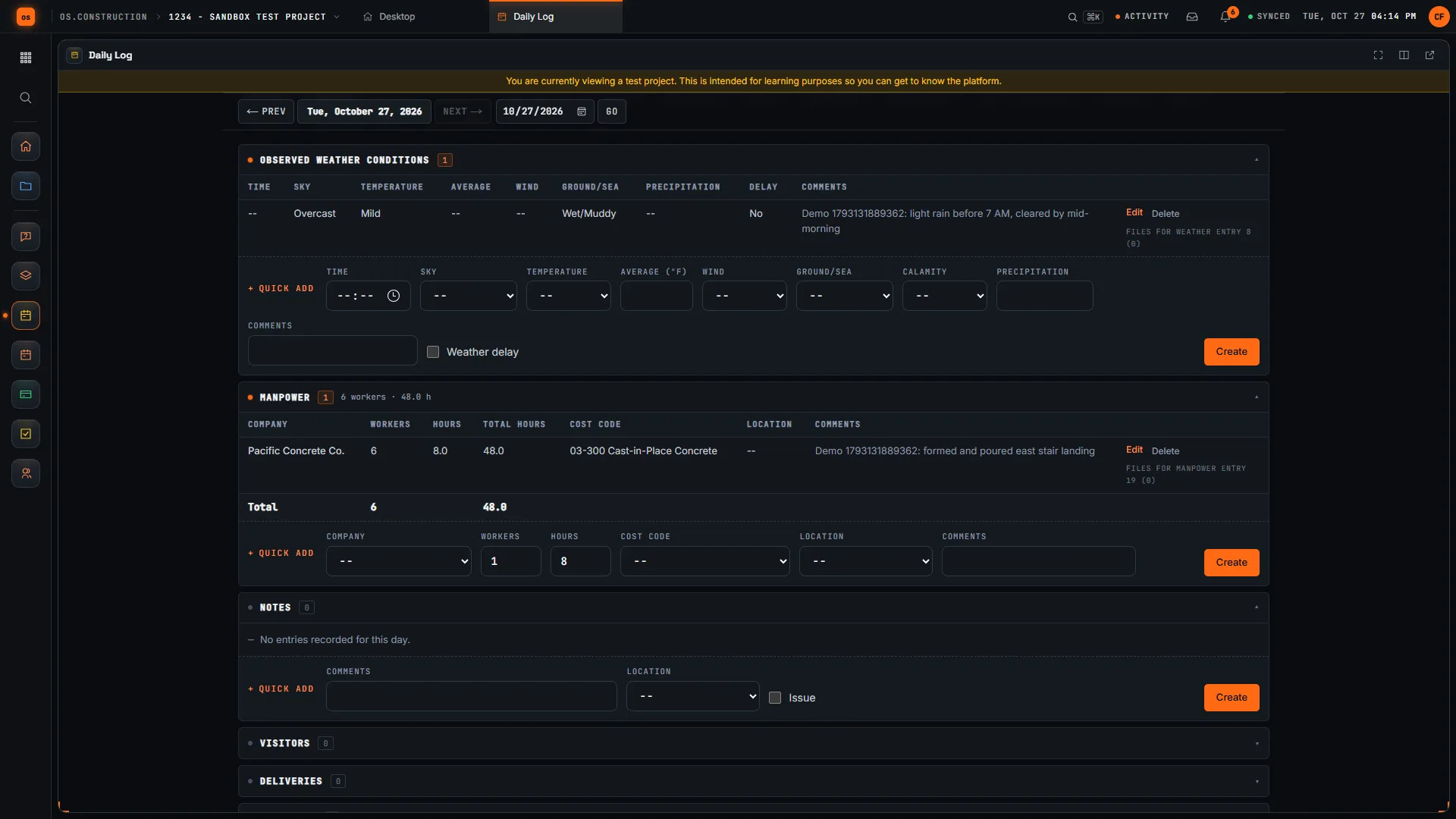
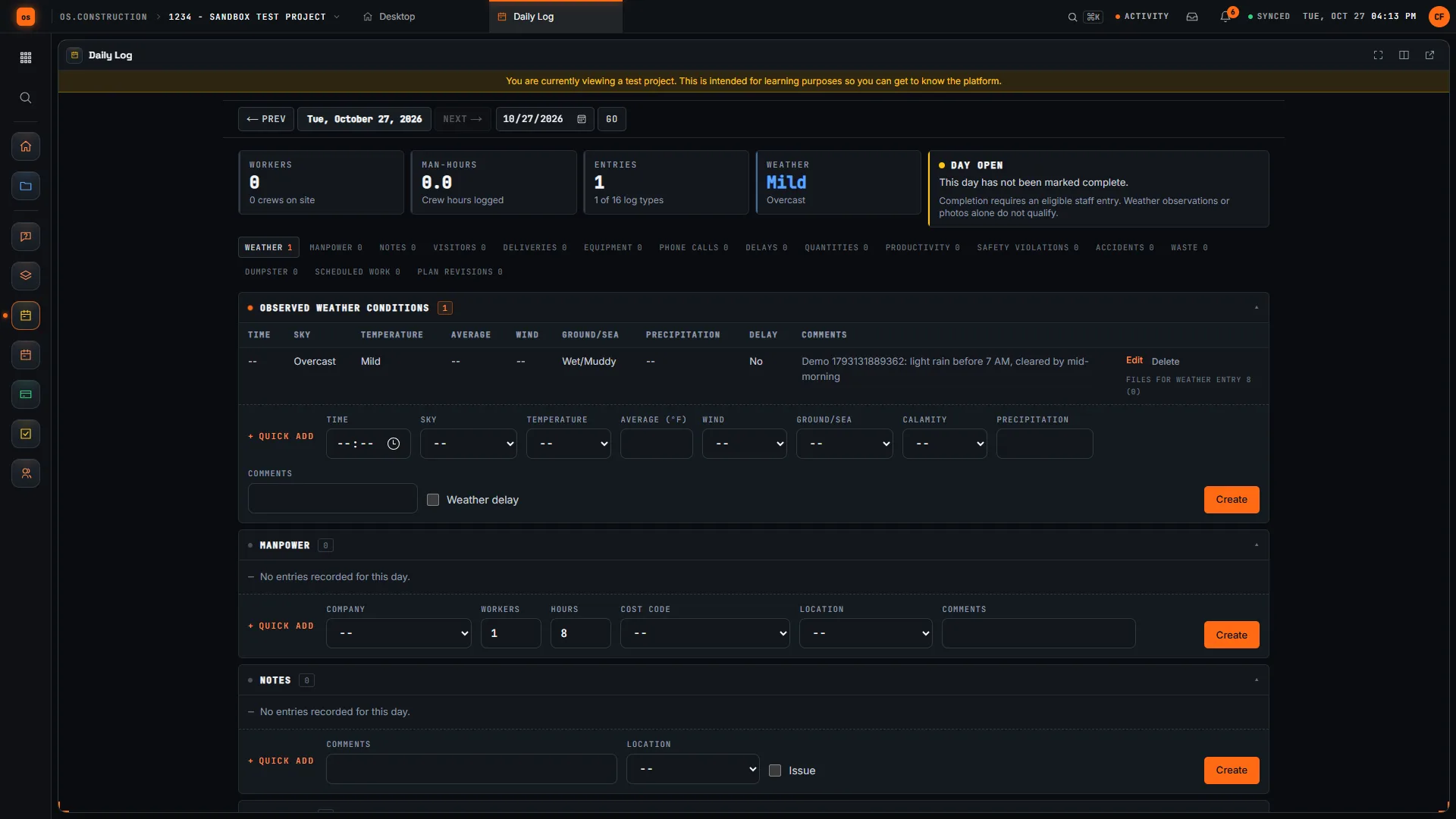
Record manpower by company, workers, hours and cost code, plus observed weather and delays. The daily log is the record of what happened on that deck that day.
Answers failure 03Docs: daily log → - 04
Charge equipment to the job
Set effective-dated operating, standby and idle rates, post approved equipment logs or usage to a job and cost code, and compare recovery with depreciation and fuel.
Answers failure 01Docs: Fixed Assets → - 05
Bill by unit price or by SOV
Lump sum packages bill on the pay app. Unit price contracts bill through the Accounting API: send the period’s quantities and Accounts Receivable prices them at contract rates into a draft invoice that follows normal approval.
Answers failure 02Docs: billing methods →
The pour day and the inspection, in the app.
Real screens on sample data: a concrete crew on the daily log by cost code, the weather entry for the same day, and an inspection with a failed item.
Rather click than read? Open the interactive demo: open RFI-212, turn it into CO #14, approve it and watch the budget and Pay App #9 update, on sample data in your browser.
Exactly what ships today.
Status comes from the app's own export, not from this page's copy. Live is in the product now; Preview is in the product with limits we document; Planned is not built yet.
- LiveDaily LogManpower by cost code, weather, delays, deliveries and notes per day.
- LiveInspectionsPre-pour checklists with pass, fail, photos and sign-off.
- LiveScheduleCPM schedule with Line of Balance and takt views by location.
- LiveEquipmentEquipment records on the project.
- LivePayment ApplicationsSOV billing by percent complete with retainage.
- LiveFixed AssetsEquipment rates charged to jobs and recovery reporting.
- LiveAccounts ReceivableUnit price billing through the API with quantity tolerance; retainage receivable.
- LiveJob Cost ForecastForecast by cost code, including a unit rate projection method.
Where we don't fit yet
- A unit price billing screen. Unit price contracts bill through the Accounting API today. There is no screen for entering quantities and pricing them; lump sum work bills on the pay app screen.
- Ready-mix and batch plant tickets. Delivery tickets are not imported from suppliers or batch plants. Ready-mix arrives as AP bills coded to the job.
- Telematics and GPS. Equipment hours come from approved logs and meter readings, not from telematics feeds.
- Concrete estimating and takeoff. There is no takeoff or volume estimating. Bring the estimate in as the budget by cost code.
- Native phone apps. Field tools run in the phone browser today. Native apps with offline capture are planned, not built.
Project tools and Accounting are live: they run in the product with documented limits. See the full list on the changelog and the platform overview.
Your books, your data.
Permissions per tool
Permission templates set each tool to none, read only, standard or admin, enforced the same way in the app and the API.
MFA and SCIM
Authenticator-app sign-in for every user, and SCIM 2.0 provisioning from your identity provider.
Change history
Tracked changes record who changed which fields and when, shown as item history and in the activity feed.
Your data, exportable
Export lists to CSV and key records to PDF. Leaving should never mean losing your history.
REST API · 2,549 endpoints
Project and accounting records are available through the documented REST API, with OAuth tokens and signed webhooks for the tools you keep.
We don't hold SOC 2 or any other security certification today, and we won't imply that we do. Read exactly what is in place, or go straight to the API documentation.
Common questions.
What software do concrete contractors use for job costing?
Typically an accounting system for cost and billing, plus spreadsheets or field apps for crews, equipment and quantities. os.construction puts the daily log, equipment charges, payroll and the job cost forecast on one data core, so the cost of a pour is built from the same records the field keeps.
Can I bill unit price work, like cubic yards or square feet?
Yes, through the Accounting API today. Set the prime contract’s billing method to unit price, send the period’s quantities, and Accounts Receivable prices them at contract rates, with a quantity tolerance and each item’s previous quantity counted, into a draft invoice that follows normal approval and posting. There is no unit price entry screen yet.
How do I charge my pumps and forming equipment to jobs?
In Fixed Assets, set effective-dated operating, standby and idle rates for each piece of equipment, then post approved equipment logs or charge usage directly to a job and cost code. Recovery reporting compares what jobs absorbed with depreciation, fuel and repairs.
How does this help with back charges?
A back charge is answered with evidence. Pre-pour inspections, daily logs with manpower and weather, and photos are dated records on the project. Read our guide to back charges for how to issue, dispute and document them.
Can it plan pours floor by floor?
Yes. The Planner reads the schedule as a Line of Balance flowline by location, marks trade conflicts and buffers, and can generate a takt plan.
Is it live, and how do I try it?
Yes. Project tools and Accounting are live. Start a 14-day free trial with no card; a sample project is already set up.
Read, calculate, then try it.
From the blog
Free tools
Terms on this page: Unit price contract · Units percent complete · Equipment costing · Back charge · Daily log · Inspection checklist · Line of balance · Takt time · Retainage · Labor burden
Know what a yard really cost you, this month.
Click through the interactive demo on sample data, or start a 14-day free trial with a sample project already set up.