On this page
A duration only makes sense alongside the days a crew can work. Dependencies describe what has to happen first. Constraints record the dates a plan must account for. A useful planning workspace brings those inputs together and keeps the result tied to the version that produced it.
The os.construction Planner introduces that workspace inside Schedule. Schedule admins can edit activities, working calendars, dependencies and constraints, then save a version and calculate its dates and float. Saving or adopting a plan does not automatically update field dates. This update adds a separate way to publish calculated dates to eligible tasks bound to an adopted retained import. Availability depends on the deployed app version; look for Update linked task dates in Planner.
Build the working pattern
Set a calendar’s working weekdays, hours per working day and non-working exceptions. Assign calendars to activities, then enter their durations. Retained calendars that contain detailed shifts preserve that working pattern; the simple editor does not flatten those shifts into a standard week.
For example, a team can represent a five-day working week and a holiday before calculating an installation sequence. The calculation uses that working pattern when it places the work.
Connect activities and review calculated dates
Add predecessor and successor relationships with finish-to-start, start-to-start, finish-to-finish or start-to-finish types and lag. Set date constraints where they apply. Save and calculate produces a saved version and results that include dates, float, critical activities and reported scheduling issues.
Saved definitions and calculation records remain tied to their versions. A later save creates another version. If another person saves first, the workspace reports a conflict instead of silently replacing their newer plan. Unsaved edits do not change the displayed saved result.
Review the results and reported issues against the source schedule and the sequence the team intends to build.
Review an imported source before adopting it
For projects with a current retained import and no Planner version, Review retained schedule checks activity matches and linked records before offering adoption. Matching uses exact source identifiers within the source project and format. A similar activity name is not enough.
Adopt reviewed schedule creates the first Planner version and calculation with bindings to existing task IDs. Existing task records, privacy, assignees and references stay in place. Manual activities, manual schedule edits, ambiguous mappings and unresolved references can block adoption. This checkpoint does not provide the reconciliation workflow for those blockers.
Planner requires Schedule admin permission because calculated results depend on the full network, including private activities. Reviewing and adopting a retained source also requires admin permission on Submittals and CRM, with those tools enabled.
Review before updating field dates
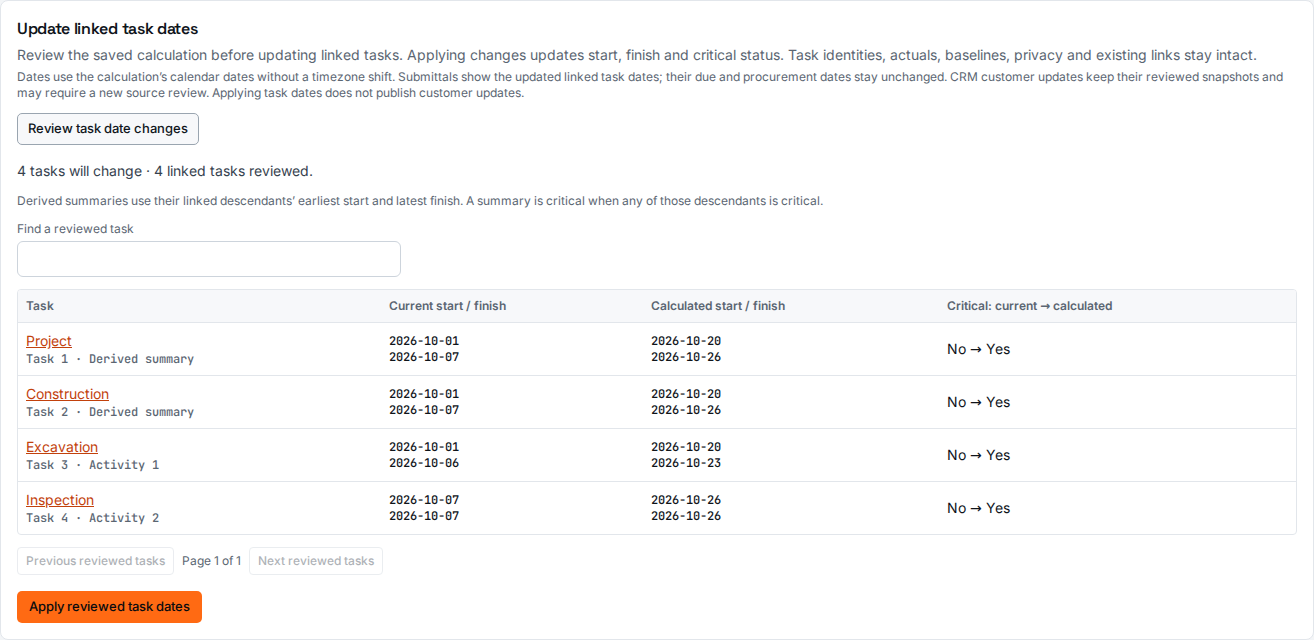
For eligible adopted imports, save the plan, then choose Review task date changes. Compare current and calculated start, finish and critical flags. Derived summary rows span their mapped descendants and are marked separately. Choose Apply reviewed task dates only after reviewing the differences and resolving blockers. The app rechecks the saved version, calculation and task snapshot before applying the reviewed changes.
This step requires Schedule, Submittals and CRM admin permissions, with those tools enabled. It preserves task IDs, privacy, assignees, progress, baseline and actual dates. Existing field views and linked submittal task displays read the updated task records. Independent submittal due and procurement dates do not move. CRM milestone snapshots may need renewed source review; applying task dates does not publish customer updates.
Criticality in Schedule identifies its source. A valid applied result uses the published Planner flags; stale published results become unavailable, with critical badges suppressed. Where no Planner result has been applied, the legacy calculation uses calendar-day durations and visible dependencies. Analytics continues to count stored critical flags and does not validate their freshness.
Native plans use a separate reviewed publication workflow in Planner or the native publication API. Both support flat, unstarted activities with explicit task policies and lifecycle choices. Full hierarchy, progress, mixed-source history and unresolved manual changes still require reconciliation. The editor’s bounded history also restricts adding and restoring activities after 64 saved versions. Neither workflow automatically applies every new Planner version.
At launch the Planner did not provide resource-leveling controls or an edited schedule export. Download Original XML/XER returns the retained source file.
Update, November 12, 2026: Scheduling is now live, including leveling and XER or P6 XML export. Current limits are in the Schedule guide.
Read the Schedule guide for the workflow and current limits, or follow the practical review tutorial before moving field dates. Developers can use the Schedule API workflow and generated reference for saved definitions, calculations, reviewed adoption and task-date preview/apply endpoints.
Share this article