Your Punch List May Be Waiting on Review, Not Repairs
Split open punch items by the next action: repairs, review or final approval. Find the queue that needs attention.
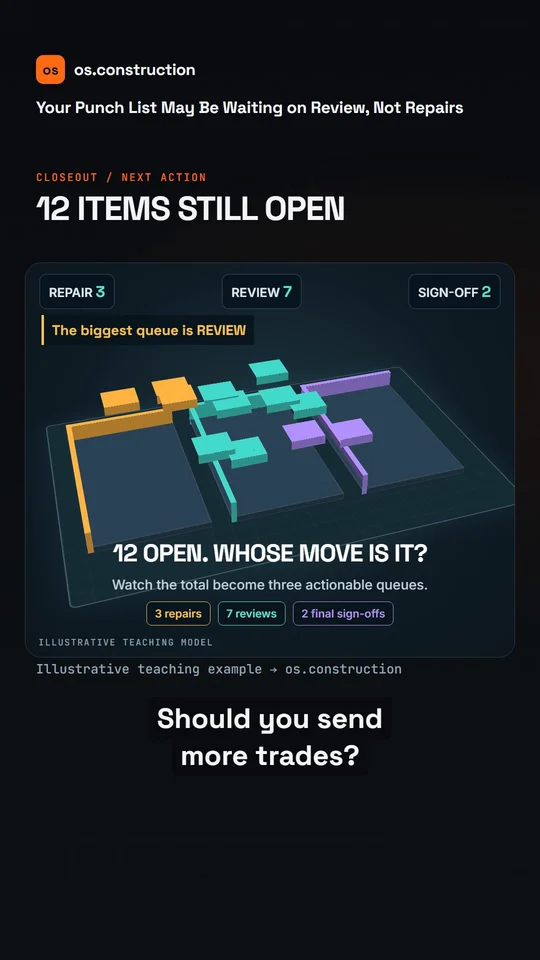
An animated teaching example with AI narration. The illustrations explain the process; they are not a recording of the app.
Video transcript
Twelve punch items are still open. Should you send more trades? First, find out whose move it is.
In this example, three need repairs, seven are waiting for review, and two need final sign-off. Most of the list is waiting on a decision.
A trade saying the work is resolved starts the review. Check the actual fix against the requirement. If it fails, return it for correction.
Schedule a review walk for those seven items. Give each remaining item a clear next owner and due date. Keep final approval separate from repair completion.
Report the queue by next action, not just total open items. The punch-list guide at os dot construction shows the full workflow.
Your next step
See it on one project record.
Explore the written guide, then open the sample project to see how construction records connect.
Try it in the app