Buyout explained: from estimate to commitments
The buyout process, what a buyout log tracks, why to level bids first, an illustrative log with a hidden scope gap, and who keeps buyout savings.
Diagrams from this explainer
Chapters
- 0:00 When the estimate becomes real
- 0:21 The buyout process
- 0:40 The buyout log
- 1:03 Level before you award
- 1:18 An illustrative buyout log
- 1:37 Net and gross
- 1:57 Who keeps the savings
- 2:22 Buyout in os.construction
Video transcript
Buyout is the phase after a contractor wins a job, when it turns the estimate into signed subcontracts and purchase orders. Bid-day numbers were often quick quotes, plugs and allowances. During buyout, every trade gets a complete scope and a firm price, and each signed agreement becomes a commitment against the budget.
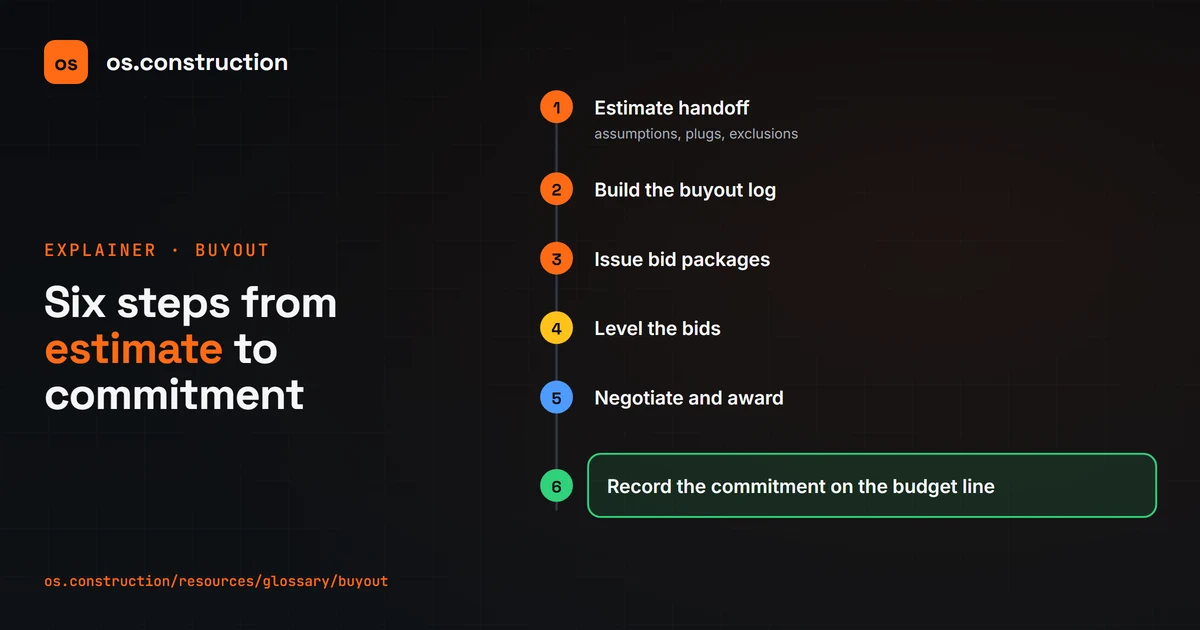
It starts with an estimate handoff, where the estimator walks the project manager through bid assumptions, plugs and exclusions. Then the team builds a buyout log, issues bid packages to each trade, levels the bids, negotiates and awards, and records the commitment against the budget line.
The buyout log is the tracker. For each cost code it shows the budget, the bidders, the selected vendor, the committed amount, and the variance: budget minus committed. Positive is savings, negative is a loss. It also tracks scope notes, award dates and contract status, so anyone can see what's still uncommitted.
Never award on the low number alone. Bid leveling puts proposals side by side for the same scope, so exclusions show up before the contract is signed. Scope gaps found after buyout usually come out of the general contractor's pocket.
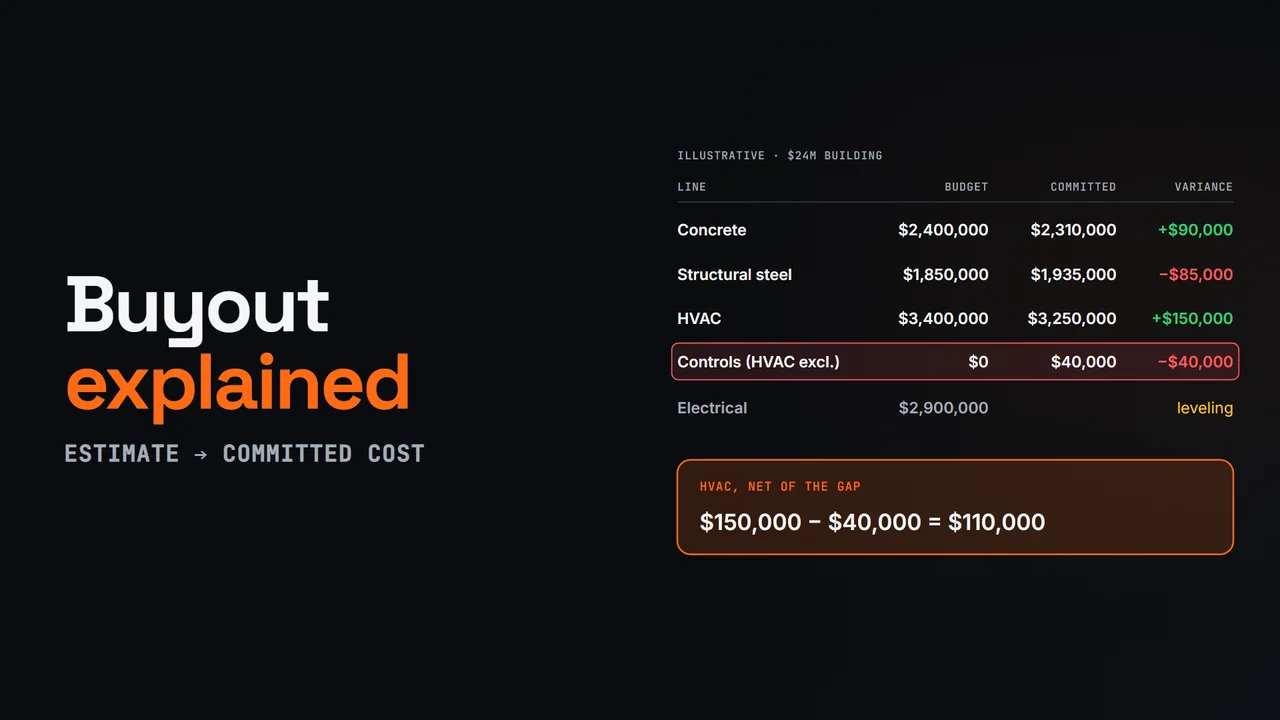
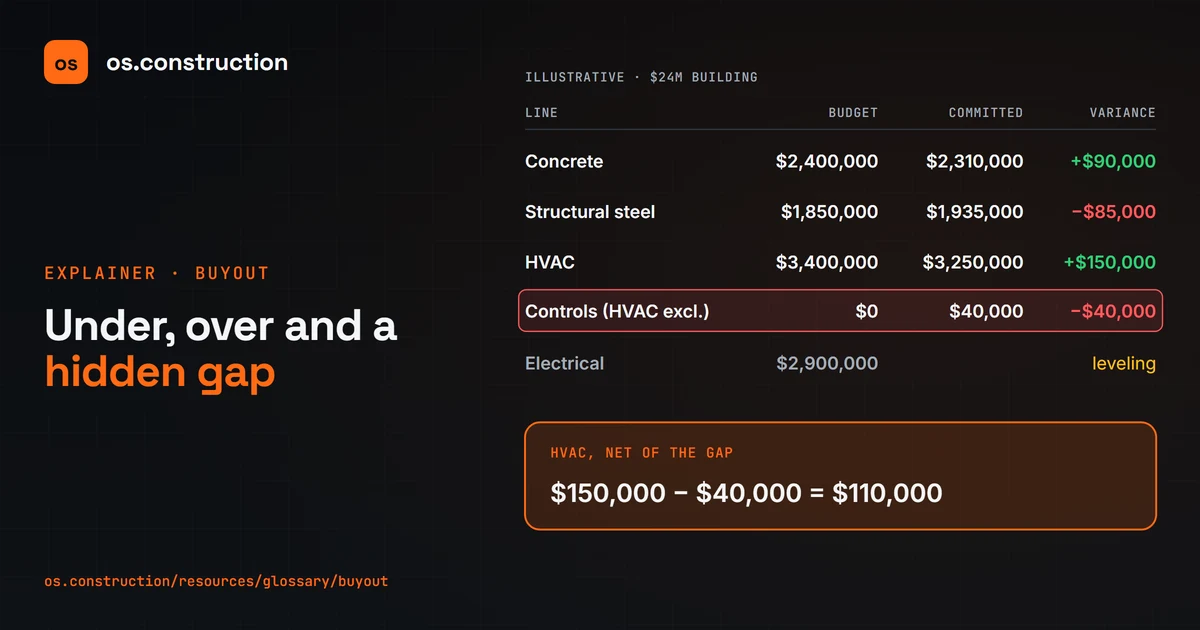
Here's an illustrative log on a twenty-four million dollar building. Concrete bought out ninety thousand under budget. Structural steel came in eighty-five thousand over. HVAC came in one hundred fifty thousand under, but the low bid excluded controls, which cost forty thousand to buy separately.
So far, seven point six five million dollars of budget is committed at seven point five three five million, a net one hundred fifteen thousand favorable. Report savings and losses separately too, so the steel overrun isn't hidden. And electrical is still leveling, so two point nine million dollars of exposure remains until it's signed.
Who keeps buyout savings? The contract decides. On lump-sum work they're generally the contractor's, though many hold them in contingency until the risk passes. On GMP contracts they usually go to a savings pool or contingency, and unused amounts may return to the owner or be shared. Counting savings as profit too early is how margin fade starts.
In os.construction there's no dedicated buyout log screen. Approved subcontracts and purchase orders show as committed against each budget line, and budget transfers are recorded as modifications, so buyout savings and losses stay visible instead of disappearing into a line.
Your next step
See it on one project record.
Create an account and open the sample project to see contracts, costs, changes and billing on the same record.
Try it in the app