Read the transcript
Here we are on the New Change Event page in our local sample project. A change event is where we note a possible change early, before anyone prices or approves it. Let's log one together.
First, we give it a title that says what changed. Our example is added fire sealant at corridor penetrations. The demo adds a unique reference so each recording creates its own sample record.
Next, we set Scope. For this sample we choose Out of Scope, which tells the team we believe the work sits outside the current contract. Pick whatever your team has actually agreed.
In Description, we explain what happened and why it may cost money. Our sample says the inspector asked for extra fire sealant at corridor penetrations that aren't shown on the drawings.
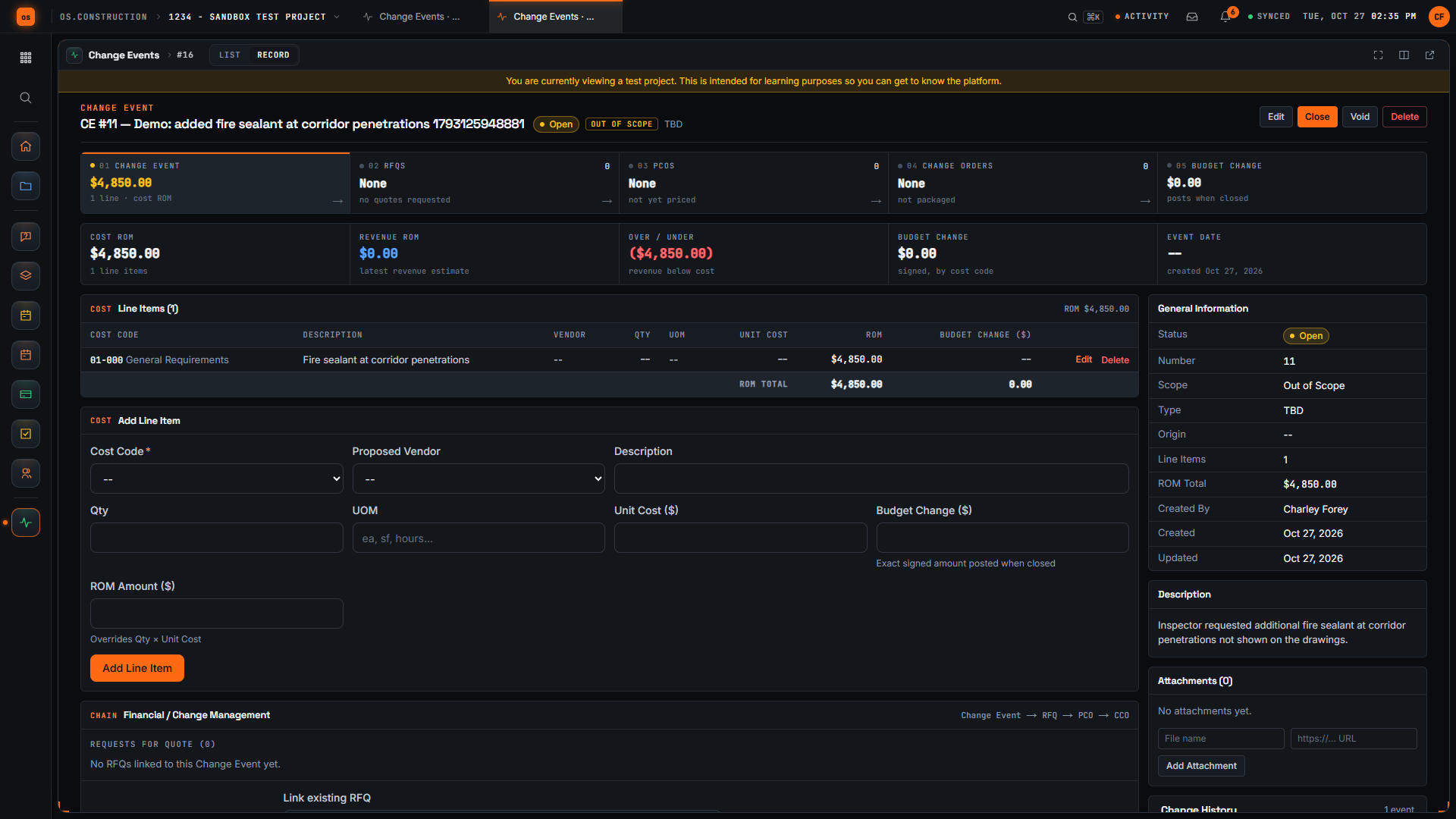
Now let's add a line item. We start with the cost code, because a line needs one to be saved. For this sample we use General Requirements; choose the code your team actually tracks this work against.
In the Line Items section, we type a short description of the work. One line is enough to start, and we can refine it later.
Then we enter a rough amount for that line. It's an early estimate, not an approved price, and we can refine it later.
Now we select Create Change Event. The app saves it and opens the detail page with its number and our title in the header.
Here's the change event we created. The header shows the Open status and the Out of Scope tag, and our new line appears in Line Items with its rough amount. We have logged the possible change, marked its scope, and recorded a first estimate, so pricing can move forward from here.