CRM for contractors: pipeline, contacts and handoff
A contractor's pipeline is a few people, a few big numbers and a lot of follow-ups. Add a contact, see what a weighted forecast says about next year's work, and keep the relationship attached to the job once you win it.
Start with the person
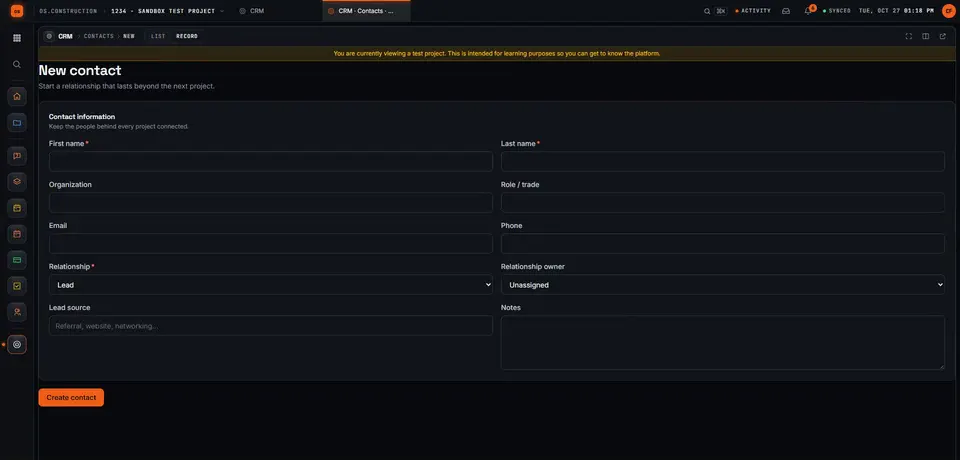
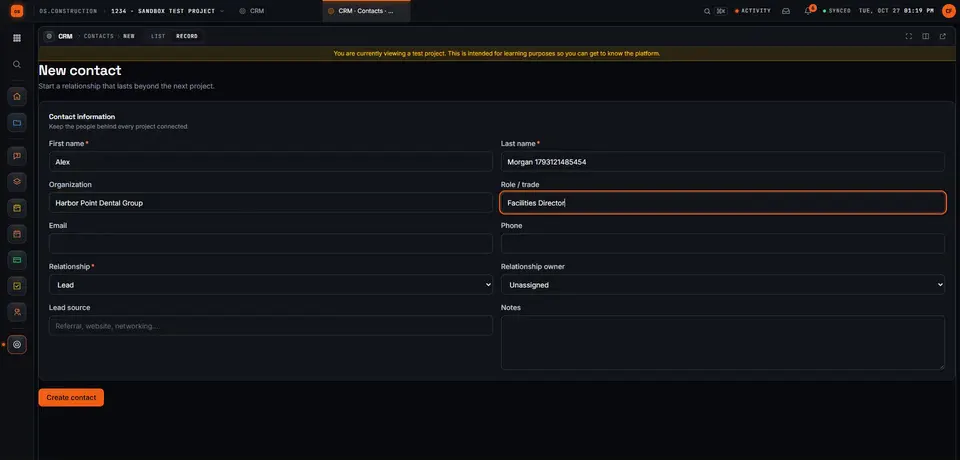
A contact is a person, where they work, their role, and how you know them. Relationship is Lead, Client, Partner or Subcontractor, and every contact can have an owner on your team. If you type someone who's already there (same email, or same name and organization), the app warns you before you create a duplicate; if one slips through, you can merge two contacts and keep their opportunities and activities together. Contacts can also come in from a CSV file.
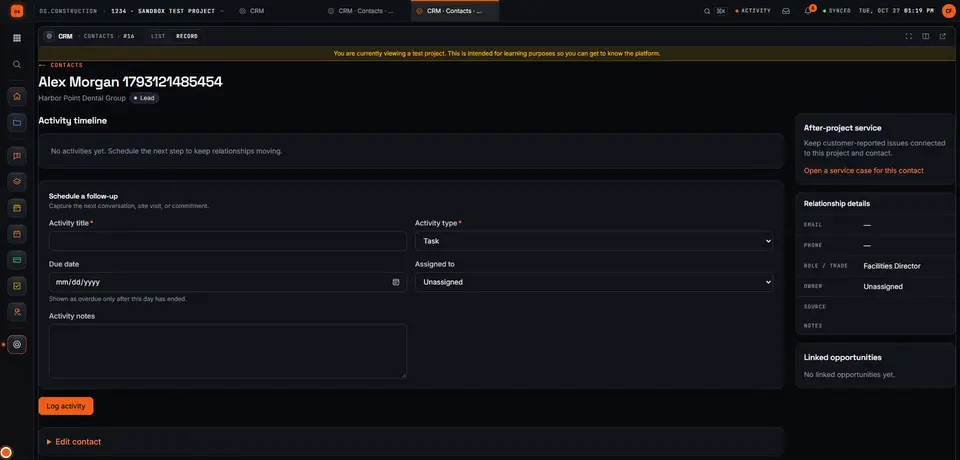
Save it, and the contact record is where the relationship lives: an activity timeline, a form to schedule the next follow-up, linked opportunities, and a link to open a service case if they're a past client with a problem.
$27.85M open, $6.97M weighted
Every opportunity has an estimated value and a win probability you set. The weighted forecast is value × probability, added up across open opportunities. It's a more honest number for planning next year than the open total. Illustrative opportunities.
| Stage | Count | Value | Weighted |
|---|---|---|---|
| Qualification | 1 | $9,500,000 | $950,000 |
| Site Visit | 1 | $4,800,000 | $720,000 |
| Estimating | 1 | $6,400,000 | $1,600,000 |
| Proposal | 2 | $4,950,000 | $2,165,000 |
| Negotiation | 1 | $2,200,000 | $1,540,000 |
| Open | 6 | $27,850,000 | $6,975,000 |
Stages run Qualification, Site Visit, Estimating, Proposal, Negotiation, then Won or Lost. Probability is yours to set on each opportunity, not a fixed number per stage; Won sets it to 100% and Lost to 0%, and a lost opportunity needs a loss reason. The app calls the forecast "a point-in-time estimate, not a calibrated prediction", and that's the right way to read it. Changes to stage, value, probability and close date are recorded with the opportunity.
The next step always has a date
Each contact and opportunity carries activities: a Call, Email, Site Visit, Meeting or Task with a due date and an owner. Once the due day ends, an incomplete one is overdue and counts in Overdue follow-ups. The CRM action queue gathers what needs attention: Follow-ups, First responses to service requests, Offer expirations and Warranty reviews.
Won is where most CRMs stop
When an opportunity is Won, someone allowed to create projects sees Review new project. The project's name and description come from the opportunity's title and scope, and Create project and move records moves the contact, the opportunities and the activities into it. The superintendent can see who the owner's facilities director is and what was promised in the site visit. The full walk from website inquiry to project is in From CRM lead to active project.
- WonProbability 100%
- Review new projectName and scope from the opportunity
- Create project and move recordsContact, opportunities, activities
Preview, and not today: syncing your Gmail or Outlook mailbox, default probabilities per stage, values in currencies other than US dollars, and undoing a contact merge. Winning an opportunity doesn't create a contract or financial records; you set those up on the project.
Keep going
Keep exploring
Related across os.construction
- GlossaryPipeline ValueThe total estimated value of every open pursuit: work you're chasing that hasn't been won or lost yet.
- GlossarySales CycleHow long a pursuit takes from first entry to a win, averaged over won pursuits.
- BlogWin rate, weighted pipeline, sales cycle: the pipeline numbers a contractor should watchA big pipeline number feels good and tells you little. Six pipeline metrics, how to calculate each one honestly, the mistakes that inflate them, and how they connect to backlog.
- DocsAnalytics BI guideGet started with Analytics, build a dashboard from the metric catalog, read the CRM & Pipeline pack, share and schedule results, and understand exactly which rows each person sees.
- DocsDashboards, earned value and WIPAnalytics (preview) builds dashboards, scheduled reports, earned value and a WIP view from the same records your team works in, for every user. Cash forecasting is Planned.
- BlogWhy your CRM and your BI should share the job's data coreMost contractors run the pipeline in one system, the jobs in another and the dashboards in a third, then argue about whose number is right. When the pursuit, the project and the report read the same records, the arguments get shorter and the answers get better.
Sample project included
Try this workflow on the sample project
Every trial workspace includes a sample project with sample data, so you can follow these steps in the app before touching a live job.
Want this on live job data?
CRM is in preview in os.construction: contacts, the pipeline, follow-ups and the project handoff work today. Mailbox sync with Gmail or Outlook is not available.
14-day free trial. Pricing for paid plans isn't set yet. Talk to us. Already have an account? Sign in →
All figures are illustrative sample data, not a real project. Contract terms and state law decide how retainage, stored materials and change orders work on your job. Check both.